Back to Technical Help
R4 Help
L
So, I've got an R4 deluxe, and I've got the R4 deluxe firmware, which, from what I can tell, not too many people are patching for these days. Am I looking for the wrong information? Is there better firmware that works with my flashcart that works with most new patches as well?
D
Replying to #1
R4 deluxe? Haven't heard or read of it. Is it new? Other R4 branded firmware might work too.
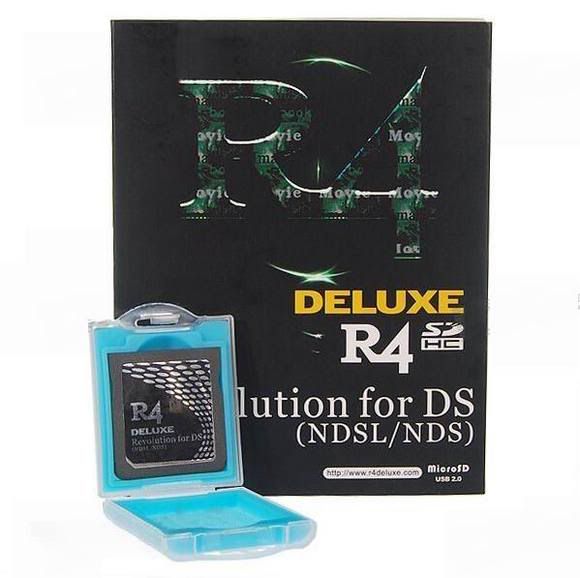
This. Looking at it, it may also be called "R4 SDHC". I have no idea.
Normally you can find it if you put the R4 in the DS and start it up.It should be in the left hand down corner( that is when you have the begin screen with the 3 icons)Good luck
L
It's not the version that I'm having trouble with, I'm just wondering if there's any firmware that will work better with this, and possibly let me play some newer games with Piracy protection.
J
This is Made for R4 revolution for DS (NDSL/NDS) users, Are R4 remakes of the original, (Note) Not ClonesR4 Firmware v1.18 + DSTT v1.17a12, (Note) run ysmenu.ndshttp://www.mediafire.com/download.php?ytnjenfztznDSTT v1.17a12 For R4 revolution for DS (NDSL/NDS), (Note) self boot.. ysmenu not neededhttp://www.mediafire.com/download.php?mxtlngy5jyrThis will play The Legend of Zelda Spirit Tracks (U) unpatched, And more games...For DSTT users, Also check list of unpatched games for both DSTT and R4 original users...http://gbatemp.net/index.php?s=67198361332873fae9a6317540ec9a12&showtopic=195808&st=0&start=0May work for over cards but i can not say for sure, Try it on a spare microsd card
L
Thank you very much. Also, would this help in any way towards running Bowser's Inside Story? Both me and my lady are really really wanting to play this game, and I've been trying for a few days here to make it work with no luck.
J
Replying to #7
Works for mario and luigi BIS (U) version ownly on a original R4 card, But i can not say it will work for all clone R4s, May do for some
All the ones on the fixed list will work, Included the new zelda (U) version unpatched
(Note) your card is a clone sine it's SDHC, Let us know if it works or not to confirm it to the list?
Many of the problem games for the R4, we have working on the Acekard 2i with AKaio 1.5. We have both cards now because the Acekard is not expensive (10-15+ sd price) and much easier to just change out a card than trying to experiment and chancing an old game not working the same with new firmware and having to back up all the save files, etc. Just my thought as I have 2 kids to please and not a lot of free time. Deal extreme for the cards if you are willing to wait for shipping. A friend said they just purchased 4g micro sd Kingstone from Newegg for less than 6 dollars.
L
I figured that mine was a clone, What would you recommend that I do?@Herz: I've got plenty of free time at the moment, so the fiddling doesn't bother me. I would really love to buy a new card, but I can't do that for a while, longer than I'd like to wait, so I was just hoping there was a way I could mess with mine in an attempt to make it work.
J
Replying to #10
The ownly way to test it with a spare microsd!, It will not bother your system in any way buy just testing, It will just not work or work it might!...
herzcp · #9Many of the problem games for the R4, we have working on the Acekard 2i with AKaio 1.5. We have both cards now because the Acekard is not expensive (10-15+ sd price) and much easier to just change out a card than trying to experiment and chancing an old game not working the same with new firmware and having to back up all the save files, etc. Just my thought as I have 2 kids to please and not a lot of free time. Deal extreme for the cards if you are willing to wait for shipping. A friend said they just purchased 4g micro sd Kingstone from Newegg for less than 6 dollars.
Those sav files might still work, just ensure (on the acekard) that it's set to ethier "nds.sav" or ".sav" at the end.
Works for me :)
-acekard 2.1/2.i user, and loyal acekard ethusist
Alright, well, I've tried both downloads, and both lead me to a black screen that just says "Loading...", and it doesn't change. I take it that this means I'm screwed?
M
Replying to #13
It's possible that you might have installed it wrong...
We had another user experience this problem for...3 months...they couldn't put it in correctly XD
Log! · #13Alright, well, I've tried both downloads, and both lead me to a black screen that just says "Loading...", and it doesn't change. I take it that this means I'm screwed?
Replace your _DS_Menu.dat just that file and see if it boots
The
DSTT v1.17a12 For R4 revolution for DS (NDSL/NDS), (Note) self boot.. ysmenu not needed
http://www.mediafire.com/download.php?mxtlngy5jyr
This has to be used alone, on a clean format
Always backup games and saves
I'm downloading the .rar files and extracting them into the root of my SD chip. Is that what you're supposed to do?
Replying to #15
This is what I did and I'm still having problems... Hmm.
Replying to #16
DSTT v1.17a12 For R4 revolution for DS (NDSL/NDS)
Format your card with the one mentioned above, then place the files onto it ^
If it don't work just format your card again and goback to your original kernal version!
Post Merge: [time]1260977988[/time]Replying to #16
Not the one from the downloaded files, Just replace the _DS_Menu.dat one from "your" firmware arcive
Post Merge: [time]1260978273[/time]
I should have mentioned it, Just the Ysmenu.nds and TTmenu folder
Onto your original firmware, Root folder
Okay, so, after doing what you said, it booted up properly (Well, sort of, the bottom screen on start up is now purple and has nothing on it but 3 invisible boxes, but hey, I remember how to get to things so this isn't anything big... I think.), but when I loaded Spirit Tracks, It got farther than it usually did, but remained stuck at the "Nintendo" screen. Any pointers?Edit: Scratch that, Turned off reset and it's working fine. Now I can only hope the infamous "Disappearing track controls" won't happen. Oof. I have a question, though, Now that this is changed, what sort of stuff should I be looking for in lists (For example: would I download something for YSmenu or DSTT (or whatever the hell that is))?
J
Replying to #18
Are you using the original rom (U) version, not patched?
Post Merge: [time]1260978987[/time]Replying to #18
Boot ysmenu.nds
They is no soft reset in ysmenu
Ps: Are you are mixing files?
I do not have ysmenu. I suppose I should get that.
Showing posts 1–20 of 29 · This discussion is archivedBack to top