Back to Tutorials
PSP - CFW Tutorial [All PSP Models] PSP 1000/2000/3000/Go/E1000 (Basic Tutorial)
J
Re: PSP - CFW Tutorial ~ All PSP ModelsDibujExThank yo so much, I had some troubles finding the PRO C because the link didn't work, and then it didn't unzip, but now everything is ok and my PSP is up and running.
Thanks for everything.
your welcome feel free to ask me if you got any questions.
T
Re: PSP - CFW Tutorial ~ All PSP ModelsXup joel . Am new here nice thread. Pls model 2k1 mini slim with cfw 6.60 pro b9 .bt stil showing corupted data wen i download games 2 memory. Gues i instald wrongly with d fastrec and pro update and even cipl. Pls wat do i do . 2 c my games on memory
J
Re: PSP - CFW Tutorial ~ All PSP ModelsReplying to #42
try upgrading to 6.60 Pro -C
First if you have Cipl installed, uninstall it
then unistall pro cfw,
and installl the
6.60 PRO -C
I hope that fixes it
K
Re: PSP - CFW Tutorial ~ All PSP ModelsHey Joel, I'm having a bit of trouble with my psp and was wondering if you knew what I can do. I was able to get 6.60 pro-c on my psp slim fine enough, but I am unable to access the VSH menu from the XMB (when I press select or home, nothing happens). I'm wanting to have plugins run on my psp but I can't do that without accessing recovery mode, so the only other way to get there was making the cfw permanent. I used psp ident to see if my motherboard was safe to use with the flasher and I believe it is.
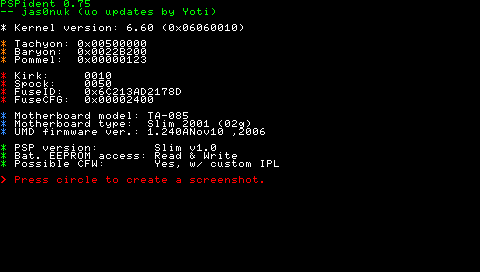
So I decided to go ahead and try using the cipl flasher, but it didn't change anything, went I shut off my psp fully, it restarted in ofw rather than cfw so I couldn't access recovery mode. Should I try downgrading to 6.20 and make it permanent or am I doing something wrong? Any help would be appreciated.
J
Re: PSP - CFW Tutorial ~ All PSP ModelsReplying to #44
well from what your saying,
i dont know much about vsh& recovery
But you can try this homebrew called system menu, http://pspcustomfirmware.com/systemmenu-8-0/
it lets you access all your plugins
or you can try downgrading to 6.20 if you like
well try out the homebrew and tell me if it works
also note that, before dowgrading make sure you uninstall Cipl and then 6.60 pro update
J
Re: PSP - CFW Tutorial ~ All PSP ModelsHello, I have a little problem.In the section How To Install Permanent Patch (6.20), the first link to find out which module my PSP has is broken. I think it's not typed correctly because the link just goes to a 404 page, could someone put up the right link?
Post Merge: [time]1358861814[/time]
Also, is that section for PSP 3000 users too? Because it in the first guide I had to update to 6.60, and now I have to downgrade to 6.20 again... Seems a bit pointless to update in the first place then.
J
Re: PSP - CFW Tutorial ~ All PSP ModelsReplying to #46
what psp are you using o.o 1000, 2000, go?
I
Re: PSP - CFW Tutorial ~ All PSP ModelsHi Joel16Im new here, i registered here becouse i folowd your tutorial (PSP 1000 Phat)PSP Before: 6.20 OFW
Version: 1004 Phat 6D
No CFW beforePSP After:
I Upgrade to 6.60 OFW like your tutorial tells, and i started Pro Update in PSP Menu,
after it i shut down my PSP and Started again by cliking Recovery,
it was all ok, so i put my first psx (.iso, .cso) files in it (ISO Folder) trough USB,
and i see there the Games RE2 and DC2, i click them but 1 goes every time black screen till i force to shut down,
and the other game tells me every time (can not start error 80020148),
what im doing wrong???thx for taking time.kind regards iManu
J
Re: PSP - CFW Tutorial ~ All PSP ModelsReplying to #48
well what iso driver are you using? you may have played around with the settings :s I'm not too sure about it though
try pressing (select) and check your vsh menu, and look at what Iso driver you're currently using
I
Re: PSP - CFW Tutorial ~ All PSP ModelsReplying to #49
Yeah, i see, it was on Inferno, but for PSX games i need the m-33 driver, all clear, thx!
idea for u, put that details to your main tutorial in it, so everyone know where are the menus, and what they means :)
thx again!
kind regards imanu
J
Re: PSP - CFW Tutorial ~ All PSP ModelsReplying to #50
your welcome o;
I'll mention it on the main post thanks very much :)
I
Re: PSP - CFW Tutorial ~ All PSP ModelsReplying to #51
Yeah, your tutorial was the 1 i choose from alllll other tuts on internet, really easy to understand, only the last steps,
it would be only a better help for next user who will enjoy your tutorial. :)
J
Re: PSP - CFW Tutorial ~ All PSP ModelsReplying to #52
aww thanks, that means a lot :)
I feel honored xD
F
Re: PSP - CFW Tutorial ~ All PSP Modelser, i want to ask a question.I recently buy PSP 3000 because i want to play patapon 3 so bad. when i buy the psp, the sellers said that i cant not online. if i online, it will cause the psp to be broken (he said it due to some updates). so, here comes my question1. what does the seller mean by the way( in term of PSP community)?
2. can i possibly online?
3. how to overcome this problem( if theres any..)#PSP 3000, 6.60#
J
Re: PSP - CFW Tutorial ~ All PSP ModelsReplying to #54
well I'm not sure about what the seller told you about,
There's absolutely no harm in playing online, Maybe they're probably saying sony shut down its online servers.
Cause most psp games don't work online anymore, that's why we have PRO-C
C
Re: PSP - CFW Tutorial ~ All PSP ModelsHello ^,^ I'm sorry for necro'ing a tad AND for requesting help on my first post, but I'm at a loss. So, here goes I guess...I'm having trouble with Multi-Disc PSX Eboots. I have no trouble creating the Eboot; in fact the game runs flawlessly.....UNTIL it asks me to swap discs. So, of course I'd use the PS button to swap the disc. Unfortunately, when I do this, the game's software seems to detect a problem with the disc and refuses to continue on to Disc 2 (probably because there is no disc XD ). I was wondering if anyone around here has had much success with running Multi-Disc PSX games on the PSP, ESPECIALLY once it prompts you to swap the disc.I have a PSP 3000 and am happily running PRO CFW. I've tried using ALL of the drivers (Inferno, Sony, and M33). I'm at a loss as to what to try next. Also, I'm wondering if it might be a problem with the software itself. I'm trying to play Fear Effect 2.Any assistance would be appreciated. Thanks in advance ^,^
J
Re: PSP - CFW Tutorial ~ All PSP ModelsReplying to #56
Sorry I don't know much about psx/ps1 games, you can post your problem here : http://wololo.net/talk/viewforum.php?f=29&sid=b3806308fddf1f750e479113781905b0 I'm sure they can help :)
J
Here are the new PRO CFW for FW 6.30, 6.31, 6.36, 6.37 and 6.38, this CFW are not official,
The cIPL is included only for the hackable PSP (01g and 02g). Works on all psp models ;)Download links:620PRO-C2.zip
630PRO-C2.zip
631PRO-C2.zip
635PRO-C2.zip
636PRO-C2.zip
637PRO-C2.zip
638PRO-C2.zip
639PRO-C2.zip
660PRO-C2.zip10.
Source Code
- Removed fatms371 from all versions.
- Fix the VSHMenu and Recovery bug.
- Add an option in the recovery menu to change text color.
- Fixed psn bug :D
Thanks to Rahim-US and the PRO team.Hello!
I have a problem and I hope I can get an answer. I have tried this method on my psp 3003 with 6.60 firmware but the games still don't show. And yes, I made an ISO folder in the root, and made sure to run the PRO, but still the games won't show. The only difference between what I saw in the videos and my psp is the MAC address which is 09g in my case. Does it have anything to do with that????Thanks
N
Hi,
I'm having trouble running Kingdom Hearts: Birth by Sleep and Dante's Inferno.
After I put the games into my system, the ISOs look fine. When I try to start the game, an error screen pops up "ERROR: 80020148"
I have a PSP Phat running on CFW 5.50 GEN-B (FULL)
I've just recently found out about this website so I dusted off my PSP. I'm not sure what steps I should do to upgrade now. Please help
Showing posts 41–60 of 61 · This discussion is archivedBack to top
