
Im not responsible for any damage to your psp system, follow the instructions carefully. If you have any questions, ask them hereHey, it's Joel16 here
so you've got a new PSP or you had one and you're sick of "buying umds". You want to run homebrews and backups, but you’re lost with all the terms "HEN", "M33", "Pro" "ME'… or you’re simply looking for an easy guide to get the best solution for your PSP? Well, you've come to the right place! I will only provide Firmwares of 6.20 And Later, Because the rest have been outdated.
Spoiler: How do I find out my PSP's Firmware Version?
Step1.
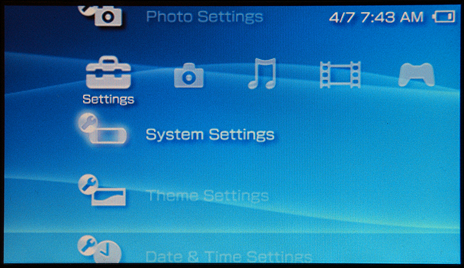 Step2.
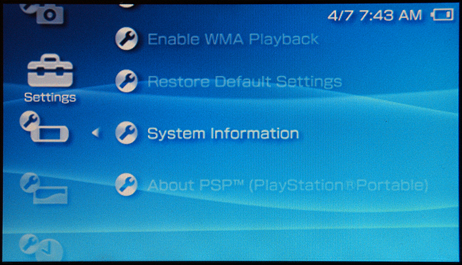
Step2. Spoiler: For PSP 1000 (Phat)
The First Ever and Most Gullible Portable system ever to be release by sony, This is one of its best, Due to its really cool "unlocking/unbricking feature" Using the Pandora and a Magic Memory Stick. Installing a Custom Firmware on your PSP 1000 has never been so easy. In this page I’m describing the easiest possible way for you to install the most reliable Custom Firmware on your PSP: Pro CFW.1. Download the necessary filesPSP Official Firmware 6.60Pro CFW (latest version)2. Update your PSP to firmware 6.60Skip this step if you already have Firmware 6.60 installed on your PSP.In order to install Pro CFW on your PSP, you will need to first update your PSP to the 6.60 Sony firmware (which, at the time of this writing, is the latest firmware released by Sony), if that’s not already the case. There are versions of Pro CFW that will run on older firmwares, but updating to 6.60 will guarantee the best compatibility for your official games.To install the 6.60 Firmware, just unzip the archive on your PSP’s memory stick, in the “PSP†folder (you should end up with an “UPDATE†folder in the PSP folder, if you do things correctly), then run the update from your PSP menu.3. Install Pro CfwThe Pro CFW archive provides several subfolders in the “PSP/GAME†folder. Two of them are interesting for us: the FastRecovery and the PROUPDATE folders. Those two need to be extracted to the PSP/GAME folder on your memory stick.Assuming you extracted the files correctly, you will see a few new applications in your PSP’s Game menu. The one you will want to run in order to install Pro CFW is “Pro Updateâ€. Just run it.That’s it. You can erase the “ProUpdate†folder from your PSP, but keep the “FastRecovery†one.
Spoiler: For PSP 2000 (Slim)
Well This Was, Sony's Best Selling PSP, This one was Both hackable to the "fullest" and still had the great "sony" features like skype.
Due to its great Unbrickable feature, I would once again advise sony's latest firmware 6.60. Installing a Custom Firmware on your PSP 2000 has never been so easy. In this page I’m describing the easiest possible way for you to install the most reliable Custom Firmware on your PSP: Pro CFW. 1. Download the necessary filesPSP Official Firmware 6.60Pro CFW (latest version)2. Update your PSP to firmware 6.60Skip this step if you already have Firmware 6.60 installed on your PSP.In order to install Pro CFW on your PSP, you will need to first update your PSP to the 6.60 Sony firmware (which, at the time of this writing, is the latest firmware released by Sony), if that’s not already the case. There are versions of Pro CFW that will run on older firmwares, but updating to 6.60 will guarantee the best compatibility for your official games.To install the 6.60 Firmware, just unzip the archive on your PSP’s memory stick, in the “PSP†folder (you should end up with an “UPDATE†folder in the PSP folder, if you do things correctly), then run the update from your PSP menu.3. Intstall Pro CfwThe Pro CFW archive provides several subfolders in the “PSP/GAME†folder. Two of them are interesting for us: the FastRecovery and the PROUPDATE folders. Those two need to be extracted to the PSP/GAME folder on your memory stick.Assuming you extracted the files correctly, you will see a few new applications in your PSP’s Game menu. The one you will want to run in order to install Pro CFW is “Pro Updateâ€. Just run it.That’s it. You can erase the “ProUpdate†folder from your PSP, but keep the “FastRecovery†one.
Due to its great Unbrickable feature, I would once again advise sony's latest firmware 6.60. Installing a Custom Firmware on your PSP 2000 has never been so easy. In this page I’m describing the easiest possible way for you to install the most reliable Custom Firmware on your PSP: Pro CFW. 1. Download the necessary filesPSP Official Firmware 6.60Pro CFW (latest version)2. Update your PSP to firmware 6.60Skip this step if you already have Firmware 6.60 installed on your PSP.In order to install Pro CFW on your PSP, you will need to first update your PSP to the 6.60 Sony firmware (which, at the time of this writing, is the latest firmware released by Sony), if that’s not already the case. There are versions of Pro CFW that will run on older firmwares, but updating to 6.60 will guarantee the best compatibility for your official games.To install the 6.60 Firmware, just unzip the archive on your PSP’s memory stick, in the “PSP†folder (you should end up with an “UPDATE†folder in the PSP folder, if you do things correctly), then run the update from your PSP menu.3. Intstall Pro CfwThe Pro CFW archive provides several subfolders in the “PSP/GAME†folder. Two of them are interesting for us: the FastRecovery and the PROUPDATE folders. Those two need to be extracted to the PSP/GAME folder on your memory stick.Assuming you extracted the files correctly, you will see a few new applications in your PSP’s Game menu. The one you will want to run in order to install Pro CFW is “Pro Updateâ€. Just run it.That’s it. You can erase the “ProUpdate†folder from your PSP, but keep the “FastRecovery†one.
Spoiler: For PSP 3000 (Brite)
The first Time Sony Ever Created an Unhackable psp, Well later they failed (well the devs are working on it : http://www.youtube.com/watch?v=KixMnQUiBSE&feature=player_embedded). Installing a Custom Firmware on your PSP 3000 has never been so easy. In this page I’m describing the easiest possible way for you to install the most reliable Custom Firmware on your PSP: Pro CFW.1. Download the necessary filesPSP Official Firmware 6.60Pro CFW (latest version)2. Update your PSP firmware to 6.60Skip this step if you already have Firmware 6.60 installed on your PSP.In order to install Pro CFW on your PSP, you will need to first update your PSP to the 6.60 Sony firmware (which, at the time of this writing, is the latest firmware released by Sony), if that’s not already the case. There are versions of Pro CFW that will run on older firmwares, but updating to 6.60 will guarantee the best compatibility for your official games.To install the 6.60 Firmware, just unzip the archive on your PSP’s memory stick, in the “PSP/GAME†folder (you should end up with an “UPDATE†folder in the PSP/GAME folder, if you do things correctly), then run the update from your PSP menu.3. Install Pro CfwThe Pro CFW archive provides several subfolders in the “PSP/GAME†folder. Two of them are interesting for us: the FastRecovery and the PROUPDATE folders. Those two need to be extracted to the PSP/GAME folder on your memory stick.Assuming you extracted the files correctly, you will see a few new applications in your PSP’s Game menu. The one you will want to run in order to install Pro CFW is “Pro Updateâ€. Just run it.That’s it. You can erase the “ProUpdate†folder from your PSP, but keep the “FastRecovery†one.Be sure to check out the How to Install Permanent Patch (6.20 only) : by Josh 443
Spoiler: For PSP Go
Installing a Custom Firmware on your PSP Go has never been so easy. In this page I’m describing the easiest possible way for you to install the most reliable Custom Firmware on your PSP: Pro CFW.1. Download the necessary filesPSP Official Firmware 6.60 (Important note the download link for the PSP Go is different than that of other models, take the right one!)Pro CFW (latest version)2. Update your PSP to firmware 6.60Skip this step if you already have Firmware 6.60 installed on your PSP.In order to install Pro CFW on your PSP, you will need to first update your PSP to the 6.60 Sony firmware (which, at the time of this writing, is the latest firmware released by Sony), if that’s not already the case. There are versions of Pro CFW that will run on older firmwares, but updating to 6.60 will guarantee the best compatibility for your official games.To install the 6.60 Firmware, just unzip the archive on your PSP’s memory stick, in the “PSP†folder (you should end up with an “UPDATE†folder in the PSP folder, if you do things correctly), then run the update from your PSP menu.3. Install Pro CfwThe Pro CFW archive provides several subfolders in the “PSP/GAME†folder. Two of them are interesting for us: the FastRecovery and the PROUPDATE folders. Those two need to be extracted to the PSP/GAME folder on your memory stick.Assuming you extracted the files correctly, you will see a few new applications in your PSP’s Game menu. The one you will want to run in order to install Pro CFW is “Pro Updateâ€. Just run it.That’s it. You can erase the “ProUpdate†folder from your PSP, but keep the “FastRecovery†one.
Spoiler: For PSP E1000 (PSP Street, Europe only)
The latest PSP, released by Europe. Installing a Custom Firmware on your PSP Street has never been so easy. In this page I’m describing the easiest possible way for you to install the most reliable Custom Firmware on your PSP: Pro CFW.1. Download the necessary filesPSP Official Firmware 6.60Pro CFW (latest version)2. Update your PSP to 6.60
Skip this step if you already have Firmware 6.60 installed on your PSP.In order to install Pro CFW on your PSP, you will need to first update your PSP to the 6.60 Sony firmware (which, at the time of this writing, is the latest firmware released by Sony), if that’s not already the case. There are versions of Pro CFW that will run on older firmwares, but updating to 6.60 will guarantee the best compatibility for your official games.To install the 6.60 Firmware, just unzip the archive on your PSP’s memory stick, in the “PSP†folder (you should end up with an “UPDATE†folder in the PSP folder, if you do things correctly), then run the update from your PSP menu.3. Install Pro CfwThe Pro CFW archive provides several subfolders in the “PSP/GAME†folder. Two of them are interesting for us: the FastRecovery and the PROUPDATE folders. Those two need to be extracted to the PSP/GAME folder on your memory stick.Assuming you extracted the files correctly, you will see a few new applications in your PSP’s Game menu. The one you will want to run in order to install Pro CFW is “Pro Updateâ€. Just run it.That’s it. You can erase the “ProUpdate†folder from your PSP, but keep the “FastRecovery†one.
Skip this step if you already have Firmware 6.60 installed on your PSP.In order to install Pro CFW on your PSP, you will need to first update your PSP to the 6.60 Sony firmware (which, at the time of this writing, is the latest firmware released by Sony), if that’s not already the case. There are versions of Pro CFW that will run on older firmwares, but updating to 6.60 will guarantee the best compatibility for your official games.To install the 6.60 Firmware, just unzip the archive on your PSP’s memory stick, in the “PSP†folder (you should end up with an “UPDATE†folder in the PSP folder, if you do things correctly), then run the update from your PSP menu.3. Install Pro CfwThe Pro CFW archive provides several subfolders in the “PSP/GAME†folder. Two of them are interesting for us: the FastRecovery and the PROUPDATE folders. Those two need to be extracted to the PSP/GAME folder on your memory stick.Assuming you extracted the files correctly, you will see a few new applications in your PSP’s Game menu. The one you will want to run in order to install Pro CFW is “Pro Updateâ€. Just run it.That’s it. You can erase the “ProUpdate†folder from your PSP, but keep the “FastRecovery†one.
Congratulations! You are now using 6.20 PRO Permanent Patch!
[/spoiler]
Spoiler: For PSX/PS One Games
Use the M33 Driver, this can be found by pressing the 'select' button which will open up the VSH Menu, from there you can change the ISO driver to M33 -Thanks to imanu for mentioning it ;D
Spoiler: For Downgraders Only
Coming soon...
Spoiler: Upgrading from 5.50 Gen
Coming soon...
Spoiler: How to Reflash/update/downgrade Firmware (Semi-Bricked/1.50/CFW PSP Users See Here)
Important Note: As of now, you can upgrade directly from CFW/1.50 OFW to 5.50 with the new AddOn. This section will take care of both upgrading/downgrading to 5.00 M33-6 & 5.50 GEN-D3.For 1.50 to upgrade to latest CFWs:1 - Download Hellcat's recovery flasher v 1.65.2 - Extract the downloaded archiver. Copy the folder "%__SCE__rflash" and "__SCE__rflash" that are located in a folder called "FW1.50", then place them in ms0:/PSP/GAME. If there is no such directory, create it.Destination CFW (5.00/5.50)To update to 5.00 M33-6:1. Download 5.00 EBOOT.
2. Extract the archive, and rename the given EBOOT to exactly "500.PBP" without the quotes.
3. Copy the renamed EBOOT to the root of your memory stick.
4. Run the application from XMB->Game Menu.
5. The program will identify your PSP. When you enter the menu, make sure that "Target FW: X.XX" is placed to 5.00.
6. Press the second option which is "Install CFW (of version selected above)".
7. Now, it will ask you to reset/not reset settings while the CFW is being installed. Of course, reset them.To update to 5.50 GEN-D3:1. Download5.50 EBOOT.
2. Extract the archive, and rename the given EBOOT to exactly "550.PBP" without the quotes.
3. Copy the renamed EBOOT to the root of your memory stick.
4. The update for 5.50 GEN-D3 is included in the Hellcat pack. Check the download again and you'll see a folder named "FW-Packs".
5. Extract the packs to any location on desktop.
6. You'll see different Packs (6.20 OFW & 5.50 GEN-D3). One for PSP-1000 and one for PSP-2000. Of course, choose the 5.50 GEN-D3 one that fits the type of your PSP, and copy it to the root of the memory stick.
7. Run the application from XMB->Game Menu.
8. The program will identify your PSP. It will enter the menu. On the first option, where you can select the (C)FW version to be installed, press "X" until it reads "load from external FW pack".
9. Press the second option which is "Install CFW selected above".
10. From the now shown list, choose the Firmware Pack that you want
to install.The updater is now running, and you just have to wait. When the installer finishes, you are prompted to press any button to reset the PSP. You will notice that the power led is blinking. DON'T freak out. That is normal. Power up the PSP after it shuts down. Enjoy.
2. Extract the archive, and rename the given EBOOT to exactly "500.PBP" without the quotes.
3. Copy the renamed EBOOT to the root of your memory stick.
4. Run the application from XMB->Game Menu.
5. The program will identify your PSP. When you enter the menu, make sure that "Target FW: X.XX" is placed to 5.00.
6. Press the second option which is "Install CFW (of version selected above)".
7. Now, it will ask you to reset/not reset settings while the CFW is being installed. Of course, reset them.To update to 5.50 GEN-D3:1. Download5.50 EBOOT.
2. Extract the archive, and rename the given EBOOT to exactly "550.PBP" without the quotes.
3. Copy the renamed EBOOT to the root of your memory stick.
4. The update for 5.50 GEN-D3 is included in the Hellcat pack. Check the download again and you'll see a folder named "FW-Packs".
5. Extract the packs to any location on desktop.
6. You'll see different Packs (6.20 OFW & 5.50 GEN-D3). One for PSP-1000 and one for PSP-2000. Of course, choose the 5.50 GEN-D3 one that fits the type of your PSP, and copy it to the root of the memory stick.
7. Run the application from XMB->Game Menu.
8. The program will identify your PSP. It will enter the menu. On the first option, where you can select the (C)FW version to be installed, press "X" until it reads "load from external FW pack".
9. Press the second option which is "Install CFW selected above".
10. From the now shown list, choose the Firmware Pack that you want
to install.The updater is now running, and you just have to wait. When the installer finishes, you are prompted to press any button to reset the PSP. You will notice that the power led is blinking. DON'T freak out. That is normal. Power up the PSP after it shuts down. Enjoy.
]The first thing you need to consider for un-bricking your PSP in this case is to have Pandora battery. What is a Pandora battery? Is it safe? How can I make a Pandora battery, or acquire one?- A Pandora Battery is kind of like homebrew but inside that battery which allows for you to either Downgrade/upgrade any PSP or unbrick a bricked PSP.- Pandora is 100% safe as long as you follow all directions.- There is two ways to make a Pandora battery : softmod and hardmod. Softmod requires the user to have a CFW PSP, or a PSP running HEN. Hardmod doesn't require a PSP. It just requires directions and patience. However, softmodding a battery is better than hardmodding one, since a hardmodded battery can't be converted back to a normal battery when finished installing CFW on the PSP.REMARK: Any PSP user whether it is an OFW or CFW can now create a Pandora battery. That is because of the recent Sony encryption codes such that devs can sign their applications. The process is explained later in the guide.- You can acquire a Pandora battery by either softmodding/hardmodding your own battery,or by ordering/borrowing from specific places/websites such as this, this, and many others.To softmod your battery you need:1 - A PSP which has any FW installed be it CFW/HEN/OFW.2 - A PSP battery. Here are the batteries compatible/uncompatible :Compatible:* Sony "standard" Li-ion 1800 mAh.
* Sony PSP-280 2200mAh.
* Datel, PSP Battery 3600 mAh (X2).
* Datel, PSP Battery 1800 Max Power.
* Datel, PSP Battery GO MAX (Model # GM1000, uses AAA batteries).
* Slim 3.6v 1200mAh batteries.Incompatible:* 3.6v 3600 mAh Battery Pack (Silver letters) (Model PSP-360) (Fake).
* 2600 mAh Mega Battery Pack (Fake).
* Atomic Battery Pack 3.6V 1800mAh.
* Sony PSP-280 2200mAh (Fake).
* Sony PSP Bloc-Battery pack 3.6v 1800 mAh .
* Battery 3600mAh, unknown brand, (china made model NK-RH00 (Fake).
* Battery Pack, unknown brand, (lithium) 3.6v 3600 mAH (Fake).
* Intec 1800 mAh Li-ion.
* Intec 2200 mAh.
* UltraLast e-Boost 3.7v 2200mAh Li-PO battery.http://i1027.photobucket.com/albums/y33 ... titled.jpg3 - Hellcat's Pandora Installer revision 4To convert your normal battery into a Pandora battery:
1 - Extract the Pandora Installer Revision 4 you downloaded to your desktop.2 - Enter the extracted folder and copy 'pan3xx' to X:/PSP/GAME on your memory stick.3 - Launch it via the game menu in XMB.4 - The credit screen will appear. just press "OK" or "Do not show this again" to proceed.5 - Scroll down to "Battery options" and choose "dump batter serial to file". (To maintain the original serial of your battery when you want to reconvert it to a normal battery again). Note: when you want to convert your battery to a normal one again, choose "set battery serial file".6 - Then, choose "make battery Pandora".7 - When done, exit the application.I AM NOT RESPONSIBLE FOR ANY DAMAGESTo hardmod a normal battery you need :1 - A Pandora compatible battery from the list above.2 - sharp/thin plastic. You can get that from a plastic CD case. Just break it and use the pieces.Instruction for FAT PSP BATTERIES only!1 - Lift and handle the sharp piece of plastic. Start at the seen around the edge of the battery. Once you get the tool your using started into the battery work your way around the edge, you will here plastic snapping as you do so, its normal. Once you get the battery open you will see this:
 2 - The red circle is the section you need to pay attention to. It is a small chip with four prongs coming out of each end of it. On the main board, beside the chip, you will see ICO4. The pin under the number 4 is the pin that you need to remove.This is what it should look when you are over :
 Instructions for SLIM PSP BATTERIES only!1 - Lift and handle the sharp piece of plastic. Start at the seen around the edge of the battery. Once you get the tool your using started into the battery work your way around the edge, you will here plastic snapping as you do so, its normal. Once you get the battery open you will see this:
 2 - Carefully fold the main board up so that you can see the side that is against the battery pack.3 - You'll see a small black chip with four prongs coming out of each side. The will be ICO4 printed below the chip.4 - Remove the pin on the top left.I AM NOT RESPONSIBLE FOR ANY DAMAGES DONESince now you have a Pandora battery, we can move on to turn the memory stick into a magic memory stick to install CFW on the PSP. For this guide, we will use Rain's UltraLite MMS Maker for 5.00 M33-4.What you need for this to work:1 - A memory card compatible with the PSP fake/genuine. I prefer genuine in this kind of situation, but either way it works.2 - Rain's UltraLite MMS Maker for 5.00 M33-4 which you can download from here.3 - A memory card reader for the PC, or a friend's working PSP.4 - 5.00 EBOOTFor the procedure :
1 - Download Rain's UltraLite MMS Maker for 5.00 M33-4 from the link supplied above, and run RainsUltraLiteMMS.exe. This application installs DDC 8.2 - Download the 5.00 EBOOT, and place it in the same folder as the program (Rain's UltraLite MMS Maker).3 - Insert your memory stick in the card reader, or connect to the PC with a USB cable if you have another working PSP (that is if you have a bricked PSP, otherwise just use your PSP) with your memory stick inserted in it.4 - Close any windows or other programs connected to the PSP.5 - When you are ready, click "Make MMS"6 - When its finished, safely remove your memory stick.Using the MMS and the Pandora battery :1 - Insert the MMS first into your PSP.2 - Insert the Pandora battery, while holding the left trigger (L button). Then the application will guide you from there. For available options and extra guidance, check this thread.When you finish downgrading/upgrading/reflashing your PSP, and you want to convert the battery,which was softmodded (NOT HARDMODDED), back to normal, continue reading.To convert your Pandora battery into a normal battery:1 - Extract the Pandora Installer Revision 4 you downloaded to your desktop.2 - Remove the battery of the PSP and plugin the AC adapter.3 - Power up the PSP, then place the battery back.4 - Enter the extracted folder and copy 'pan3xx' to X:/PSP/GAME on your memory stick.5 - Launch it via the game menu in XMB.6 - The credit screen will appear. just press "OK" or "Do not show this again" to proceed.7 - Scroll down to Battery option and choose "make battery normal".Remark: If you have the original serial of the battery dumped, then choose the option "set battery serial from file".8 - When done, exit the application.
[/spoiler]
