Back to Technical Help
[Urgent] problem with Microsoft Word
I
well, im sorry to ask this but i need help. my sister needs to turn this paper in, and she added these horizontal lines which i cant take off. i tried searching on the internet, but couldnt find any solution to it. here is a picture so you understand better.
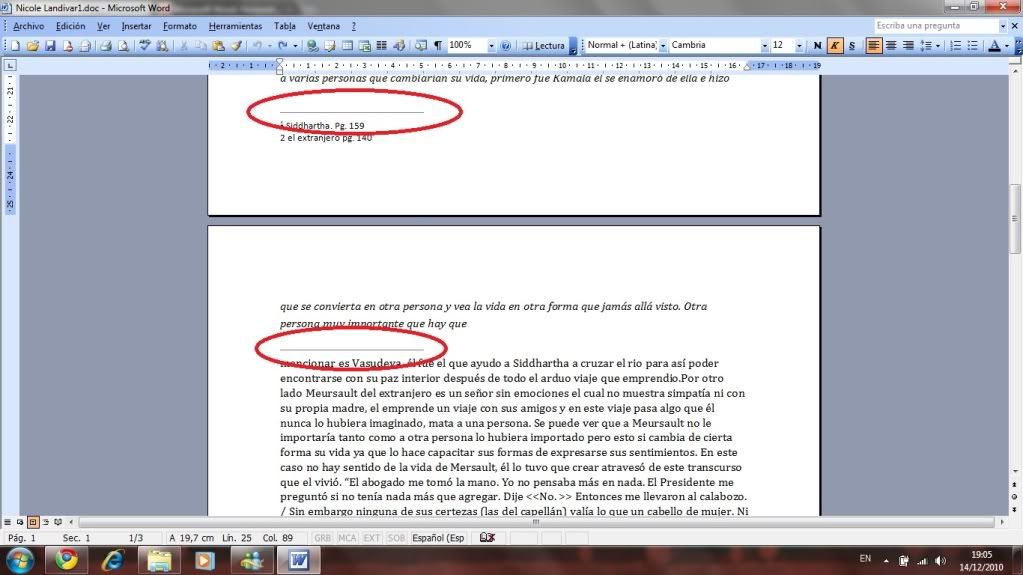
please help me! she needs this for tomorrow. or else she gets plagiarism for some odd reason
check print preview to see if they show there. You should be able to select them and hit delete.
I
i can see them on print preview. but when i try to select them, i cant.
D
errr try to open a new document and copy paste the text
T
Try putting the cursor behind the first letter after the line and backspacing...it should get rid of them because there's no where else for the words to go =/
Replying to #4
This works to :P
Duncan Idaho · #4errr try to open a new document and copy paste the text
Replying to #5
i tried both and none work. when i try copying, it copies with the lines. when i copy by paragraphs, it copys the whole thing. i tryed bacspaceing and i cant
iluvfupaburgersi tried both and none work. when i try copying, it copies with the lines. when i copy by paragraphs, it copys the whole thing. i tried backspacing and i cant
If you copy it piece by piece, like highlight a part, press ctrl+c, then go to a new document, press ctrl+v, then skip the line, and continue, then it should work...
Replying to #7
that is what i tried, and didnt work
hmm it seems almost like she activated the third function, the one with the S near italize and bold
I
no, it is not underlined
S
its a footer shading
go to view menu , header footer
format menu , Borders and shading
select nonedepends on word versionbut u should get there
Post Merge: [time]1292395719[/time]
or you could copy everything to notepad and then copy back to a new word doc
A
If the line is not in the header/footer section then I think you can select the whole document and use a normal formatting.
L
Copy it into notepad then copy it back like sinbad said
Showing posts 1–13 of 13 · This discussion is archivedBack to top