
Source : NDSLIBRIS SourceForge Project Site
Direct download : Download DSLIBRIS.NDS v.1.49 Personal Review:
Spoiler
(+) Easy to use
(+) Have book marking ability
(+) Files readable is easy to locate
(+) Easy to locate file convertor for use with this program
(+) Book style reading (vertical)
(+) Paragraph adjustable
(+) Font Size adjustable
(+) Touch screen function when turning pages back and forth
(-) Book mark uses an asteric < * > on the page number which makes it rather unattractive
(-) Unattractive page style
(-) Only comes with 2 page color choice (Black Text - White Background or Inverted Color)
(-) Only able to read files with extension ending as .epub , .xht , and .xhtml
(-) If you have more than 25 books inside the book folder, it often crash
NDS Console using the R4DS. In the package there are 5 files:
# NDSLIBRIS.NDS # Book Folder # Font Folder
# Install.txt # dslibris.xht
Add all the files into your R4 Cart, except the install.txt file.2. ReadMoreAlpha (Made by: Björn Giesler)
Source : ReadMoreAlpha Blog Page
Direct Download : ReadMoreAlpha.NDS Personal Review:
Spoiler
(+) Easy to use
(+) Have 3 book marking ability using 3 different choice of color on the top left text
(+) Files readable is easy to locate/create
(+) Easy to locate file convertor for use with this program
(+) Book style reading (vertical)
(-) Font Size adjustable is limited to 2 size choice
(-) Touch screen function for book choosing function is low-responsive
(-) No touch screen ability to turn pages
(-) Unattractive page style
(-) No color choice for the font and background
(-) Only able to read files with extension ending as .txt
NDS Console using the R4DS. In the package there are 4 files:
# ReadMore.NDS # Font Folder
# ReadMe.doc # ReadMe.pdf
Add only the .NDS and the Font Folder. You may create a 'Book Folder' for convenience.3. DSReader (Made by: Eddie Park)
Source : DSReader HomeBrew
Direct Download : DSReader.NDS Personal Review:
Spoiler
(+) Easy to use
(+) Files readable is easy to locate/create
(+) Easy to locate file convertor for use with this program
(+) Paragraph adjustable
(+) Font Size adjustable
(-) Not a book style reading (Horizontal)
(-) No touch screen ability to turn pages
(-) Unattractive page style
(-) Color choice limited to White Text - Black Background or Inverted Color
(-) Only able to read files with extension ending as .txt
# DSReader.NDS # Ariel Font
# Gara Font # Alice.txt
Add the .NDS file and create a 'Font Folder' and insert those 2 fonts into that folder. The same goes
for the text files, create a 'Book Folder' for convenience. The Alice.txt is short for 'Alice in Wonderland'.
At first run, you need to set the font to either Ariel or Gara, and then complete the other setup asked.
It will then self create a 'Settings Folder'.4. MoonShell (Made by: Krishen V. Persaud)
Source : MoonShell Homepage
Direct Download : MoonShell v.2.10 Stable.NDS Personal Review:
Spoiler
(+) Easy to use
(+) Files readable is easy to locate/create
(+) Easy to locate file convertor for use with this program
(+) Paragraph adjustable
(+) Font Size adjustable
(+) Supports ANSI, S-JIS, UTF-8, UTF-16BE, and UTF-16LE
(-) Not a book style reading (Horizontal)
(-) No touch screen ability to turn pages
(-) Unattractive page style
(-) Background depends on what Moonshell skin you use which can be disturbing to use
(-) Only able to read files with extension ending as .txt
# _MSHL.NDS # moonshl folder
If version v.2.10 stable is too large for your cart, try the v.1.71. Its the same. Look for one with
.dpg ability to make it equivalent to the v.2.10.5. Ikureader (Made by: No_please a.k.a Chintoi)
Source : Ikureader Homepage
Direct Download : Ikureader.NDS Personal Review:
Spoiler
(+) Easy to use
(+) Files readable is easy to locate/create
(+) Easy to locate file convertor for use with this program
(+) Supports TXT, UTF-8, and FB2
(+) Horizontal and Vertical style book reading
(-) Partial touch screen control
(-) Partial support of EPUB
# iku.NDS # books folder # data folder
# info.txt # install.txt # how-to-control.png
Only add the iku.NDS , books folder and the data folder into your cart.#DLDI Patching Tool (Made by: Chishm)
Source : Chishm Homepage
Direct Download : Complete DLDI Patching Tool As promised, the above is the patching tool. Open the Win 32 patch program, choose the patch to use
and then choose the .NDS file to patch. As simple as that.Converting FilesThere are many e-book extensions floating around the internet, most common are;
# .pdf # .epub # .doc # .docx # .rtf # .xhtml
# .html # .lit # .txt # .mobi # .xht # .fb2There are many more. But remember that the above programs can run only a few of it. So you need to convert it.1. Calibre E-Book Management Program (Made By: Kovid Goyal)
Source : Calibre E-Book Management Homepage
Direct Download : Calibre E-Book Management Download The program is easy to use and has multiple converting and saving types. It basically accomodate
all e-book formats, except the audiobook types. Act as a ebook convertor, PC ebook reader, and
manager. Image:
Spoiler
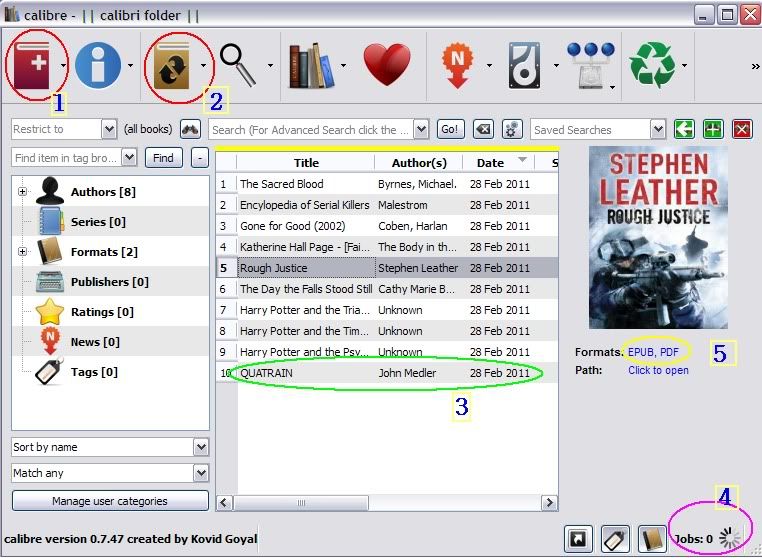
1. Press + to add the files to convert (Illustrated as marked no.1)
2. The file to convert will show up with a picture of the cover to the side of it (Illustrated as marked no. 3)
* You may double click on the info to rename/change it
3. Press the brown book icon to convert (Illustrated as marked no.2)
* At default the end format will be .epub
4. The converting process is shown at the bottom right (Illustrated as marked no.4)
5. The original and end result format is also shown (Illustrated as marked no.5)2. Online ePub Convertor (Made by: Time2Talk)
Source : E-Book Online Convertor This online convertor (specifically for ebook converting) supports converting files source format;
# .epub # .lit # .mobi # .fb2 # .pdf # .lrf # .pdb # .tcr
Convert the above file extension into the other supported extension only!3. Online 2ePub Convertor
Source : Online 2EPUB Convertor This online convertor supports;
Input formats : # .doc, # .epub, # .fb2, # .html, # .lit, # .lrf, # .mobi, # .odt, # .pdb, # .pdf, # .prc, # .rtf, # .txt.
Output formats: # .epub, # .fb2, # .lit, # .lrf, # .mobi4. Online PDF to TEXT Convertor
Source : Online PDF to Various Text Convertor This online convertor supports converting .PDF to (and vice versa);
# Words Doc # Image File # .txt # .htmlOf cause there are also other converting tools. For .txt you can either simply block the entire text file and copy paste it into the NotePad program, or use a text convertor which is unnecessary, given the fact its easier to copy paste it directly. But I prefer using the Calibre, as it also has an additional function of managing the books I converted into specific folder and help find the proper book cover.E-Book SourcesThere are lots of ebook sites around the internet, to name a few source to look into;1. Project Gutenberg
Source : Project Gutenberg Free Ebook Wiki Homepage In it mostly old books with expired ISBN copyrights, so its alright to download as mostly the books are
from the 18th century or early 21st century. There are around 33.000 books to choose from.2. ePub Bud
Source : ePub Bud Browse Free E-Books3. Free EPUB eBooks
Source : Free EPUB eBooks Homepage4. Free eBooks from ebook3000.com
Source : ebook3000 Homepage5. MobileRead
Source : MobileRead Forums A Place to Share eBooks6. OnRead
Source : OnRead - Instant Free eBookAnd so many more sites to look ........Simply use the Search Engine for assistance if you can't find the specific book you want to grab. Convert the file using the above convertor to turn it into an .epub , .xht , or .xhtml to run on DSLIBRIS or change it into .txt for the other programs. Remember if its originally for example an .epub file, and let say you are using the ReadMore program, this means you need to first convert the .epub file into .pdf using the convertor, and then you have 2 choices, use a .pdf to .txt convertor or simply open the .pdf and manually copy paste it into a text reader such as NotePad to save as .txt file.After you convert or copy paste, depending on what file extension that fit the e-book program you decide to use from the above choices, simply copy the text file into the 'Book Folder', and run it on the NDS. So that's it, very simple.Happy reading on your NDS.....why carry a heavy book when you can use the NDS as a pocket e-book reader! Enjoy! ;D