
Tools required-Hacked psp (VERY important to not only test your rips but also rip)
-USB cable
-Large memory stick (if you want to store several 8GB or more is advised-otherwise just a 2GB will do for holding a single game-or 4 if the sizes are right...)
-UMG gen v4.00 (the only bit of software-this is a pc based app)
-A UMD (psp game disc)So, you have the required tools, so where to begin?First, with your psp on, either head to the recovery menu or via VSH menu (press select to get this) and switch the USB device from "memory stick" to "UMD disc" to start.(The option on the VSH menu only appears if you have the plugin ultimate VSH menu installed, otherwise you have to get to the recovery menu, just hold R and start the system up while holding, its in CONFIGURATION> XMB USB DEVICE and keep changing until you get the UMD option)Next, connect your psp to your computer, when it opens, you will see an iso file-THAT IS YOUR UMD'S DATA!
Easy part-drag it to your pc :) Now we have a perfect iso!This iso will load far faster than the UMD because it's pure data, and isn't restricted by the UMD drive, however this will also take up the most space, the max a psp iso would be is 1.50GB-bigger than a GameCube disc hard to believe.
You can either place this back into the "ISO" folder in the root or beginning of your psp (after you switch back the USB device back to memory stick :) ) or you can follow on to compressing the ISO to save space.
Basic iso compression.There are many programs out there that do this, however the best one I have ever tried that has the most features is "UMD gen".The original purpose of the program wasn't iso compression but ripping files of the iso to reduce the size, music and cut scenes can be removed, however I have not tried this and am not going to for the following reasons...1. The files can be linked to required game files and if the wrong music files are tampered with can wreck an iso
2. It's not an easy process
3. I like my music and cutscenes :)
4.Too many people who do this upload these to torrents and such and sadly many of these fail to even start because of the said effects (on romU's trading board a nice user uploaded some self ripped games-however he obviously didn't test as only 1 out of 7 I downloaded didn't start :( )I will explain safe ripping soon so now to continue, UMD gen v4.00 has a built in ISO compressor, it has 3 options.-ISO (can be used on a pre-compressed file to extract it incase it's not working)
-CSO (the most common compressed iso format for psp
-DAX (Dark Alex-the inventor of the legendary "M33" and CFW created his own iso compression-it's just an alternative and works the same as a CSO)There is an extract button in the top bar if you want to quickly extract an iso from a cso/dax file :)The compressed options can save up to 50% (rough estimate, not always, some games might only loose 100MB with some of the larger games) of the original disc space used by the iso-the trade off with compressed games is...-They load slower (not as slow as UMD's...)
-They might lag during game play (example-god of war) because the data is being constantly read and extracted and back again
-Sometimes they might fail to load (this is what I have heard-it's never happened to me)Now, how to compress an iso or extract a compressed cso/dax file.1. Open UMD gen2. Top panel-Open button
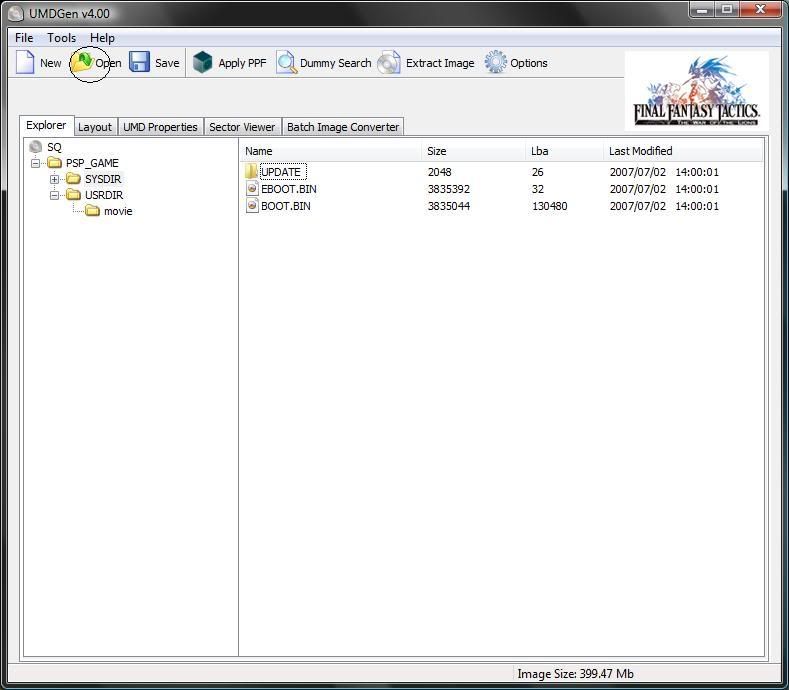
(thought i put these here incase your new -black circle :) )Be advised-I highly suggest keeping the original file that your messing with incase something goes wrong-UMD gen makes a second file when it's compressing and doesn't overwrite the original, but don't delete it until it's tested and works fine for you...3. Select the file your after4. Top panel-Save button
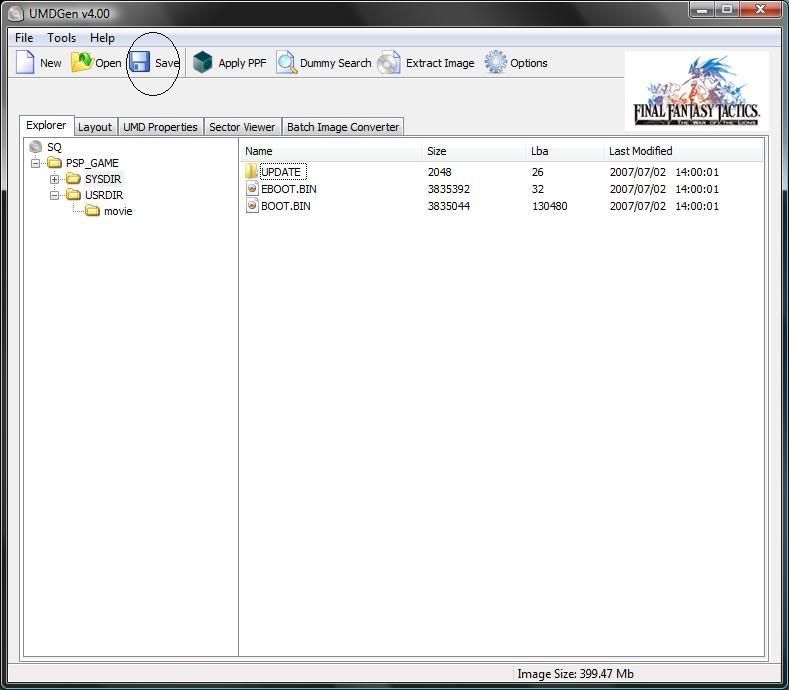 5. Select the format as described earlier6. Now save it (for best compression if you see compression size, make sure it's on 9 or else no point bothering)7. Play test and remove original if you're safe to do so, you can always do the process again and change the file into an ISO again.Now to save another bit of space, basic UPDATE ripping!
Update ripping.Q.What is the UPDATE folder you're talking about?A. On a standard psp or a hacked one that shows UMD updates this is what controls it, and contains the OFW update eboot file (which is usually extracted and process by the people who make CFW's like Dark Alex or GEN team :) )Q. Do I even need it now it's an iso?
A. Not really because you won't be able to see it, and if you could and it's an OFW then small risk of damaging your psp.Q. How big is it?
A. Usually 22MBQ. Is it such a big deal?
A. Not really, but if your iso is JUST a little too big you would crave the slight space given.Q. You didn't want to risk removing music and cutscenes, so is this safe since it's separate?
A. Not quite as I sadly found out.I once download a copy of Initial D street stage as an iso, then I compressed it, however out of boredom I checked the file to find an UPDATE folder, and seeing as I did several UPDATE rips from games I ripped myself, I thought this was safe...Apparently not, some games are "LBA" protected, which means if one file is altered, NO MATTER WHAT, the iso becomes dead data.Now, I will explain the safest method to ripping UPDATE folders.1. Open UMD gen2. As before, click OPEN and select the iso you wish to alter3. Before doing ANYTHING, go to FILE in the drop down list> FILE LIST> EXPORT and save that file.
 It'll create a txt document that remembers the file positions.4. Next locate the UPDATE folder, which is in PSP GAME>SYS DIR> UPDATE
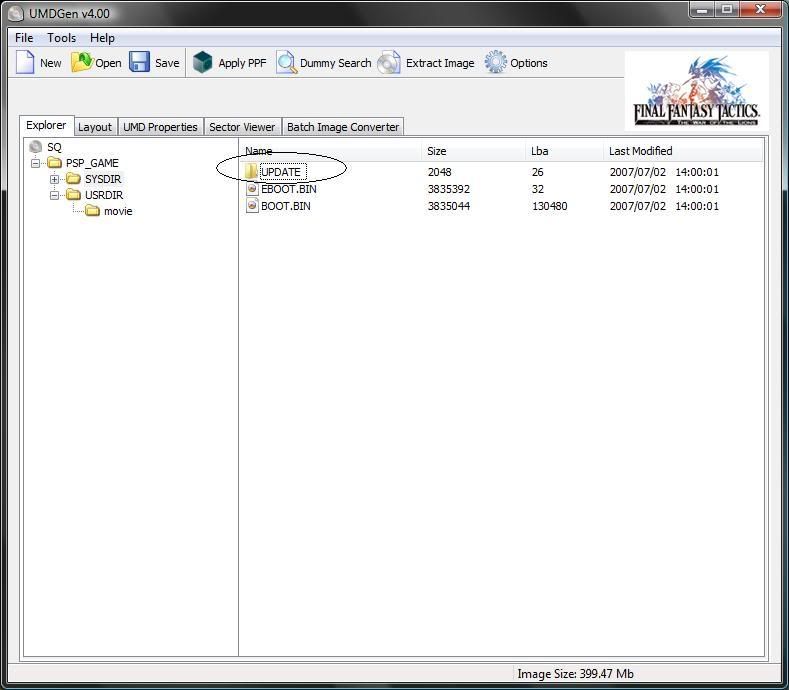 The WHOLE FOLDER is to be removed, right click> delete5.While I normally skip this step, if you want to save yourself time and patients, load the file list you saved earlier by File drop down> FILE LIST> IMPORTAnd make sure it's the file you recently made, you can't use the same file since each games is different, and when it ask the follow question
 Say "yes" as it'll lock the other files in position.6. Rebuild your iso in whatever format you choose-use the compressing steps at the same time to save time7. Test and delete original if you wish, making this an iso would make it as safe as it was, but with 22MB of data saved :)Well that's it, the safest way to have small self dumped psp games to enjoy.BTW-there is ONE other method of ripping your own games that doesn't use a pc..."UMD dumper"Google that, it works like a psp game, it goes under PSP>GAMEIt rips a UMD the same way, difference is you don't need a pc, plus on the last known version (since they sadly stopped working on it) it has a mini game to play while ripping (since it's slow) and also has a catchy song which you can change, which I'll leave to you...This is how I originally did it, however some games would work correctly for some odd reason (soul caliber, resistance fall of man for example) and their file sizes vary, meaning if there is a patch for the game for any particular reason that requires dead on sizes it might fail...And while the programs speed can be changed (222MZ to 333MHZ) that's only for 2000/3000 psp's and if you're doing a cso at level 9 compression you could be looking at over an hour for some of the larger games...I thought I mention this as many of the older games I used to rip worked fine-straight after this program is done it goes straight to the iso folder ready to play/test, but if you do bother...I highly suggest using only 333MHZ speed and ISO mode as sometimes the cso mode fails to work (the iso made from this may only work if done via iso than cso).Any questions, feel free to ask, I'm planning on adding more pics and editing the content a bit, I'm not responsible to whatever happens to your files as you edit them, but to save frustration...always keep the original files and THEN DELETE once the copy is proven safe :)