
This is to permanently modify the flash in your psp-if done incorrrectly or not following the warnings, it can damage your psp, if you're not up to it, please don't continue reading...
Warning: Read this guide fully before starting the process-while it may seem step by step, it can be risky following it like that, and also-I WILL NOT TAKE RESPONSIBILITY FOR ANY DAMAGED PSP'S!Howdy, today I'm going to finally teach you all how to hack a psp, no money or risk of an exploding battery required!However, there are a few requirements for this to begin, you shall need1. Pspident 0.4
2. Hellcat's recovery flasher 1.60
3. ChickHEN R2 update or later
4. The official 5.00update (renamed as 500.pbp in a folder called RECOVERY in the GAME folder)
5. Your psp to be on 5.03 OFC (Official FimWare)
6. A psp with a nice healthy FULL battery is advised-shut offs -and having a blackout or power changes (i.e. you pull out the charge plug, etc) will destroy the system-caution is advised.Also...
 While not needed according to hellcat's recovery (as it's meant to autodetect when motherboard is in use)-I think it's best to use pspident, this picture displays which motherboards are safe to hack-for all cautious people out there :)Note that there may be updates and other CFW (Custom FirmWare) which can be used, however this guide will teach you how to install 5.00M33v6, which is only compatible on psp's 1000 and 2000, without the TA-88v3 motherboard, however, if you have that motherboard, chickHEN can help enable partial homebrew use, but not fully unlocked one's psp.No matter the type of psp, read on.Ok, once you have located those files, firstly install the following to check if your psp is compatible
* Pspident-goes into psp/GAME folder
* chickHEN-all relevant files go into the pictures folder (where pictures on your psp can be viewed via XMB-or the psp menu for those who don't know)Now, with chickHEN, it's a hit and miss, sometimes it will work, other's it may not, to make sure you have max chances of getting it to work...* Turn all UMD based options off (UMD cache, etc)
* Delete all photos stores inside the photo album as they can reduce the chances of this from working
* Make sure you have the correct chickHEN type (an older chickHEN will not let you use hell cat's recovery flasher, and there is a different type of chickHEN depending on your psp, a PHAT or SLIM, please use the relevant one to match)
* Having a reset psp can increase the chances more (reset all settings, even user name, to default)
* Make sure your stock standard, default theme is enabled-any changes to the colour or theme can reduce chances of this working (but the gray background seems to help :) )
* Have an official magic gate card big enough to hold all of the tools required
* If you have any save data, back it up and remove from card (if it only has the stuff you need, it shall help with the process-plus back you up in some part if something goes wrong)Ok, now is the hacking part, if you have a 3000 psp, follow along until I give you the “red light†warning, as you can still use homebrew, but not all of it, nor psp backup games or psx games.
*note that this may change with certain plugins for the future
Now, to begin, once chickHEN is installed, open your pictures folder on your XMB (psp menu) and DON’T TOUCH ANYTHING!If all of the UMD options are off (and using an official magic gate card may help a little) you should see your psp flash green and restart-that means chickHEN is now enabled-YAY!
If not-your psp just Freezes and shuts down, something has gone wrong, re-check your options, reset the psp again if you need, also I find having the gray colour on my slim psp helped getting mine going.*If something has gone wrong, your psp is not damaged, the best part about HEN is that it doesn't touch the flash (the psp's memory) and thus doesn't void factory warranty-HEN as some users have said, is a hit and miss, keep trying, persistence is keyNow, if you want check out the firmware-it should say chickHEN as the firmware type, otherwise it will say what it was before the process begun.
*ChickHEN can be used as a safe alternative, but your psp will reset to original if turned off, if you want to leave it in chickHEN you will need to use standby mode instead of a full power down.RED LIGHT-3000 USER'S STOP HERE!Now, once chickHEN is enabled, use pspident (go to memory stick option on your XMB and select it-provided you put it where I said) to see what your psp's mother board is, if it's TA-88v3 you may need to try one of the other (but unfamiliar to me) options out there, this guide doesn't help you with that part, and so...RED LIGHT-INCOMPATIBLE USER'S STOP HERE!Next step, if you're cool, now (if you haven't already tried/guessed) install hellcat's recovery flasher 1.60 in the same place as pspident (psp/game) and just click that option.Now the scary part-this is the part where your psp will be changed forever!
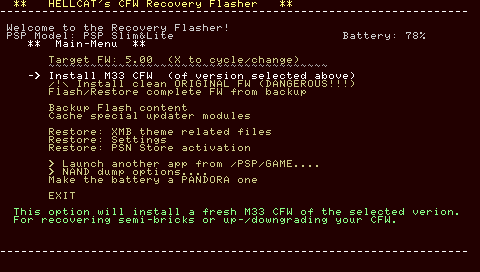 I will admit to you, I have not used the other options, but all you need is the one highlighted option :)
(The program will help you out a little as well-see the description at the bottom-it will help alot, I'm saying this to you because I have used 1.50 of this program, which only gives you 5.m33v4, and thus a little unfamilier with this one, but process should be the same)Now, follow thru with the prompts-however it will ask if you want to delete the flash saved options (user name, dates, etc) do so as it is (as the program itself advises you) the safest option.
If you're unsure at this point, I would advise reading the read me packed with hellcat’s recovery flasher, it will contain useful information that may help you.Now the process-it will load up the CFW, and with a good battery it will go thru the process on its own, once done, it shall restart with 5.00m33v6-enabling full usage of your psp.
Well, you're done-and provided your psp didn't malfunction-you should be a happy person with your now hacked psp.No Pandora batteries, no battery modding, just free software :)Feel free to now admire the firmware change-NOW GO GET SOME PLUGINS AND SOFTWARE TO ENJOY!
Any questions, please ask me-if you're worried about the process, PM or post comment before going to the hellcats recovery flasher-otherwise I can't help you from after that point.FINAL DISCLAIMER-again I advise caution using this, if I made any errors please tell me asap so other user don't make any mistakes during the process-this is romulation-we help each other here right?*Unfortunatly due to a possible site error some of the content has ben altered-if anything doesn't make sence grammer wise or a vital instruction is missing and it wreaks your psp, I apoligise-however if you pm me not only can we try to workout the psp's trouble-but prehaps save other user's from having the same fate-though I'm not sending money to get them fixed-that isn't included in the guide...