
Stuff Needed:
A Flashcart and Legit cartridge
SavSender 1.1 (SavSender.nds) Download here: http://www.dcemu.co.uk/vbulletin/showthread.php?t=63925
Netcat (nc.exe) Download here: http://joncraton.org/files/nc111nt.zip
cmd line commandsREAD THE ENTIRE TUTORIAL BEFORE STARTING!1. On the root of your microSD card, make a New Folder called DATA.
2. Inside the DATA folder, make another New Folder called SETTINGS.
3. Create a new .txt file called savsender.txt and open it in Notepad.
4. Run cmd and type ipconfig.
5. Copy down the IP address, should be 192.168.1.xx or something like that. Mine is 192.168.1.68
6. In the savsender.txt file, type the IP address that is shown and choose a port. All tutorials, and I, used 5000.
It should be typed like this:
192.168.1.68
5000
7. Save the file.
8. Rename the extension of the file from .txt to .conf
9. Put savsender.nds in the DATA folderNext section covers Port Forwarding. I didn't need to do this section...
However, since every router brand is different, the Port Forwarding is different. The idea is to enter in the IP and the port that was found earlier in making a new Port Forwarding entry. To make this simpler, just turn off the internal firewall on your router, but don't forget to turn it back on when you’re done.Put nc.exe onto your DesktopDumping Saves:
1. Run cmd.
2. Type cd desktop, hit enter.
3. Now type nc.exe –l –p 5000 > savefile.sav
5000 is the port number, that is a lowercase L, not a 1 or an I, savefile being whatever you want to name it. When you're done, hit enter and don't touch it.
4. Boot up your flashcart with the microSD card in it.
5. Go to DATA.
6. Start savsender.
7. When the black screen comes up, switch the flashcart with the legit cartridge, and press A to start dumping.
8. When it says Done! You are done. It should be on your Desktop.
9. Hit Ctrl + C to end the "nc.exe –l –p 5000 > savefile.sav" command.Restoring Saves:
Note: The savefile must be on your Desktop along with nc.exe
1. Run cmd.
2. Type cd desktop, hit enter.
3. Now type nc.exe –l –p 5000 < savefile.sav
5000 is the port number, that is a lowercase L, not a 1 or an I, savefile being the save file on your desktop. When you're done, hit enter and don't touch it. This needs to be <, don’t mix this up with the last instruction set.
4. Boot up your flashcart with the microSD card in it.
5. Go to DATA.
6. Start savsender.
7. When the black screen comes up, switch the flashcart with the legit cartridge, and press B to start restoring. Do not get this mixed up with the Dumping function.
8. When it says Done! You are done. The savefile that was designated on your Desktop is now copied to the legit cartridge.
9. Hit Ctrl + C to end the "nc.exe –l –p 5000 < savefile.sav" command.
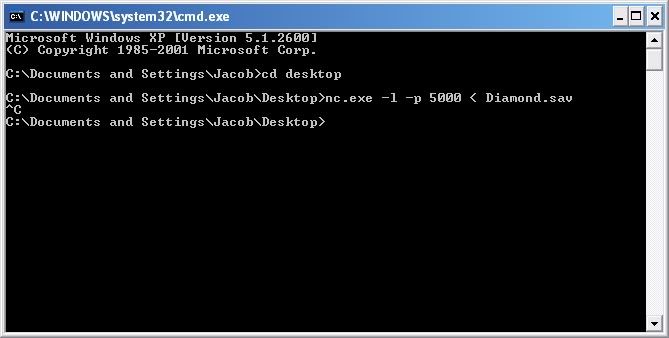
The end result of what it looks like, even halting the process at the end of the transmission.Ending comments: This tutorial is based off of this tutorial http://www.scdev.org/forum/index.php?topic=9915.0 reworded to make it EVEN SIMPLER than when I did it. I was going to include SavReceiver in this tutorial but the Restoring function doesn’t work as smoothly (or at all) as the dumping function does so I decided to go the Netcat route since it does both flawlessly.