
- extinfo.dat
- infolib.dat
- savlib.dat
- usrcheat.dat/cheat.dat
- eNDcryptS.exe
- TTDT.exe
- R4CCE.exe
 OTHER NECESSARY FILE(s)
- RetroGameFan's Latest Official YSMENU/TTMENU Updates
- Jhon591/Drwhojan's Latest Unofficial YSMENU/TTMENU Updates
- Game Rom
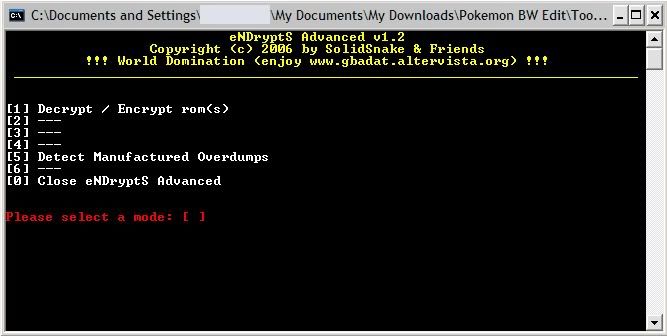 How to Use :
1. Place the ROM in the eNDcryptS folder
2. Run the program
3. Press (1) to encrypt if the ROM is in decypted mode
Like wise press (1) a second time to decrypt it if its in encrypted mode
(or vise versa)
4. Wait until its said DONE, and request you to press any key
5. Press any key, close program. DoneImportant Note :
The purpose of doing the above;
1. You need to use the encypted GAME ID to use on the extinfo.dat, infolib.dat, and savlib.dat
2. You need to use the decypted GAME ID to use on the cheat.dat or usrcheat.datFor new games released after 2011, you'll need to open up the rom using a hex editor. Fill up offset line number 00000160 to 000001FF with several pairs of 00, like as shown in the image below to acquire the encrypted game ID;
 Once you do as shown in the image, use R4CCE to look up the game ID for use in TTDT.exe.2. Finding the GAME ID to UseTo do this, you need R4CCE.exe. This program is useful in finding out the GAME ID for the ROM that you had encrypted or decrypted. Its also the program that you'll be using to edit usrcheat.dat or cheat.dat, depending on which of the 2 DATs that is useable for your cartridge. However for now, I shall only cover the first method, while to edit the cheat database shall be covered later.
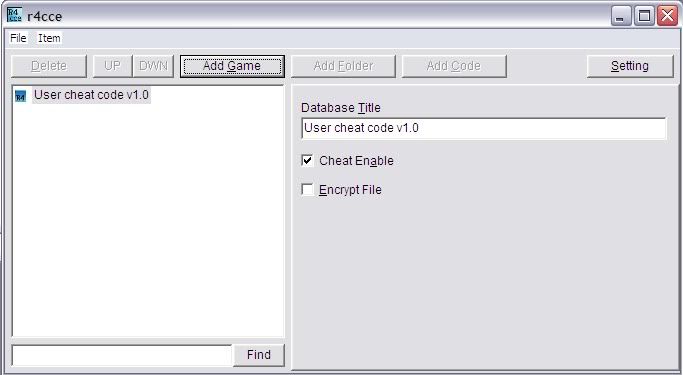 How to Use :
1. Run the program
2. Click EDIT then click ADD GAME or click the ADD GAME button
3. Click the "..." button next to the "Dup?" button
4. Locate the ROM in the eNDcryptS folder, choose to open it
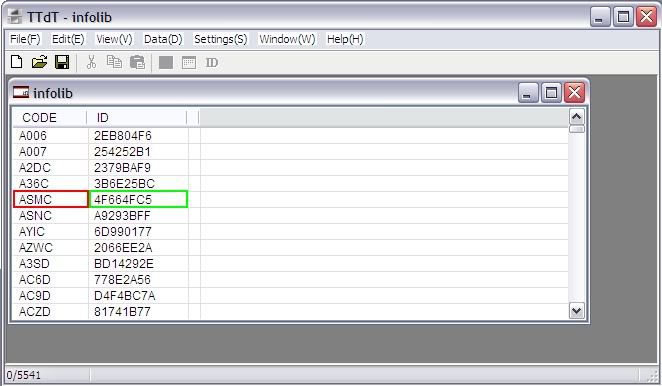
5. See and take note of the GAME ID as shown in the picture below
marked in the red and green box
6. Close the program, when prompted to SAVE, choose NO
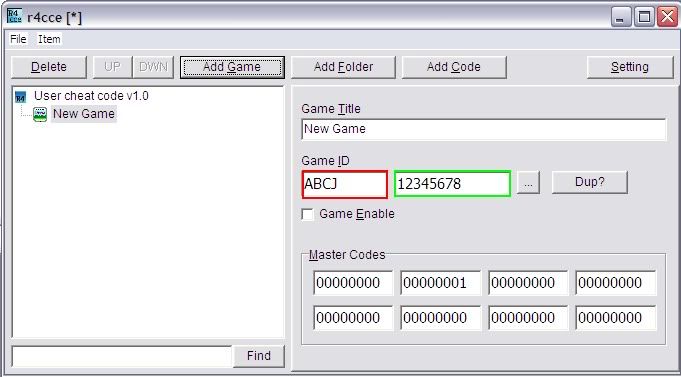 Note :
1. The 4 digit ID marked in the red box is default and shall never change no matter what,
even if the ROM is decrypted/encrypted or even when the ROM is patched, etc.
2. The 8 digit ID marked in the green box will change when encrypted/decrypted or when the
ROM is patched, etc.Thus, when you just need to locate the ROM's offset in all these DATS, use the first 4 digit as your main reference.The remaining 8 hexdecimal digits will only be necessary when you need to edit the GAME ID in those DATs.3. Editing the Game ID in the DATsThe program to use is TTDT.exe.This program will be use for 2 purpose. Part.3.A. for only editing the GAME ID (either to change or duplicate it), while in Part.3.B. it will be about self-adding offsets pre-provided by people who had located it for you.
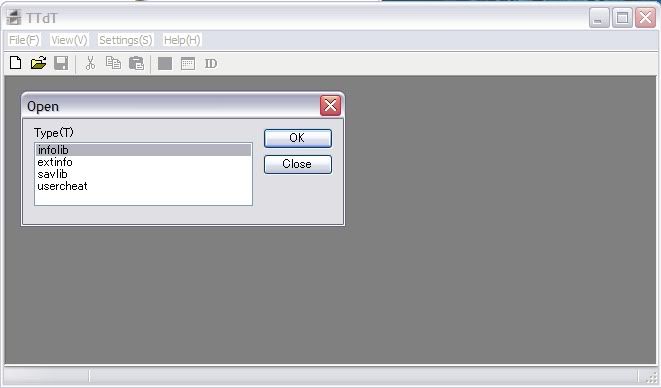 Above is what the program main window looks like. But before we go further. First activate the titlelist.xml for convenience. Its a list provided, which you can self-update as well using a text editor or notepad. But this is optional.Activating TITLELIST.XML
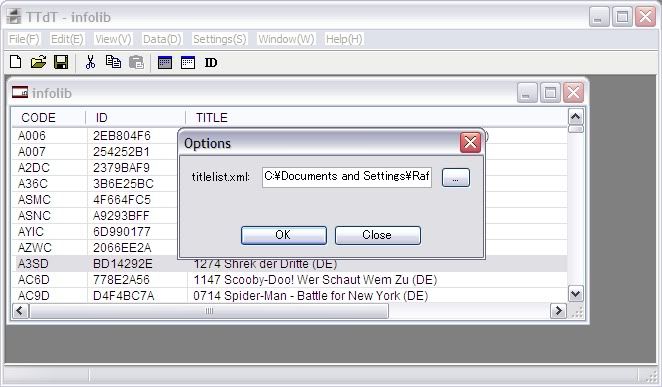 How to Activate the XML File :
1. Make sure to have the latest titlelist.xml in the TTDT.exe folder
2. Run the TTDT.exe program
3. Go to SETTINGS
4. Choose OPTIONS
5. Click on the "..." button
6. Locate the xml file
7. Press OK. Done
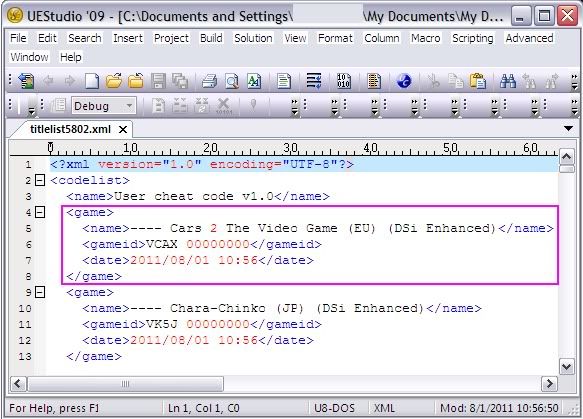 The XML list is usually updated by Jhon591/Drwhojan in his Unofficial Updates. Simply copy-paste it into your TTDT.exe folder. As shown in the picture, each GAME ROM is listed in the format as follow;
<game><name></name><gameid></gameid><date></date></game>1. Replicate the format
2. Add in the first 4 GAME ID digit
3. For the 8 digit GAME ID portion, replace it with "00000000" this is so that
whatever the GAME ID that you add into the extinfo, infolib, or savlib. As long as the
first 4 digit is the same, it will show up with the same GAME NAME
4. Once done, choose SAVE, do not press SAVE ASMainly the titlelist.xml contain the 4 digit GAME ID as been mentioned. That 4 digit is the game's serial number which actually is in the format NTR - 4 digit ID - Region, for example : NTR-ABCD-USA. You may also use DS-Scene Rom Tool from RetroGameFan or NDSTS program from No-Intro (both programs not provided in this tutorial) besides using R4CCE.exe. See below image sample :
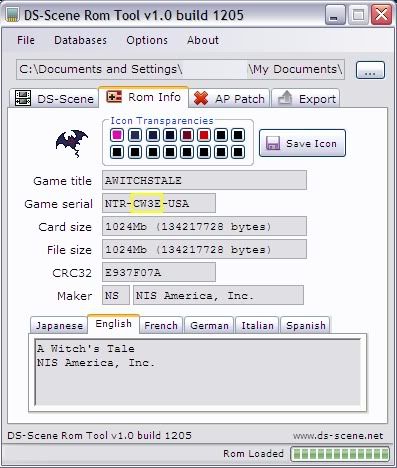 As you can see in the above image, the portion marked in yellow box is the GAME Serial Number/Game ID.You can also use R4CCE.exe to edit the titlelist.xml :
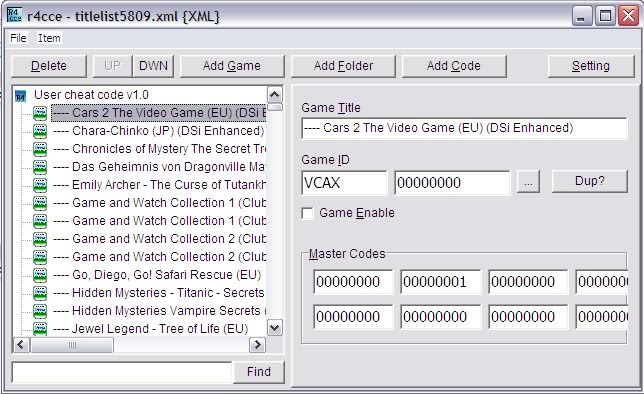 Method :
1. Choose FILE then press OPEN
2. Locate the titlelist.xml to edit
3. Choose Add Game to append the database
4. Fill in the Game Name, 4 digit ID, while the 8 digit fill in as "00000000"
5. Go to FILE then press SAVE (repeat steps 3-5 when adding more)
6. To Edit, click 1x/highlight the Game Name to edit
7. Edit the data panes, Go to FILE and press SAVE
8. DoneComplete Release ID DatabaseYou can find the complete release ID for all NDS games in this link :Advance Scene Website :
 Its under the "NDS Release List" section. (The website does not provide any roms for downloading, only database information for handheld games dumped in the internet, and tools/programs.)TitleList.XML Updates :
[quote author=Jhon 591]
updated titlelist6089.xmlhttp://www.mediafire.com/?hvs7a6oyouwu8pv
[/quote]Step 3.A. Editing Game ID for Existing File
 Above is what the GAME ID that you had acquired from doing the previous steps in part 1 and part 2 is to be use. For the Extinfo.dat, Infolib.dat, and Savlib.dat, you'll be using the encrypted Game ID.How to Edit Existing GAME ID :
1. Still remember the 4 digit and 8 digit GAME ID from the encrypted ROM? Make sure you remember!
2. Open the extinfo.dat first (though you may open the infolib or savlib first, either way you must make sure you have all 3
DAT files edited depending whether the GAME offsets are already added into the file)
Note :
Normally the GAME ID and Offsets been added for extinfo and infolib in each updates
made by RetroGameFan or Jhon591/Drwhojan. Unless there is a need to also have some
fix on the save file as well, then there will be also in the savlib.
3. Run down the list by using the first 4 digits as reference. Once you find it, check out the 8 digits behind it
4. If the 8 digits behind it is different from the one you had located, then what you can do are as follow;
Method 1 :
a. Click 1x on the GAME you want to edit, it should be highlighted
b. Either go to DATA then choose ID INFO, or click on the ID button
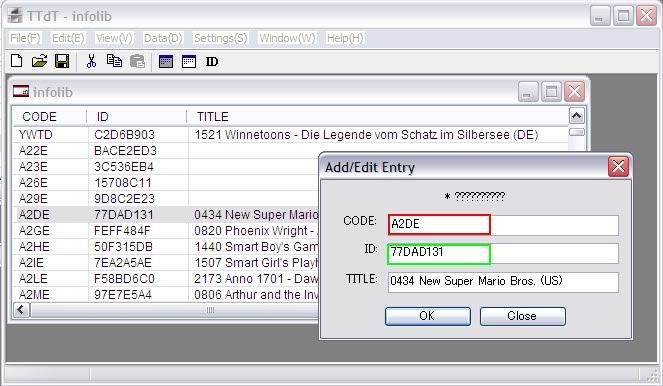 c. Now you should see the image as shown above. Ignore the red portion, edit the green
portion with the 8 digits you have found
d. Once done, press Ok. That's it. Method 2 :
a. Click 2x on the GAME you want to edit, it should be highlighted
b. Choose EDIT, then press COPY, then press PASTE
c. Locate the duplicated GAME ID you had made
d. Edit either one of that set, by doing method 1.
e. DoneStep 3.B. Adding/Editing the Offsets in the DATS
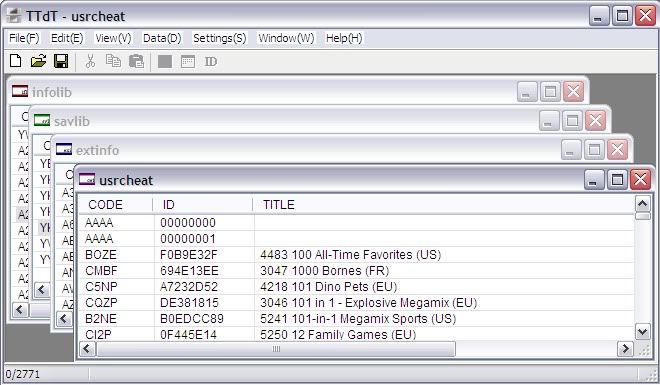 In the above picture is what the 4 DAT window will look like, each marked with different color on the top left side. Of cause you won't need to edit them all. Just the DATS that had been pre-provided the offset database. Jhon591/Drwhojan has this tendency to post what he name as "manual edit". Its a set of extinfo offset, infolib offset, and sometimes savlib offsets in a code pane. You can add those by doing the below steps;A. Editing Extinfo.dat
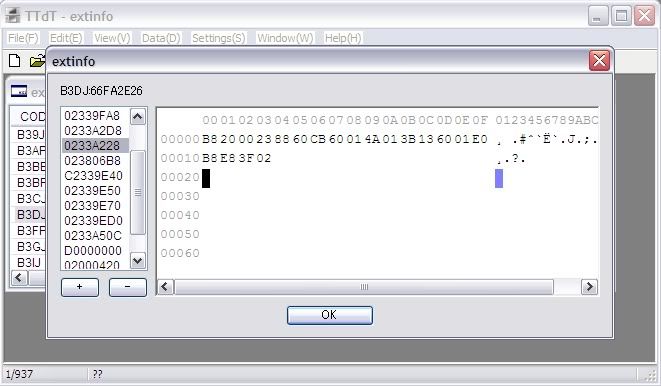 How to Edit :
See image above; the left portion is for adding binaries. The + sign is to add new, while the - sign is to remove. The right larger screen portion is for you to add the binaries from 00 to 0F. Simply copy all the codes when provided as it is. Then press OK once done.B. Editing Infolib.dat
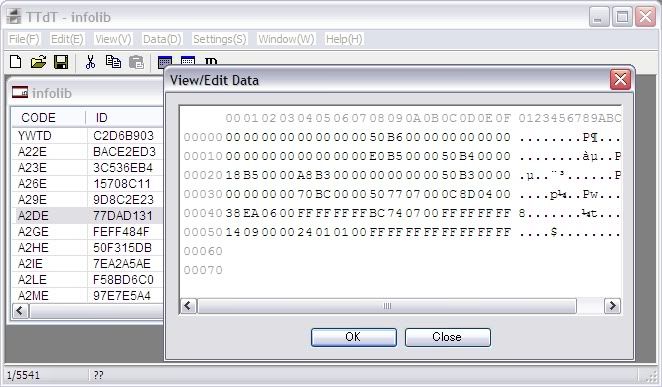 How to Edit :
Same case with the infolib, except for the infolib there's only 1 main edit pane. Simply copy the binaries where provided, then press OK.C. Editing Savlib.dat
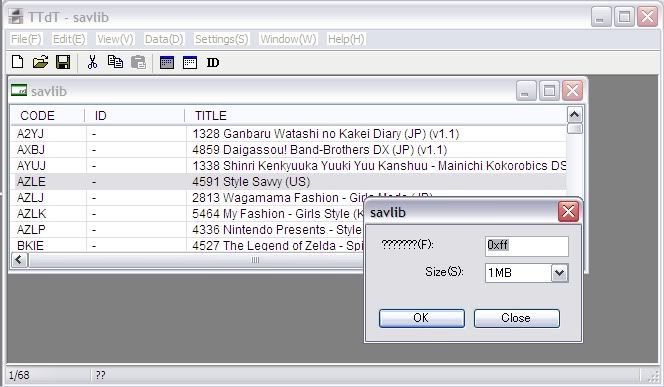 How to Edit :
1. Make sure to add the 4 digit GAME ID, while the 8 digits as "00000000"
2. Then, in the savlib edit pane, determine the save file size limit
3. Press OK when DoneD. Editing Usrcheat.dat
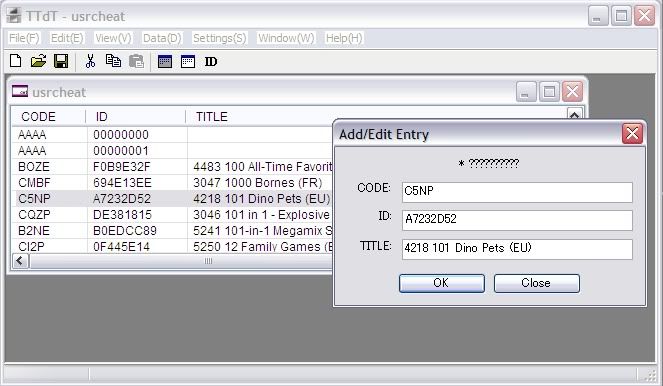 Actually this feature in TTDT is rather strange and pretty much useless, it does not allow editing, just adding of the GAME ID. Remember that cheat database uses the decrypted GAME ID, not like the other 3 DATS.How to Edit :
1. Open up the usrcheat.dat
2. Choose to ADD or Edit the database GAME ID
3. EDIT it, Done.There's nothing else you can do with it. Because if you double click any of the list in it, it will cause a crash. So best is to ignore this feature. If you want to edit the cheat database best is to use R4CCE.exe instead. Steps as illustrated below.EDITING CHEAT DATABASEThe program to use is R4CCE.exe. As been mentioned, in this section I'll be informing the method on how to ADD/Edit the Cheat Code Database in the usrcheat.dat or cheat.dat. However I will not cover the method on how to locate the offsets by yourself. Instead you'll need to use the usrcheat.dat/cheat.dat provided by either RetroGameFan or from any cheat database website/forum site. Again just a hint; if you want to locate them yourself then you need to use DeSmuMe's features, though its also possible to use other emulators with similar ability. However, I will not touch that aspect as I'm pretty much blind about it.
How to Edit :1. Choose FILE and press OPEN
2. Locate an existing Cheat Database (usrcheat.dat or cheat.dat; depending on what you use)
3. You should now be viewing like the image below
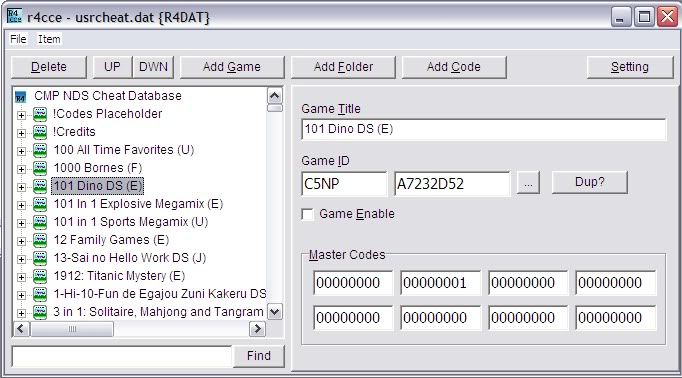 Lets say you see the cheat database contains the codes for a game you want to use, however did not show up on your console's cheat enable list. Then there are 2 methods of approach;But again before going to the below steps, remember to acquire the decrypted GAME ID of the ROM by doing the eNDcryptS and R4CCE method as been mentioned in the first portion of this tutorial.Method 1 :
1. Highlight the Cheat Database of the Game to edit
2. Click on the GAME ID and replace them with the one you had acquired
3. Go to FILE, choose SAVE, do not ever press SAVE AS. DoneMethod 2 :
1. highlight the Cheat Database of the Game to edit
2. Copy and Paste, locate the duplicate
3. Edit the Game ID of the duplicated database
4. Go to FILE, choose SAVE, do not press SAVE AS. Done
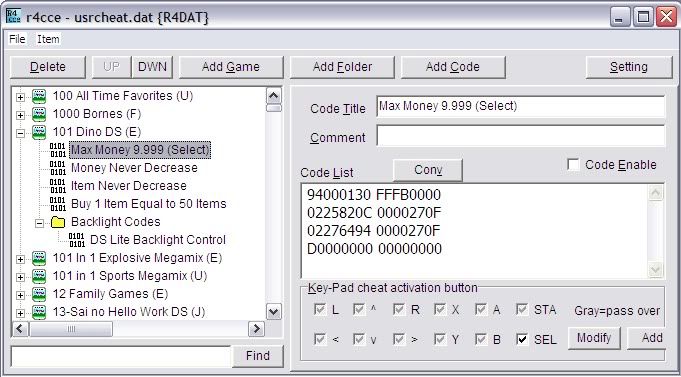 In this portion is where you get to ADD new codes into existing database of an existing GAME codes, or create a new database into an existing database.Adding New Codes into an Existing Game's Cheat Database
1. Open up the usrcheat.dat/cheat.dat using R4CCE.exe
2. Locate the exsisting game to add more codes
3. Depending on condition, you can create a folder or sub-folder for the new codes below the exsisting codes
4. You then press ADD CODE to start adding new codes into the database
5. Type in the title of the Code, and add in the cheat code binaries into the CODE LIST
6. Tick the KEY-PAD Activation Button if you want the code to only activate if you press a certain button combination
7. Choose ADD/Save to keep the appended databaseAdding New Codes into an Existing Database for a Game that is not yet Added
1. Open the usrcheat.dat/cheat.dat using R4CCE.exe
2. Choose ADD GAME
3. Fill in the decrypted GAME ID into the box, and add in the name of the GAME
4. It should now be created in the left pane
5. Highlight it, and choose ADD FOLDER or ADD CODE, depending on your requirement
6. If you choose to ADD Folder then the codes should be grouped by you
7. If you had choosen to ADD FOLDER, then next step is to ADD CODE
8. Next, fill in the NAME for the CODE TITLE
9. Fill in the CODE LIST
10. Tick the Key Pad Activation Button if necessary
11. Choose ADD/SAVE when doneExtra :
For those of you who want to try learning about how to locate offsets from within the Game ROM to use in the extinfo.dat and infolib.dat. You might want to download this file from Jhon591/Drwhojan;Download Link :
It'll help you learn and possibly be able to get at least 98% of the necessary offsets, except on how to overcome the Anti-Piracy issues when running the ROM on flash cartridges.But the Anti-Piracy issue can be overcome by using RetroGameFan's DS-Scene Rom Tool, download the program from the link below;Download Link :
 As for how to locate cheats using DeSmuMe, try reading this Wiki from DeSmuMe.org;DeSmuMe Wiki Guide : End Note :
If you want to know more about how to locate offsets using DeSmuMe, hex editor, etc. including on how to find game cheat codes on your own, then best is to ask those credited in the list below. I'll expand this tutorial whenever I feel necessary.Credit Acknowledgements :
1. Romulation for hosting this tutorial
2. RetroGameFan for the DS-Scene Tool and Latest Official Updates (Official Updates not provided in the download link)
3. Jhon591/Drwhojan for the TTDT.exe program, and the Unofficial Updates (Unofficial Updates not provided in the download link)
As well as the tutorial on how to find offsets for extinfo.dat and infolib.dat
4. No-Intro & SolidSnake for the eNDcryptS.exe program
5. Yasu for the R4CCE.exe and the original YSMENU/TTMENU firmware
6. And those who had contributed with cheat codes (Not provided in the download link)*The End*