Back to Computers & Modding
Spare Parts
S
I dismantled a computer tower quite recently, which was undeniably more fun than I thought it would be... But now I have a few spare parts, and another Hard drive...I can piece it back together, and it'll work fine right? :)I have the Motherboard, a few expansions for Ethernet Ports, etc, which connect into the motherboard, but I don't think I'll stick them in. I have the Fan, the Hard disk, The Floppy Drive (Oh my! Ancient Technology!) The CD Drive. All the Power cables etc.Think I can piece it back together? Take it into account it's my first time piecing it together.. Does anyone have a document or a website that will give me very rough details?
H
The main things that a computer needs is the motherboard, the processor, the RAM, the Power supply, some kind of bootable drive (hard drive, cd/dvd rom, floppy, flash drive etc), a keyboard, and a video output (VGA, DVI, s-video... can be integrated or an add-on card.) So there you go as long as you have at least what I have listed your computer will boot. (mouse not important for booting but it is nice to have for a GUI.)
S
Thanks hmfan, I'll look at what I have to see if I have everything..So far I know I have:
- Hard Drive (40gb Seagate, needs to be formatted)
- Motherboard (Unsure of make at present will have to take a look soon)
- Monitor (Unsure of the type of connection but I have the wire for it at any rate)
- Various wires (Including Power Supply)
- Fan
- Floppy Disk Drive (No point installing this though as I don't have an Floppy Disks)
- CD Drive
- Keyboard
- Processor (I think)
- RAM (I think)The Motherboard also has a fan attached to keep it cool. I'll have to look at images for these pieces of hardware to see what they are.
L
if the fan is on a big heatsink then the processor will be underneath it.
S
Replying to #4
Yeah it's on the heatsink, that's good to know.. Any tips on what Ram typically looks like? I'm assuming sorta like a USB but not the same exterior.. Will it be attached to the Motherboard too?
Pretty much all you need just to get it booting into the bios is, the motherboard, with processor and ram, with power supply and a monitor, and keyboard.
Here's more info on ram :
http://en.wikipedia.org/wiki/Random-access_memory
Power Supply:

Motherboard (Similar but not exactly the same)
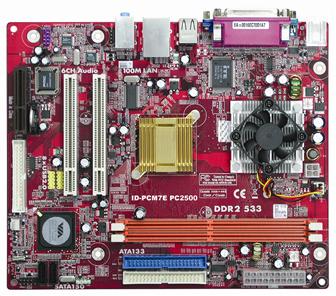
Will upload more pictures of what I think they are later.
Showing posts 1–7 of 7 · This discussion is archivedBack to top
