Back to Site Support
site seems to laag....
T
it seems to me this site lags every time i scroll down a page... :'( i go to many sites everyday, and this is the only one with the problem, in all threads, but never anywhere else...does anyone else have this issue?!?!
T
I don't see any issue like this, what specific threads are you viewing? Lots of images? etc.
T
it just seems to me that no matter which thread i'm in (even this one....) scrolling looks like it's loading part of the page, while still keeping the old page.... (no good at examples....) but on any other site, i don't have the issue....
S
Probably a slow PC or firefox that's using so much RAM it's being painfully slow. Nothing we can do about it really.
T
Replying to #4
it can't be just FF, or my computer, cuz i don't seem to have issues anywhere else, just here......
I never have had problems with the site except when I'm downloading.
T
i've tried the following browsers...FF 3.6
FF4.0 beta
chrome
safari
IE 8all of'em have the same issue.....it's not my PC, i know that for a fact, otherwise it would be the same on all sites...but it's just here.... :'(
S
I've never had it happen to me and never heard of it happening to any one else. I can't reproduce this so I cannot fix it.
L
This actually does happen to me. It just sort of lags going down a page, regardless of browser or what's going on. I can confirm it is just this forum too. I don't really know what the issue is though.
S
Could it just be an issue of the mouse wheel?
U
I do lag in this forum but when i press the stop loading button and opens a new tab, it didn't seem to lag anymore.
A
it's normal
the page loads slowly
L
lag during scrolling is usually caused by your graphics driver not being installed properly, so windows is using its default vgasave driver, which is frankly crap.
T
Replying to #13
hmmm....how can i figure out if mines installed correctly?
check the display properties, on the page where you set the resolution and bit depth it should say 'monitor on xxx' where xxx is the name of your video card. If it says vgasave where the xxx is then its not installed properly or not working properly.
T
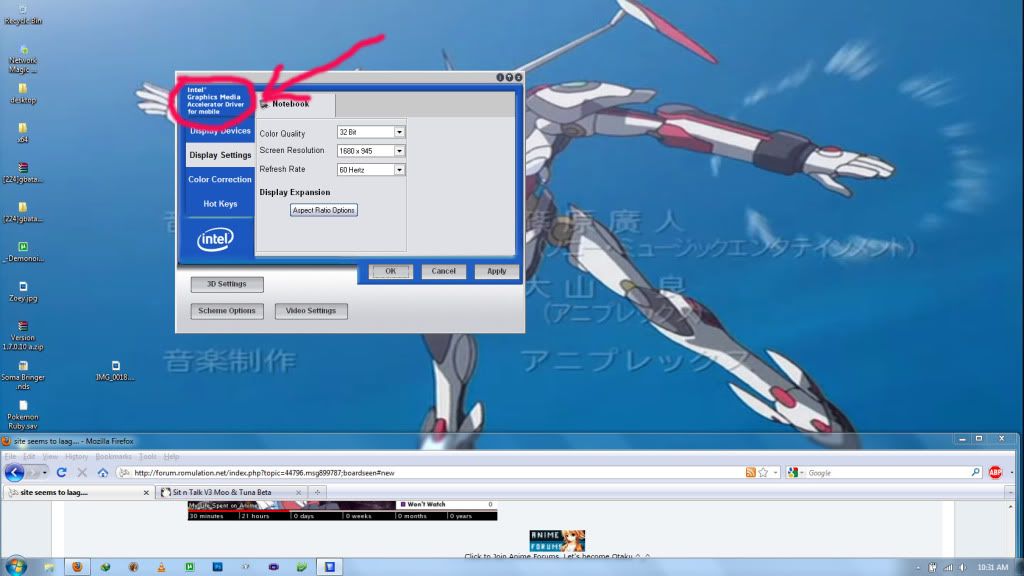
it seems to be a bit different from what you said....but if you look at the image below, you'll see where it says which driver i'm using....
Showing posts 1–16 of 16 · This discussion is archivedBack to top
