
----------->http://gbatemp.net/t237398-waio-woodallinone<------------
Moving on, next another program you'll need is desmume 9.5 or 9.6 for when the r4 sdhc card cant read the .sav file ( happens alot) you can create a save file for it. ------------>http://desmume.org/download/<--------------
FOLLOW THE STEPS BELLOW!1.Make sure you have a r4 sdhc, nothing else just r4 sdhc2. Put waio.nds and rpg and r4 sdhc.nds into the root of your card..... ( when you open the rar file just go into the build folder you'll find them there)
Picture Turorial
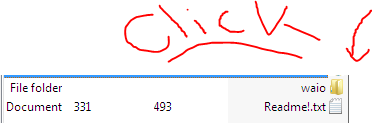
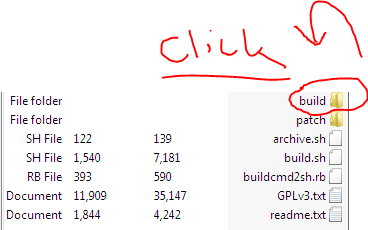
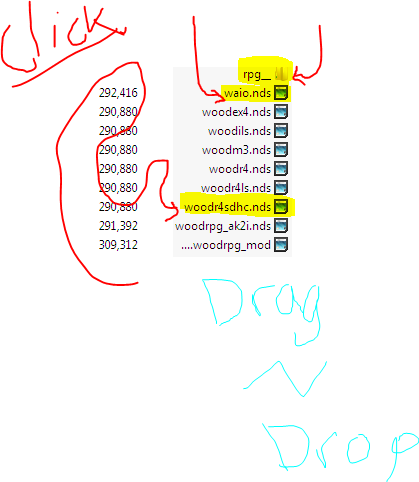
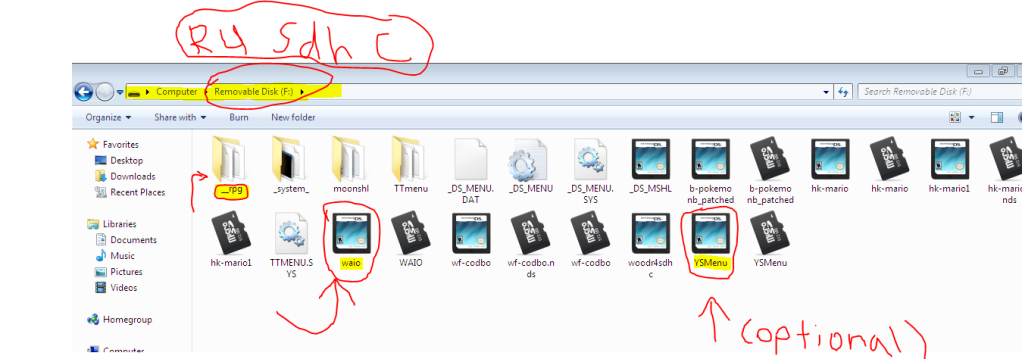 /!\ OPTIONAL- SOMETIMES GAMES WONT LOAD FOR SOME REASON SO YOU MIGHT NEED YSMENU- /!\3.Place your ysmenu with your ttmenu onto the root of the card4.Now desmume comes into play the r4 sdhc will block you to play because it cant save properly, so you need a save file sometimes if your lucky you can find save files on the internet, but for now will use desmume, so when you load up desmume start playing the game.5.Okay so once your playing your game on desmume emulator, I HIGHLEY! Recommend that you save in game such as when you have the option to save INSIDE the game not saving the state of it.( You have the option to save the state whitch means you can save at anytime even in a battle referring to pokemon) So once saved, to the desktop you need to rename it to xxxx.nds.sav and then put it onto the root of your r4 sdhc or in your games folder MAKE SURE I CANT STRESS THIS ENOUGH TO HAVE THE EXACT SAME NAME SO IF THE GAME IS CALLED POKEMON.NDS YOU MUST RENAME IT TO POKEMON.NDS.SAV OR IT WILL NOT WORK! ( If desmume is laggy look at the video at the bottom of the page)6.Load up the game And boom your done!7.THANKS
PLEASE IF YOU SEE ANYTHING WRONG RECOMMEND ME TO PUT IT IN THE POST PLEASE LET ME KNOW THANKSMake sure your card looks like this
 <------------------------------IF DESMUME IS LAGGY WATCH THIS VIDEOhttp://www.youtube.com/watch?v=lngFrWoDmcU