Back to Flashcart Help
R4i-There is no card inserted in the DS Game Card slot
D
I have a R4i v1.4.1 with 2 GB micro SD card.I updated to the latest kernel R4i V1.46b.
Everything was working fine over the weekend.When I went to switch on the message that came up was "There is no card inserted in the DS Game Card slot".
How do I get this to work again?
J
Back up everything and then format.
After that place all your files back
D
i reformatted the card after backing up,then placed all the files back on.Still the same message.
T
Stick a slip of paper or cardboard in the slot to push the contacts closer together.Remember this tip, Jonez, it's a common problem.
J
Replying to #4
[me=Jonez001]takes a sheet of paper and writes tip down[/me]
Consider it done
Have managed to get a piece of cardboard into the slot with the R4i card but still the same message.
J
Wait a minute, which console are you using?
D
A nintendo DSi
J
D
version 1.2E
J
Form which site do you dll your firmwire?
D
r4i-sdhc.com
J
^So this is your cart:
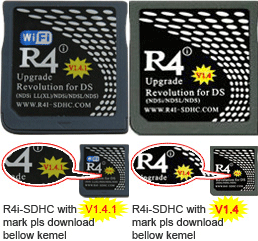
yes
J
http://forum.romulation.net/index.php?topic=39701Maybe this can help
D
I clicked on the link you gave me.I then clicked on the Wood v1.38 for R4iDSN download link.I then downloaded the file.it was a 7z type file.I have now managed to open it.What do I do now?Do I copy everything onto the micro SD card?
J
Ask CoolKill3r or the people in that thread. They are experts. I don't have a R4 to test out that firmwire.
X
This is exactly the same problem I have. It was working fine and now suddenly no card is inserted in the DS Game Card slot.
Showing posts 1–18 of 18 · This discussion is archivedBack to top
