Back to Technical Help
r4 problem
A
Hi there, was adding games onto my r4 cartridge and now when i switch on my ds, all i get on the top screen is ?menu in the shape of a micro chip.please helpthanks
alison
Z
Do you have the system folder? Firmware? File, ds games and all that?
J
abbitweetypie · #1Hi there, was adding games onto my r4 cartridge and now when i switch on my ds, all i get on the top screen is ?menu in the shape of a micro chip.please helpthanks
alison
What make of R4 is it from your box or card ?
The website on your box , has the correct firmware for it!
yes, was working great just before i put the new games on. any ideas?
T
It either cannot find the system files (firmware) or the MicroSD is not seated properly in the card anymore (happens sometimes).
A
hiya, th make of my r4 is r4 revolution for ds (ndsl/nds) http://www.r4ds.comPost Merge: [time]1262211089[/time]
how do i get the firmware back?
T
Check to see if the Firmware is on your MicroSD.
There should be:
A folder called moonshl
A folder called _system_
A file called _DS_MENU.DAT
A file called _DS_MSHL.NDSIf it's not, download it from that site you just listed.Or if you want a more compatible firmware, check out this thread.
https://www.romulation.org/forum/index.php?topic=27617.0It has an unofficial firmware that works well.
J
New firmware for games like zelda spirit traks, mario & luigi BIS (US) roms ownlyDSTT v1.17a12 For R4 Original Users , Updated 27/12/09http://www.mediafire.com/download.php?f0itmtdty5m
A
thanks, will i have to delete all my games off r4 before downloading files again?
T
You shouldn't have to. You should backup everything before doing anything though, so you don't lose your save files.Is your firmware not on the card anymore?
J
Thanks TirithRR in it befor me,But the qurstion is a microsd chip display?, That sounds odd to meThe ownly one that dose that is ttmenu firmware, if it's done rong...
T
I believe most of the R4s and R4 clones (DSTT included) display the "menu?" error when it can't find firmware or the MicroSD.
A
i can only see moonmemo, moonshl2 and r4 menu
J
Replying to #13
Use this one on a clean microSD chip, It easer for bigginers
DSTT v1.17a12 For R4 Original Users , Updated 27/12/09
http://www.mediafire.com/download.php?f0itmtdty5m
All you need is
TTMenu folder
_DS_MENU.dat
NDS Games folder
On your microSD chip, place games in NDS Games folder
The changeloag.txt you can read on the pc
added the r4.dat and now my micro sd is saying: fake card! please return to retailer?
J
Root folder

TTmenu folder, Be sure non of thease files are missing

NDS Games Folder, The A don't meen nothink it just registerd to my no$gba emulator, Ignore

Waht R4.dat ?, That a R4 SDHC card type
thanks 4 everyones help, i now up and running again.thanks a millionhappy new year. woo hooalison
Y
TirithRR · #12I believe most of the R4s and R4 clones (DSTT included) display the "menu?" error when it can't find firmware or the MicroSD.
Yeah. My R4i and R4 SDHC do that.
abbitweetypie · #15added the r4.dat and now my micro sd is saying: fake card! please return to retailer?
That happened to me too. You are using the R4 Original that should look like this?:
R4
Revolution for DS
(NDSL/NDS)
Then download the firmware from the site you mentioned.
If the card looks like this:
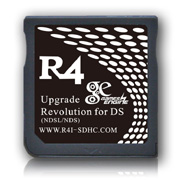
Download from
here.
Post Merge: [time]1262212776[/time]abbitweetypiethanks 4 everyones help, i now up and running again.thanks a millionhappy new year. woo hoo Happy new year!alison
Oh. Sorry for replying so late.
Showing posts 1–18 of 18 · This discussion is archivedBack to top
