
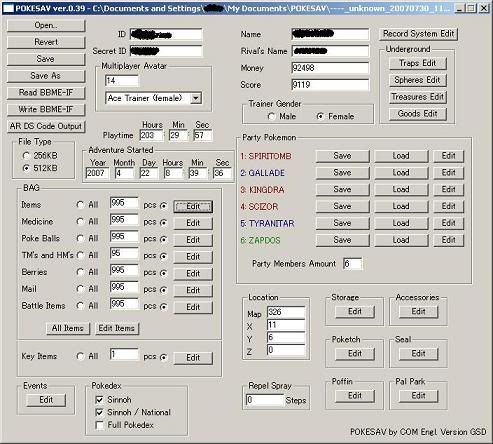
 You can see you can do a lot stuff on this. You can edit all your regular information, such as your Name, your Rival's name, your ID (for Lotto etc.), Money, Score, Multiplayer things, Gender, File Type/Size, Playtime, Adventure Started time, etc as well as Records (the ones you can see in that tower).To open your save, just click the Open button and load it in the window. Revert is the Undo button, undos all the edits to the save file since you last opened it. Save and Save As is pretty much explained. Saves as one of the formats. If your flashcart doesn't use that, convert it, or simply change the extension to .sav,.dat,.0. ArDS Code Output, exports edits into a usable Action Replay code file, in .xml. If you have a R4 etc., you should be able to use the Cheat Code Editor to open the .xml file, and then export as .dat file. If not, just take the Action Replay codes (copy them, open the file in Notepad etc.) and then add them in accordingly via your flashcart.SETTING ITEMS (Bag, Underground etc):Click the appropriate Edit button. A window should pop up. Click a Slot or section. Choose a value or item in the Type menu, and then click Modify to apply the selected item to that slot. You can also set the quantity etc :)SETTING THINGS (Party Pokemon etc):Basically just click Edit, and enter the values and click Ok. For Party Pokemon, once done setting values, go Save, and you can export your own .pkm pokemon file, so other people can use what you have done. Load is for loading .pkm files, so you can load your own or other people's pokemon.BAG:In this section, you can add etc. items in your inventory, all categories. Click the All option will change all the categories to All, which means you will get all items known to D/P in the set number. You can choose whether you want it to be custom by clicking Edit, or manually clicking the options. Want to know how to set individual items manually? Read the SETTING ITEMS section above.
STORAGE:You can choose whatever pokemon you want, with box settings, to be in your computer storage, you can load .pkm files from there as well, like ones you have created.ACCESSORIES:You can choose how many of each accessory you want, for the Visual part of Contests. Pretty simple to work out.
POKETECH:You can choose which applications you want enabled on your watch device, which you usually find by talking to certain people etc.SEAL:You can choose how many of each seal you want, for visualing Pokeballs, for your pokemon. You can usually buy these from the Market, in one of the towns.POFFIN:You can choose how many of each poffins you want, and set individual values to each one.
PALPARK:Choose starting pokemon that you have in Pal Park (I could be wrong on this)POKEDEX:Choose which Region Pokedex's you wanted filledLOCATION:Something or rather, please tell meSome troubleshooting/Issues:Won't fit the Screen: This happened to me too, change the window resolution, or download Urza's mod, available below, which uses a smaller windowMore can be found at http://pokesav.org/main/troubleshootingLINKS:Download Pokesav http://pokesav.org/main/download-pokesavPokesav Forum http://forum.pokesav.org/Pokemon Database (with .pkm files) http://db.pokesav.org/Got anything to add, post here or something.