Back to Technical Help

pcsx help

kourrie14OP
#1
uhhh hello, i would like to know what program i shoud use to turn a mdf file in to an iso to run on the pcsx? by they way my pcsx is working
meganova
#2
Use Mounting Program, such as Daemon Tools, or Alcohol 120%.Mount the mdf file, and then configure your pcsx disk path.But, I recommend you to use to use ePSXe to run PSX games.
kourrie14OP
#3
oh lol its a ps2 game, star ocean 3 till the end of time, its a mad game, and ah i tryed it but its saying the GS plugin isnt supporting it, any idea how to fix that sorry? i have no idea what a GS is?
Post Merge: [time]1265022327[/time]
and then the game just goes to an error like crash thingy and closes, i dont know if the GS is doing that but its saying it tho?
meganova
#4
Lol, you should have told me earlier. :P
PCSX is for PSX games, while..
PCSX2 is for PS2 games..Good for you that I've finished playing it on PCSX2,
so don't worry about it.First, tell me your computer spec.
mds64
#5
Meganova.The reason why pcsx2 has it's name is because there is a pcsx original :)I heard it's not bad, no bio's required...apparently.
kourrie14OP
#6
uhhh how do i get my comp specs? and did you want me to put a screen shot of the problem and the crash error report?, and ohhh lol sorry i get confused
Post Merge: [time]1265025750[/time]
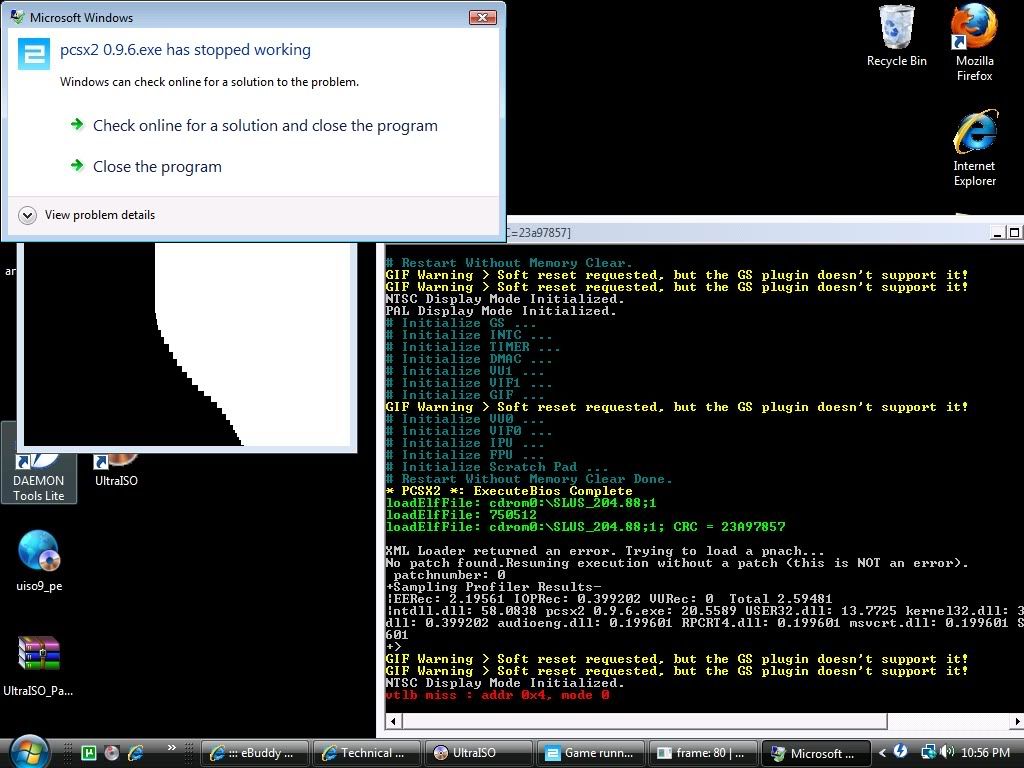
thats what it looks like and this is the crash reportProblem signature:
Problem Event Name: APPCRASH
Application Name: pcsx2 0.9.6.exe
Application Version: 0.0.0.0
Application Timestamp: 49a77286
Fault Module Name: pcsx2 0.9.6.exe
Fault Module Version: 0.0.0.0
Fault Module Timestamp: 49a77286
Exception Code: 80000003
Exception Offset: 0000f1e2
OS Version: 6.0.6001.2.1.0.256.1
Locale ID: 1033
Additional Information 1: fd00
Additional Information 2: ea6f5fe8924aaa756324d57f87834160
Additional Information 3: fd00
Additional Information 4: ea6f5fe8924aaa756324d57f87834160
Post Merge: [time]1265025884[/time]
but i can run any other game fine? well with alittle gltiching and stuff but thats barrible, games are ff10,Atelier Iris Eternal Mana and shin magami tensi- persona 3 fs (fs means its like a special edison) but like they run?
meganova
#7
Go to my computer, right click properties and you should be able to see your computer specs there,
tell me your Graphic card, and processor and ram.Looks like your graphic card not able to support the emulator..
mds64
#8
What game is this exactly?(Now I'm on track XD)Looks like one of the plugin's set were showing some error...GS loader...mega what does that do again...been ages since I used this.
kourrie14OP
#9
processor: intel pentium dual CPU 2.40GHz
ram: 2.00GB (shoud be 4 but my comps like....blahhhh)
windows 64 bit
gfx card is NVIDIA geforce 8600 GThmmm i can still run the emu pritty ok?the game is star ocean 3: till the end of time, i got the game...*cough* and unziped it and had 4 files, like 2 disks and each disk had 1 mdf and 1 md, just saying as well all i did was turn the mdf in to an iso
mds64
#10
Changing the file from it's original format to another can affect it.Sometimes it's sound, and in a few rare cases crash emulators...prehaps it's struggling to run it for some reason.And your pc is far better than my laptop, so it's not struggling...Have you checked the compatibility list before hand?http://pcsx2.net/compat.php?c=key
Post Merge: [time]1265028496[/time]
I just checked, if it's the america version it should work...I can only assume it's something to do with the settings or the format of the game that's the problem.
kourrie14OP
#11
uhhh no i havnt checked the list, but its not working as a mdf or an iso?
Post Merge: [time]1265028773[/time]
its the america version and idk why its reading 2 ram instead of 4? get me friend to fix it lol
mds64
#12
Your pc is fine-even with 2 ram instead of 4...my laptop has only 1 and it runs ps2 games (a tad slow...but graphically perfect as far as ps2 emulation goes)
Right now, are you running the iso you made or the mds/mds files?I'd advise the latter, the original format is always reccomended.
kourrie14OP
#13
well i still get the error no matter what one i run, even the 2nd disk?
Post Merge: [time]1265029587[/time]
but this is my first encounter with mdf and mds so???
mds64
#14
mds and mdf are just an another type of iso, the is also img, ccd and cue files for some types...Where did you get the iso from may I ask, currently I can't think of anything except for messing with plugin settings and changing plugins themselves.
meganova
#15
GS is a graphic plugins for PCSX2(if I'm not mistaken)and his disk was okay, the problem was the emulator settings.Looks like your PC can fairly run the emulator.
Here's what I suggest you to do.*ahem*Star Ocean 3 can only be run on 0.9.6 if you have an extremely good PC.
You need to use the Beta version for that, since the beta version is good to emulate
any PS2 games that have 3D geometry in it. For example Front Mission 4/5.First, what you need to do is...
- Download the Beta version of PCSX2, r1888
- and the latest plugins for it.
- after you have downloaded it...
- Go to Config --> Configure, set plugins and bios directory.
- and then set only the following..
- Sound ( SPU2-X 1.2.0 )
- First Controller (any, I'm using r1853)
- Cdvdrom( cdvdGigaherz r2361)
- and the rest should be default, don't forget to set your Bios
- leave your graphics alone for now..- after that, go to Config --> CPU, and then check your CPU features(first box on the upper left)
- you should be able to see what feature your cpu has offer, for example, MMX, SSE,SSE2,SSE3
- remember all the features..
- then, go back to Config --> Configure,
- set your graphic plugins based on those feature, the higher it is, the better.
e.g, my CPU support MMX, SSE,SSE2,SSE3.
So I use GSdx 2404(MSVC 15.00, SSE2) 0.1.15
you can't choose other plugins that your CPU doesn't support, the emulator will crash.
Even if the Test says successful.- After that, go to Config -> GameFixes.
- tick the VU Add Hack - Special fix for Tri-Ace games!, click OK.
- this will enable you to skip/go through the intro movie
- then go to Config -> Speed Hacks, and then enable the followings..
- EE sync Hacks (default cycle rate)
- EE Misc Hacks ( INTC Sync Hack)
- VU Hacks (Status Flag Hack)
- and be noted with the VU Cycle Stealing, you can increase the speeds of the game IF you have a slowdown(below 40 FPS)- Finally, configure all settings (Memcard, etc..etc)
- and then try to run it.

kourrie14OP
#16
uhhh.....i got it from some random torrent....lol (sorry about the illigileness...i aint gonna sell it, so its all good)and ehhhhh.....lol thats alot of info
meganova
#17
@kourrie : Just follow all the instruction from the start until the end, step by step... I'm sure it will worth it.
I'd like to give you short,simple explanation but I'm afraid you will confused.@mds : I'm sure you can find it at 'you know where' :3
and the second disk for the game was hosted on our site.. the first wasn't... If I'm not mistaken...
kourrie14OP
#18
yah i dont mind the long one its just gonna take alittle bit of time and i have no idea man...i just found a random torrent lol
Showing posts 1–18 of 18 · This discussion is archivedBack to top