
[color=orange]
INFORMATION ON INSTALLING CFW/OTHER EXPLOITS
Spoiler
5.03 GEN-C has been released, currently supporting nearly all UMDs/ISOs, and demos until 12/15/09, and possibly any currently supports a few new games that require 6.20. GEN-C does not have Sedna support. GEN-C has an automatic sedna-like patch that does not let you shut down your PSP, unless you use the vsh menu via select on the XMB. It allows sleep mode only. I would not shut down your PSP using VSH menu multiple unless you want to risk the ultimate destruction of the PSP. This is only for PHA PSPs less than or equal to 5.03 OFW.5.50 GEN-D3 can be installed in multiple different ways (through XGEN Pandora, direct update, etc.). It also supports many game up to 12/15/09 and possibly some new games that require 6.20 firmware. I recommend to install it from 5.00M33v6, to prevent bricking. Note that this has an even higher chance of bricking your PSP than GEN/HEN firmware. This is only for CHA PSPs less than or equal to 5.03 firmware, but if you have a higher firmware, you can downgrade.You can downgrade DIRECTLY to M33 or 5.00 firmware with the use of a magic memory stick. This is only for people with CHA PSPs above 5.03 firmware. This is probably one of the riskiest moves you will ever take, since this requires the PSP to be in service mode (aka Pandora battery).There are several new CFWs and HENs out, they are listed at the bottom just in case you want to try them if you're PSP is not compatible with 5.50 GEN-D3 or 5.03 GEN-C.
WARNING: DO NOT DOWNGRADE OR INSTALL NORMAL CFW IF YOU HAVE A PHA PSP. IF YOU DO IT WILL BRICK YOUR PSP OR DAMAGE IT BEYOND REPAIR. IM SORRY IF YOU HAVE ALREADY ATTEMPTED AND BRICKED YOUR PSP.Prometheus CFW automatically patches games to work, but removes compatibility with some older games (ETA before January 2010). It works better with newer games and UMDs. There are versions ONLY for 5.50 GEN-D3 and 5.03 GEN-C, each different.You can use a Patapon 2 demo exploit to run homebrew on any PSP. Homebrew only for now, no questions.[color=red]Vocabulary:
Spoiler
PSP - PlayStation Portable
Phat - The first generation of the PSP (100x, X is the region id); Chunky and matte paint, with umd drive with latch (All CHA)
Slim - The second Generation of the PSP(200x); Home Button says home and is a semicircle, a lot lighter (One edition PHA)
Brite - The third generation of the PSP(300x); Home button is the Playstation insignia and is round, brighter paint, slightly lighter (All PHA)
Go - The fourth generation of the PSP(N100x); Slide Open, much smaller, no UMD, many other features (UHA)
firmware - Sort of like the internal OS on which a system runs
OFW - Official FirmWare
CFW - Custom (unofficial) FirmWare
Downgrade - Installing Firmware lower than the current firmware, impossible without a service mode battery and MMS
Signed - homebrew able to run w/out any form of CFW
vsh - A menu in which you press Select to choose features; integrated into the XMB
CHA - Completely HackAble (All PSP 1000s, non-TA-088v3 PSP 2000s) (CFW capable)
PHA - Partially HackAble (TA-088v3 PSP 2000s and PSP 3000s) works with HEN (+ CFWE, GEN-C, etc.)
UHA - UnHackAble (PSPGo, PHA PSPs above 5.50 OFW) If you have one of these, go to the eLoader section at the bottom.
eLoader - EBOOT loader (homebrew loader)
homebrew- a game developed to run on unofficial firmware
XMB - XrossMediaBar; the main menu of the PSP
HEN - Homebrew ENabler; Used to run homebrew on a kernel exploit level
CFWE - Custom FirmWare Enabler; Installed after HEN, improves compatibility
LCFW - Light CFW, a fully functional HEN with ISO loading compatibility
MMS - magic Memory Stick; Memory Stick Duo with the power to downgrade PSPs
Pandora Battery - AKA Service Mode Battery; allows alteration of the flash of CHA PSPs
exploit - a fault used in firmware, hardware, or software that allows unsigned content to run
user mode - type of exploit that supports homebrew, but not alteration of flash (installing CFW/HEN)
kernel mode - type of exploit that allows large homebrew to be run and alteration of the flash
flash - referring to flash memory, such as the flash0 that holds the firmware in the PSP
decrypt - usually referring to decrypting ISOs to be playable on the PSP
Phat - The first generation of the PSP (100x, X is the region id); Chunky and matte paint, with umd drive with latch (All CHA)
Slim - The second Generation of the PSP(200x); Home Button says home and is a semicircle, a lot lighter (One edition PHA)
Brite - The third generation of the PSP(300x); Home button is the Playstation insignia and is round, brighter paint, slightly lighter (All PHA)
Go - The fourth generation of the PSP(N100x); Slide Open, much smaller, no UMD, many other features (UHA)
firmware - Sort of like the internal OS on which a system runs
OFW - Official FirmWare
CFW - Custom (unofficial) FirmWare
Downgrade - Installing Firmware lower than the current firmware, impossible without a service mode battery and MMS
Signed - homebrew able to run w/out any form of CFW
vsh - A menu in which you press Select to choose features; integrated into the XMB
CHA - Completely HackAble (All PSP 1000s, non-TA-088v3 PSP 2000s) (CFW capable)
PHA - Partially HackAble (TA-088v3 PSP 2000s and PSP 3000s) works with HEN (+ CFWE, GEN-C, etc.)
UHA - UnHackAble (PSPGo, PHA PSPs above 5.50 OFW) If you have one of these, go to the eLoader section at the bottom.
eLoader - EBOOT loader (homebrew loader)
homebrew- a game developed to run on unofficial firmware
XMB - XrossMediaBar; the main menu of the PSP
HEN - Homebrew ENabler; Used to run homebrew on a kernel exploit level
CFWE - Custom FirmWare Enabler; Installed after HEN, improves compatibility
LCFW - Light CFW, a fully functional HEN with ISO loading compatibility
MMS - magic Memory Stick; Memory Stick Duo with the power to downgrade PSPs
Pandora Battery - AKA Service Mode Battery; allows alteration of the flash of CHA PSPs
exploit - a fault used in firmware, hardware, or software that allows unsigned content to run
user mode - type of exploit that supports homebrew, but not alteration of flash (installing CFW/HEN)
kernel mode - type of exploit that allows large homebrew to be run and alteration of the flash
flash - referring to flash memory, such as the flash0 that holds the firmware in the PSP
decrypt - usually referring to decrypting ISOs to be playable on the PSP
Spoiler
PSP 300X or PSP-200X TA-088v3 5.03 or less OFW (PHA PSPs -- 5.03 GEN-C) OR
PSP 100X or 200X non-TA-088v3 (CHA PSPs -- 5.50 GEN-D3, downgrade guide for people above 5.03) OR
Any PSP (HEN, LCFW, HBL, etc.)
Memory Stick Duo backed up and freshly formatted
PSP with system settings defaulted
USB-mini cable or MS Duo Card Reader
Patience (up to 45 minutes free time)
PSP 100X or 200X non-TA-088v3 (CHA PSPs -- 5.50 GEN-D3, downgrade guide for people above 5.03) OR
Any PSP (HEN, LCFW, HBL, etc.)
Memory Stick Duo backed up and freshly formatted
PSP with system settings defaulted
USB-mini cable or MS Duo Card Reader
Patience (up to 45 minutes free time)
Spoiler
Skyline969's 5.03 GEN-C Installer (PHA PSPs)
SkyLine969's 5.50 GEN-D3 Installer (CHA PSPs)
HellCat's Recovery Flasher 1.60 w/5.50 GEN-D3 Pack (CHA PSPs)
The GEN-C installer includes MHUSpeed v3, the 5.03 OFW Updater, Ultimate VSH Menu (with recovery), PSPident, CXMB, and 5.03 GEN-C. I did not create the installer, SkyLine969 did, and he did not make the software included in the software. No one but yourself is responsible for your PSP if it is damaged in any way by these softwares. I hope you are considering the risk of messing up your PSP in this guide. The GEN-D3 Installer includes all of that above, minus GEN-C, but with Hellcat's Recovery Flasher, 500.PBP, 550.PBP and GEN-D3.
SkyLine969's 5.50 GEN-D3 Installer (CHA PSPs)
HellCat's Recovery Flasher 1.60 w/5.50 GEN-D3 Pack (CHA PSPs)
The GEN-C installer includes MHUSpeed v3, the 5.03 OFW Updater, Ultimate VSH Menu (with recovery), PSPident, CXMB, and 5.03 GEN-C. I did not create the installer, SkyLine969 did, and he did not make the software included in the software. No one but yourself is responsible for your PSP if it is damaged in any way by these softwares. I hope you are considering the risk of messing up your PSP in this guide. The GEN-D3 Installer includes all of that above, minus GEN-C, but with Hellcat's Recovery Flasher, 500.PBP, 550.PBP and GEN-D3.
Spoiler
Before install, make sure to go to system settings, and click restore to default. Go through the prompts. Now, when you are finished, go to system settings, and turn UMD Cache and UMD Auto start off. Back up all data on your Memory stick and FORMAT IT ON THE PSP (System Info>Format Memory stick). This is required to make it run properly. There is also a risk in bricking your PSP if you choose to repeatedly flash your PSP with CFW multiple times, or any other method that touches the flash memory. This guide requires some technical experience, and is not recommended for those who get confused during this guide. Oh yeah, and it isn't my fault if Sony is on your @$$ after installation. I did not create any of this software, kudos to the creators. I recommend this for homebrew use only, that means I discourage pirating (even though I still do it).IF YOU ARE JUST INTERESTED IN HOMEBREW, TRY SIGNED HOMEBREW OR A HOMEBREW ENABLER INSTEAD OF A FULL CFW.
Spoiler
Standard Installation Instructions for Both Installers
Plug in your MS Duo using the USB Mini Cable that came with your PSP or remove it and place it in a card reader.
Download, and run the version for your specific psp model.
Click Next, then read the legal crap, then click I Agree.
Select the Drive in which the PSP memory stick is, and click Next.
DOWNGRADE USERS, SKIP TO DOWNGRADE SECTION
When it is done, click finish, turn off USB mode or remove your Memory Stick out of your PC into your PSP.
(If your computer gives you an error that it didn't install properly, ignore it.
(*If you already have 5.03 OFW installed, skip this step, and delete the update off your PSP.)
*Go to game, memory stick, then select the 5.03 update. Let it run.
*Delete the update off your PSP. This is mandatory for those using 5.50GEN-D3Go your Picture section>Memory, and let the thumbnails load. Then go into the mhuspeed3 folder, make sure to press no other button afterwards, and your PSP should reboot into MHUSpeed. If it doesn't work, and just freezes and shuts down, reboot and try again. Check the firmware in system settings, and it should say 5.03 MHUSpeed v3 or something similar, if not, keep trying. MHUSpeed either works, or it doesn't, and has little to no chance of a brick. Remember, it's a hit or miss.If you want to make sure you have the right PSP, use PSPident in MHUSpeed by going into the games section of your PSP. If you have a PSP motherboard that is listed in red, continue to read my guide. If your PSP's mother board is listed in green, read the rest of my guide OR hYpNoS's guide on installing 5.00M33v6. The newest PSP300X and the PSPGo are unknown to PSPident I think.
Plug in your MS Duo using the USB Mini Cable that came with your PSP or remove it and place it in a card reader.
Download, and run the version for your specific psp model.
Click Next, then read the legal crap, then click I Agree.
Select the Drive in which the PSP memory stick is, and click Next.
DOWNGRADE USERS, SKIP TO DOWNGRADE SECTION
When it is done, click finish, turn off USB mode or remove your Memory Stick out of your PC into your PSP.
(If your computer gives you an error that it didn't install properly, ignore it.
(*If you already have 5.03 OFW installed, skip this step, and delete the update off your PSP.)
*Go to game, memory stick, then select the 5.03 update. Let it run.
*Delete the update off your PSP. This is mandatory for those using 5.50GEN-D3Go your Picture section>Memory, and let the thumbnails load. Then go into the mhuspeed3 folder, make sure to press no other button afterwards, and your PSP should reboot into MHUSpeed. If it doesn't work, and just freezes and shuts down, reboot and try again. Check the firmware in system settings, and it should say 5.03 MHUSpeed v3 or something similar, if not, keep trying. MHUSpeed either works, or it doesn't, and has little to no chance of a brick. Remember, it's a hit or miss.If you want to make sure you have the right PSP, use PSPident in MHUSpeed by going into the games section of your PSP. If you have a PSP motherboard that is listed in red, continue to read my guide. If your PSP's mother board is listed in green, read the rest of my guide OR hYpNoS's guide on installing 5.00M33v6. The newest PSP300X and the PSPGo are unknown to PSPident I think.
Spoiler
Then go to the Game>Mem stick section, and select INSTALLER-LOADER, then press L/R when directed to. ONLY PRESS IT ONCE. Press O to exit. Do not turn off your PSP at any time in this menu, you will probably brick.After this, DO NOT TURN OFF YOUR PSP through the vsh menu (select), or else you will have to reflash the PSP again.Now you're finally done! Add some homebrew on your PSP and have fun! Adding a game.txt in the seplugins folder can help playing incompatible games.
Spoiler
Now this is a bit harder than installing GEN-C.
Now, there is a new version of HellCat's Recovery Flasher that allows straight installation of 5.50 GEN-D3. Delete the 550GEND3 folder from PSP/GAME, and 500.PBP from the root of the memory stick. Download ONLY the firmware pack from pspslimhacks and put the corresponding .rfp file in the root of your memory stick. Make sure 550.PBP is in your root also.Go into Games, and run HellCat's recovery flasher. Agree to it and you should get a menu like below. (Sorry hYpNoS for ripping your picture)
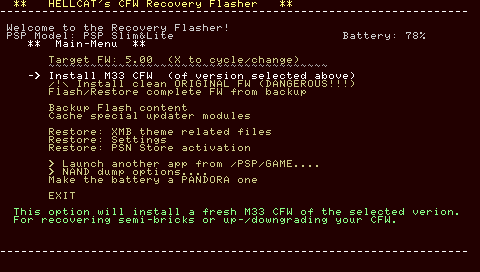
Lauch HellCat's Recovery Flasher from the XMB. On the first option, where you can cycle the firmware to be installed, press "X" until it reads "load from external FW pack", then from the now shown list, choose the Firmware Pack that you want to install. Then, select install CFW. Now, don't turn it off until it's finished, and when it is finished, TURN IT OFF BY PRESSING X, do not EVER EVER touch the power switch or the battery EVER during all this. After this is done, you have 5.50 GEN-D3 CFW.
PSP Grader v008
Pandora Battery
Formatted and backed up Memory Stick w/ 40MB+ free
Completely hackable PSP
[color=orange]
Create or buy your Pandora battery. The battery has to be below 2000MaH and Sony brand, or TOOL brand if you bought it. Test it before you use it, you have to put it in your PSP with no Memory Stick in. It should boot up with no display automatically. If not, you bought a fake Pandora or messed up making it. Also, create or buy your magic memory stick. I'd take EXTREME caution doing this.
[SIZE=9px][/spoiler]How to create a Pandora Battery:
(skip if you want to buy it or already have one)EASY METHOD
Spoiler
Requires another PSP with CFW that says "Creates pandora" in the hackable PSP list up above. .
Insert the normal battery in the CFW PSP. Press select, and press Make Pandora. Now test your battery. When you are finished, you can always make it normal again, through the vsh menu.
Insert the normal battery in the CFW PSP. Press select, and press Make Pandora. Now test your battery. When you are finished, you can always make it normal again, through the vsh menu.
Spoiler
Requires a knife, a pencil (for PSP-S110 1200mAh(slim type) batteries), knowledge of the risk of blowing your hand off, or the battery never working again if you damage the cell or short the pins. I also recommend a magnifying glass, and a solder sucker and solder gun.
Slim Battery (non-S110):

^Pry or cut open the battery, fold out the circuit, and CAREFULLY pry the pin up or off, or you can desolder it if you wish. I'd be careful not to touch the other pins. You MIGHT be able to resolder/push it back on if you are careful.
Slim battery (S110):
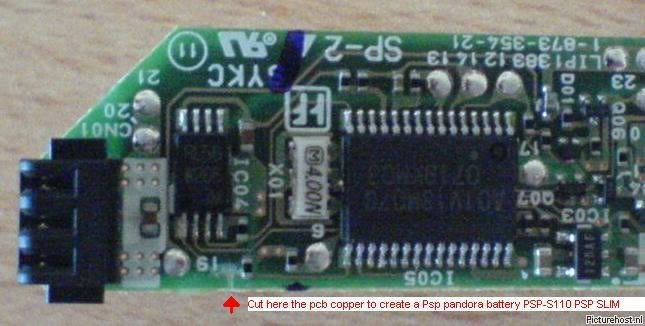
^Pry/cut the battery open, fold out the circuitboard, and cut where it says to cut using an exacto knife. You can always use a circuit pen or graphite pencil to unhack it by relinking the two circuits.
Phat Batteries:
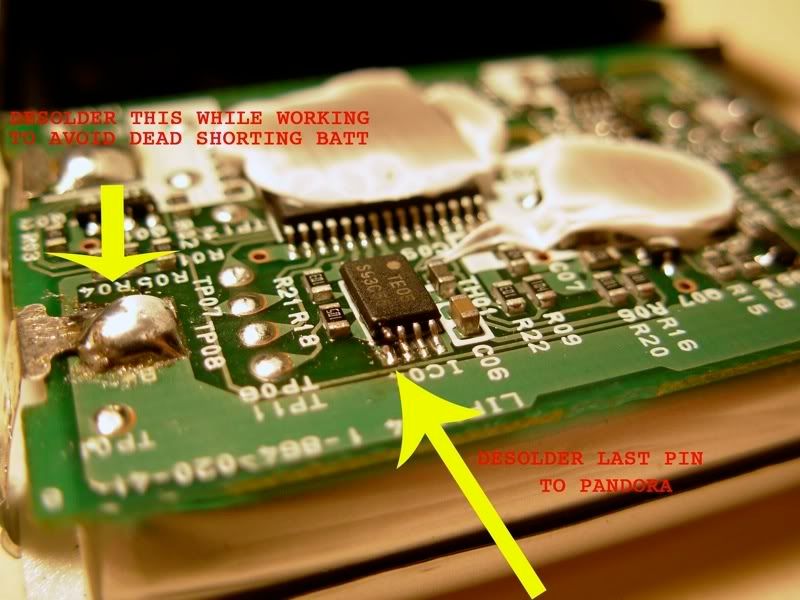
^This is one of the versions of a phat battery, don't do anything until you confirm the version. Pry/cut it open, and find the ICO4 or CO4 label. Pry up the pin where is says 4, or wherever it is in the picture (the picture is the battery rotated clockwise 90 degrees-ish). You can also soldersuck the place where it tells you to to prevent shorting out the battery. Resolder it when you'e done, and when you are done with the battery you MAY be able to resolder/push it back on.

^This is the second version of the phat battery. I'd be careful prying this one open. Just remove the pin farthest upto the right when facing the top of the battery. Again, you can resolder/pry it back on.
Slim Battery (non-S110):
^Pry or cut open the battery, fold out the circuit, and CAREFULLY pry the pin up or off, or you can desolder it if you wish. I'd be careful not to touch the other pins. You MIGHT be able to resolder/push it back on if you are careful.
Slim battery (S110):
^Pry/cut the battery open, fold out the circuitboard, and cut where it says to cut using an exacto knife. You can always use a circuit pen or graphite pencil to unhack it by relinking the two circuits.
Phat Batteries:
^This is one of the versions of a phat battery, don't do anything until you confirm the version. Pry/cut it open, and find the ICO4 or CO4 label. Pry up the pin where is says 4, or wherever it is in the picture (the picture is the battery rotated clockwise 90 degrees-ish). You can also soldersuck the place where it tells you to to prevent shorting out the battery. Resolder it when you'e done, and when you are done with the battery you MAY be able to resolder/push it back on.
^This is the second version of the phat battery. I'd be careful prying this one open. Just remove the pin farthest upto the right when facing the top of the battery. Again, you can resolder/pry it back on.
(Skip if you already have one or want to buy one)
Spoiler
Follow standard installation instructions until it says for you to stop.
Download and RUN PSP Grader, Download and Load 5.00 Official EBOOT.
Set the Target memory stick and click Create Pandora Stick.
Unlpug the PSP from the computer or remove the Memory Stick from a card reader and<* put the MMS in the PSP.[/SIZE]
Download and RUN PSP Grader, Download and Load 5.00 Official EBOOT.
Set the Target memory stick and click Create Pandora Stick.
Unlpug the PSP from the computer or remove the Memory Stick from a card reader and<* put the MMS in the PSP.[/SIZE]
Spoiler
Remove the standard PSP battery and plug in an AC adapter. Don't put in the Pandora just yet. Make sure you can tell which one is a Pandora battery. Make sure the PSP is off. Get ready to insert the Pandora battery. Hold L while inserting the Pandora battery, and shut the battery cover, or firmly hold it in if it doesn't fit. A screen should pop up with a lot of choices, select something that says Install 5.00 M33 firmware or something similar. DON'T TURN OFF THE PSP, REMOVE THE BATTERY, UNPLUG THE AC, etc. When it is done, press X or it may automatically turn off. You now have 5.00M33v4 CFW. Reboot. Format your Memory stick again, and replace the Pandora Battery with the Standard Battery, or UnPandora it. Follow the standard instructions, then follow the 5.50 GEN-D3 Instructions.
Post-Installation for CFW:
Spoiler
Put all your savedata and other files back on your PSP.
Put a GAME150 folder in the ms0:/PSP folder.
Grab some homebrew and put it in the GAME150 or GAME folder.
Press Select and set the GAME CPU Clock to 333/166 by press left and right, UMD ISO mode is on M33 Driver, and XMB Clock is the same.
Create a ISO folder in the root of the memory stick. Put .ISO/.CSO gmes in there (safest place is www.pspisoz.com). Inside the ms0:/ISO folder, put a folder called VIDEO, where you can put ripped videos from disks in there.
Put a GAME150 folder in the ms0:/PSP folder.
Grab some homebrew and put it in the GAME150 or GAME folder.
Press Select and set the GAME CPU Clock to 333/166 by press left and right, UMD ISO mode is on M33 Driver, and XMB Clock is the same.
Create a ISO folder in the root of the memory stick. Put .ISO/.CSO gmes in there (safest place is www.pspisoz.com). Inside the ms0:/ISO folder, put a folder called VIDEO, where you can put ripped videos from disks in there.
Spoiler
Download 5.XX Prometheus Add-On
Place the correct version for your PSP in the ms0:/PSP/GAME folder
Run it and press X. This adds on compatibility for new ISOs but removes compatibility for some ISOs, although it's not that big of a deal if you just manually patch it.
Place the correct version for your PSP in the ms0:/PSP/GAME folder
Run it and press X. This adds on compatibility for new ISOs but removes compatibility for some ISOs, although it's not that big of a deal if you just manually patch it.
Spoiler
Basic Troubleshooting for nearly any situation:
Restore your PSP to factory settings (aka Format Flash1)
Set theme to original gray Sony theme
Decrypt the ISO you are playing (if you are playing one)
Remove any mods
Turn off all plugins
Reformat memory stick
Install CFW againIf you’re having problems getting the black screen when installing 5.50 GEN-D3, you need to reflash your PSP to 5.00 M33v6. You then should update from 5.00M33v6 to 5.50 GEN-D3. If that still doesn't work, you should update from 5.00M33v6 to 5.50 GEN-B2, then to GEN-D3. If you are STILL having trouble, go back to M33, go to GEN-A, then B, then B2, then C, THEN D, then D2, then D3. Try to make it as short as possble, if you reflash too many times, you can wear out the PSP and kill it.
To reflash the PSP, follow all the instructions again.If you're having trouble with GEN-C, just turn off your PSP and try flashing it again. Turn it off through the vsh menu, or Select>SHUTDOWN.
Restore your PSP to factory settings (aka Format Flash1)
Set theme to original gray Sony theme
Decrypt the ISO you are playing (if you are playing one)
Remove any mods
Turn off all plugins
Reformat memory stick
Install CFW againIf you’re having problems getting the black screen when installing 5.50 GEN-D3, you need to reflash your PSP to 5.00 M33v6. You then should update from 5.00M33v6 to 5.50 GEN-D3. If that still doesn't work, you should update from 5.00M33v6 to 5.50 GEN-B2, then to GEN-D3. If you are STILL having trouble, go back to M33, go to GEN-A, then B, then B2, then C, THEN D, then D2, then D3. Try to make it as short as possble, if you reflash too many times, you can wear out the PSP and kill it.
To reflash the PSP, follow all the instructions again.If you're having trouble with GEN-C, just turn off your PSP and try flashing it again. Turn it off through the vsh menu, or Select>SHUTDOWN.
6.20 TN-D (Can be Perma-Patched to Full CFW but not reccommended)
6.35 Pro-B2 (My personal fave)
6.35 CFW v17 FiX 2/ 6.37 ME-2 (Can dual boot OFW and CFW, must have previous CFW/HEN to install)You can use ISOTool if any CFW doesn't run ISOs for you.
[color=blue]
/color][/spoiler]