Back to Technical Help
newbie here and I am SOO lost please help
M
??? Hello everyone I have purchased :
R4 SDHC Upgrade Revolution MicroSD/TF Multimedia Flash Cart for NDS and NDS Lite (Compact Pack)
Item# 21577
I have no clue what I am doing.. I was under the impression it came with a ??chip??to download onto it then insert it into the case that inserts into the DS. I am praying that I can get this together in time for Christmas.
As of now I am LOST!!..lol
Thanks in advance for any help you can give..Mary
S
What you'll need is a Micro SD card. This card fits straight into the cart and is what is used to put your firmware, games etc.You can buy these Micro SD cards from any store that sells technology items. They're quite cheap, so you won't have any problems there.
M
Thank you!!!! I will do that tomorrow, is there something I should do as for as downloads? or should I just dump the games that he wants onto the Micro SD card?
S
Replying to #3
You'll need to download the firmware that R4 SDHC uses. Download this:
"R4 SDHC (ndslr4.com, r4sdhc.com)" You will find this on this page: http://www.linfoxdomain.com/nintendo/ds/
All you need to do is download the English version. Once you buy the Micro SD card, just put all the contents from your download onto your Micro SD card.
Once the contents are in your Micro SD card, you're ready to put .nds roms in it to play.
I hope I helped. :)
You don't need to dump your NDS games, as you can easily download all NDS Roms from here:
https://www.romulation.org/NDS/
All you need to do is extract the download and chuck the .nds rom straight into your Micro SD card. It doesn't matter where they're located.
your just helped make a little boys Christmas!!! Thank you :)
S
Replying to #5
I'm very happy to hear that. :)
Merry Christmas!
I
marynjason · #3Thank you!!!! I will do that tomorrow, is there something I should do as for as downloads? or should I just dump the games that he wants onto the Micro SD card?
If you purchased this from memorybits in the Channel Islands (http://www.r4i.co.uk/ or whatever this site comes up in the country you are from) I recommend only downloading from their site as I have yet to find any firmware elsewhere that works. I have a feeling that their R4 SDHC cards may actually be r4i cards that aren't compatible with version 1.4 of DSi but I'm not entirely sure.
you will need winrar or winzip to unzip the compressed files though mary,filehippo host it as a demo if you need to download it.good luck
M
Thank you everyone for your help.. LOL I just found out that I have to buy a micro card... hmm talk about newbie!..lol after I get that I am sure I will need help with all of this. thanks again!!!!
M
ok so I just got my mico sdhc card and this is what I have done so far... somehow I'm missing a step!!
:-\
I formatted the card to FAT 32 according to the tutorial on here and I downloaded the zip file (http://www.rarlab.com/rar/wrar391b1.exe) and I extracted it using winzip
I dumped the 4 files on the sd card and then I downloaded the game Indiana Jones Legos 2..
I extracted that and I dumped the file on the card.. ???? yes it is .NDS extensionI inserted it in the DS and hoping it would work I got a blank screen that has a box that looks like the r4 card and inside it it reads "menu with a ?"What am I doing wrong??
T
It cannot find your Firmware files. It refers to them as "Menu Files" so that is what the ? Menu icon means.You may not have the correct firmware files for your flashcart. Go to www.linfoxdomain.com/ds and download the correct ones for your R4 version.
J
The website for your firmware version will be on the box... it came in!
M
I went to the website I purchased the "r4-sdhc" card from and I downloaded and followed the directions to a T! BUT...lol Im getting a loading screen and its stuck :(this is the download page: http://www.r4i-sdhc.com/downloade.asp
(mine is the one without the i)
heres the faqs page: http://www.r4i-sdhc.com/rde.aspI hope someone can figure this out for me!! I am so lost, lol but at least I have something cooking other then a "menu ?" on the screen! I am confident with this forums help I can make this happen!!
S
I'll make this easy for you. I'll download the firmware for your flashcart and arrange it so all you need to do is put the files straight into your SD card. You'll just need to wait a few minutes. Don't worry, we'll get your flashcart ready to work today. :)
Post Merge: [time]1259455107[/time]
Okay, follow these instructions and you'll be playing DS games on your flashcart in no time! :)
1. Download this: http://www.megaupload.com/?d=HUZDM5TO
2. Extract the rar file with winRAR. To do so, Right-Click it and click "Extract Files...". Follow winRAR's steps by "OK" to extract it.
3. You should now end up with a folder with these contents:
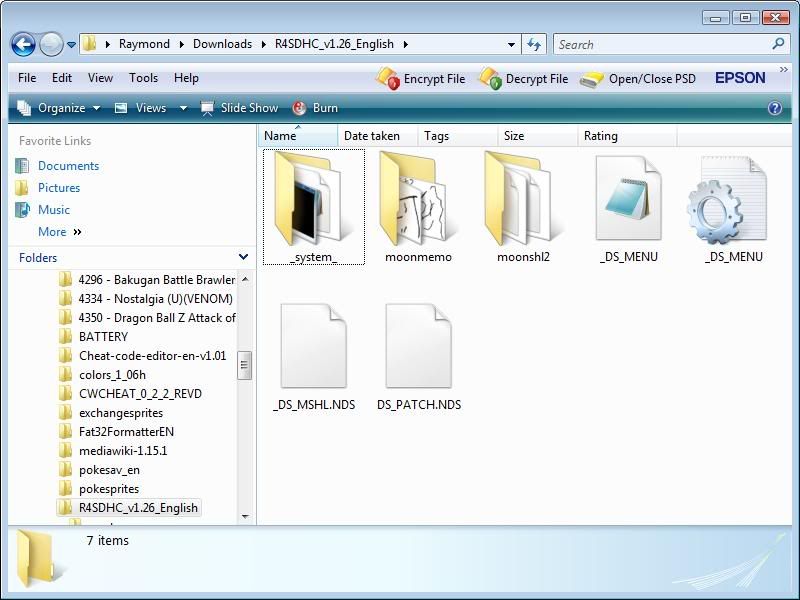
4. From here on, it's very simple. All you have to do is copy those contents and drag it into your Micro SD Card.
5. Make a new folder on your Micro SD Card called "NDS Roms". This will be of course where you put all your .nds roms.
And that's it! :) Post back to tell me how it goes.
marynjason · #13I went to the website I purchased the "r4-sdhc" card from and I downloaded and followed the directions to a T! BUT...lol Im getting a loading screen and its stuck :(this is the download page: http://www.r4i-sdhc.com/downloade.asp
(mine is the one without the i)
heres the faqs page: http://www.r4i-sdhc.com/rde.aspI hope someone can figure this out for me!! I am so lost, lol but at least I have something cooking other then a "menu ?" on the screen! I am confident with this forums help I can make this happen!!
Format your card and try both the left and right kernals
How to format, click left on the letter drive your microsd card is using, and you will see format click on that, and then format it in fat32 then you microsd card will be wiped clean
It should be the kernal on the left as it show both with i and r4 without , R4i English V1.12b
Replying to #15
No need to go through all that :)
I already fixed his problem via PM. He just needed to place his firmware files correctly.
Replying to #16
I see thanks, and hope it working ok for him!...
Showing posts 1–17 of 17 · This discussion is archivedBack to top