Back to Computers & Modding
Need help with my computer!
H
Alright. So I'm getting a new computer and all (exciting stuff, I know :P) and I was just wondering if my system would be efficiently run with my system. I'm getting :
Intel Core 2 Quad Q9450
2 GeForce 8800 GTS's in SLI
P5N-D Motherboard
1 TB Sata Hard drive
A mouse, and a keyboard.I'm thinkin' of getting a 650 Watt PSU. Like an Antec Trio 650 Watt PSU
3 Rails of course
85% efficiency.Any input would be amazing. :D!
L
should be OK, although I'd be going for a 700-800W to allow room for future upgradesFewer, larger 12V rails is better than more smaller ones. This is because its harder to overload a single rail.Stick to known brands such as antec/seasonic/OCZ whatever you get.
G
How much ram are you getting. What frequency is will the ram be. DDR2 or DDR3. I'd recommend getting ram with the same frequency to your processor, cos then the system will run more efficiently.Also what OS are you going to run. XP, Vista, Ubuntu. And will you get 32-bit or 64-bit
L
Replying to #3
Not true, just get the fastest ram your board supports.
sounds fancy but quads and sli are pointless and a waste of money
L
Replying to #5
not really, quads are very useful if you're into video editing like I am (a lot of other intensive applications use them too; plus it allows you to do more at once) and SLI can give you the graphics power of an expensive card by using two much cheaper ones.
there are still very little programs that use quads efficiently or even more then the one core and not every one is like you and needs ridiculous systems
and the money spent on the sli board and the two cards can be spent more wisley on a better card anyway.
but you have to admit that it is a waste of money for fancy sounding stuff if its nnot going to be put to its full potential
L
most boards I've seen have been SLI or crossfire; especially recently. Multiple PCI Express x16 slots gives more flexibility as any PCI-E cards will work in them, whereas a PCI-E x4 card would be bottlenecked in a x1 slot. You don't even have to do SLI, you could have a geforce 9800 driving your monitor and a cheap 8 series card working as a physics processor board.
U
sli only if both are 16x [typically from nvidia boards and are typically expensive].
L
actually they run at x8 when in SLI, and any cards from the 6800 up can be used in SLI (both must be the same though) My board can do quad SLI and has 2 x16 slots and 2 x8 slots.
H
I'm using 4 gig's of DDR2.. the "cheaper" stuff. I'm really into video editing etc, and I ain't paying for it.. Thank god for Dad's :P
And I'm using Windows Vista.. God forbid :(
and at Equitypetey : I already HAD 1 8800 GTS bro. Got it for cheap for some special on newegg one day. I'm just getting another one because there's a deal on atm. ALSO, I WAS gonna get an E8600, the last of the Duo Core's by Intel, but for 50 buck's more.. I can get a quad with a whole new chipset.
equitypetey · #7there are still very little programs that use quads efficiently or even more then the one core and not every one is like you and needs ridiculous systems
and the money spent on the sli board and the two cards can be spent more wisley on a better card anyway.
but you have to admit that it is a waste of money for fancy sounding stuff if its nnot going to be put to its full potential
Replying to #11
Then why didn't you say so?
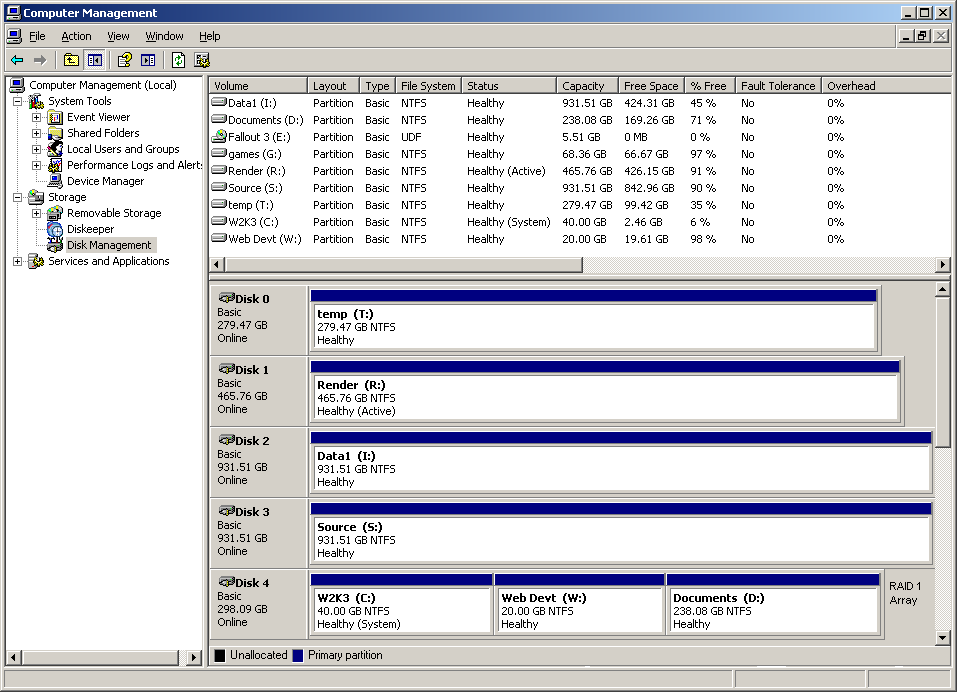
video editing requires a lot of ram (when editing) and a powerful CPU (when rendering, more cores == better if you use decent software like sony vegas, adobe premiere is not multi CPU capable, so less cores more per core speed is better). You need a lot of *fast* storage, I have 4 drives: one with the OS and software installed on, one with pagefile and temporary folders (called a scratch disk) and 2x 1TB drives, one for source video and one for rendered (== output video). All are SATAII.
Keep all your drives defragged, and never render to the same disk that your source files are on. Above all, save often and be patient while rendering, it is a very slow process.
Additionally don't use external storage in your work process; only work from internal disks, and never, ever work with heavily compressed video.
For the benefit of other people wanting a computer for video editing (called an NLE station), avoid motherboards with VIA chipsets; they crash when they encounter sustained high datarates.
Thanks for the input loony. I got the ram for that purpose alone. I have 3 Harddrives, b/c I have a full full tower. 500 gb Each.
L
well technically I have 7 hard disks, but only 6 are visible to the computer and only 4(5) are used when I'm doing video work. My system (OS and programs) drive is actually a mirrored disk array (hardware RAID 1) using two disks, but only appearing as one to the computer, and two others are a general storage/downloads drive and a very fast disk for installing games on.
Loonylion · #4Not true, just get the fastest ram your board supports.
Hmmm. I thought running the RAM at the same speed as the processor would have them run 1 to 1 and run slightly, not massively better. It works with my computer. Both my processor and my RAM are at 800mhz and they run really well together
Replying to #15
it did before computers started using dedicated memory controllers.
If I may make a reccommendation, do NOT go ASUS for your motherboard. I have their M2N4-SLI, which is about to asplode, and they refuse to replace it. I waited on hold for an hour and a half (on a Tuesday) for their RMA department. I would reccommend EVGA, XFX, and preferably, a 680i or above Northbridge.
L
NOT evga, they suck ass. Asus are one of the most reliable I've ever had, Gigabyte are also good, and one of my friends swears by MSI. Don't get DFI as their boards are temperamental.
E
i like msi boards
L
Replying to #19
There's a second recommendation then. I've only ever used Gigabyte/Asus/DFI/Tyan.
Showing posts 1–20 of 24 · This discussion is archivedBack to top
