Back to Technical Help
my usb
J
In device manager, did all of your usb ports look OK or did any of them have a yellow triangle with a exclamation mark within?Furthermore, did the list change at all when you plugged it in or took it out?
H
nope and there were no triangles
J
Huh, it is weird that it works in other computers and not your own that it used to work in. Computers are like women you can't live with them and you can't live without them.
H
o.o can u research it and find out for me :P
L
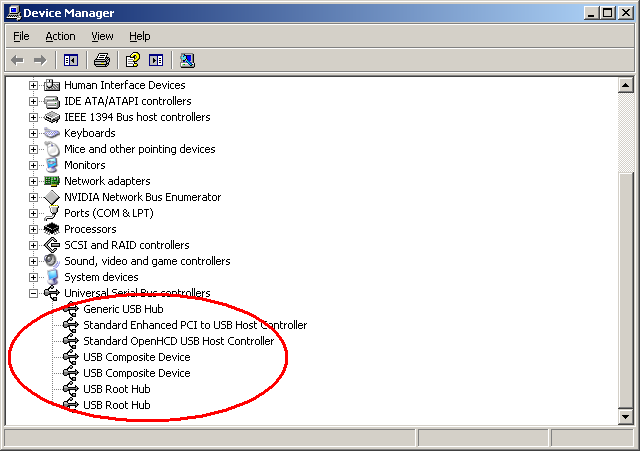
delete everything in the ringed section and reboot.
you mean uninstall?
L
yes, click on each and press delete.
H
if i reboot will it reinstall?
L
yes
H
i did it and it turned out they were my keyboard and mouse :P still wonts work D:
B
...It turned out WHAT were your keyboard and mouse? Is your flash drive formatted correctly?P.S. This belongs in Computers/modding.
L
hlw_rocer · #30i did it and it turned out they were my keyboard and mouse :P still wonts work D:
they werent your keyboard and mouse, they were the devices your keyboard and mouse are plugged into.
but the usb still doesnt work :P
L
then either the ports are physcally dead, or your reader is dead, or the microsd is.
H
prob the reader i can see it but it wont open :/ and u cant see it in my computer
Showing posts 21–35 of 35 · This discussion is archivedBack to top