Back to Technical Help
my display driver....
T
hello all, i have noticed that on here i laag a lot, and am wondering if i should change my drivers....i got 2 choices for drivers, i will post images to give you guys an idea....
my current driver...
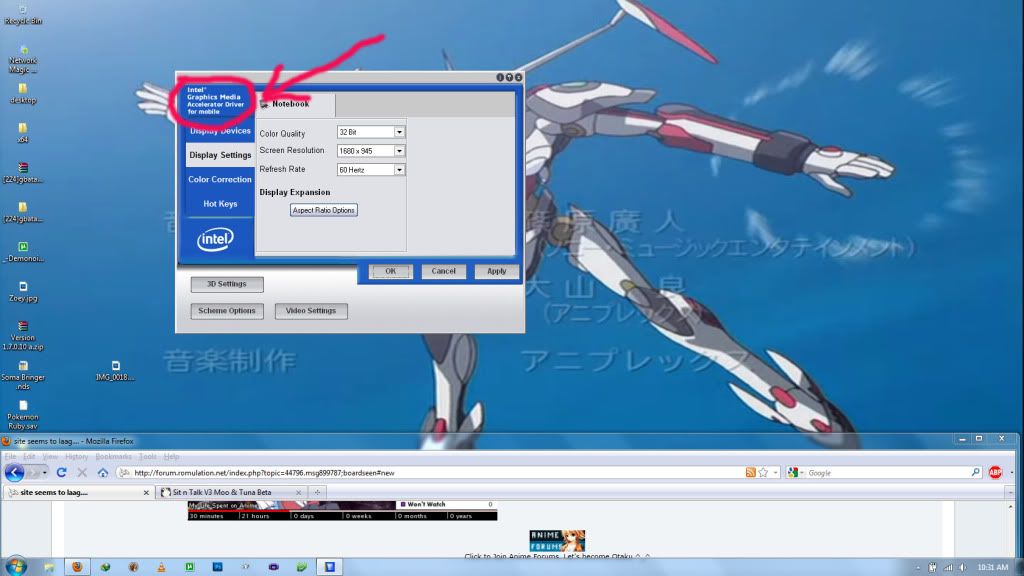
i don't understand why it says intel, cuz my driver is AMD....
the one i wanna get.....

but i dunno if my graphics CARD supports it or not...if it doesn't, what could happen? and should i change? also.......i seem to have video issues....could this fix it?
also posted elsewhere for twice the advice. ;)
a nvidia driver wont work if you have intel integrated graphics.the thing to do is to install dr. hardware 2009, on the hardware tab click 'pci bus' and look through the list until you find vga/video controller or something similar, and click it. the lower half of the program will tell you what it is.
T
screenies.....


i'm guessing since it has that one thing....my drivers are installed wrong..... can someone guide me on how to install them? i got a Toshiba Satellite P505-S8980
and when i install them, i download the driver, then i run it.....shouldn't that install it?!?!
and WOW, those were poor quality....
Edit: deleted wrong idear...
L
Yup its intel, your drivers are right as they are.
J
nvidia driver on intel ...I don't think that would mix well, For that type of driver you need the nvidia card as well
L
he has intel drivers installed, he was asking if he should install the nvidia ones.
T
Loonylion · #5Yup its intel, your drivers are right as they are.
so...if my drivers are right....what could be causing my video problems ever since i re formatted differently? i usually use geeksquad disks, but i have a win7 64bit disk, so i used it (got rid of custom....) and well...i continue to experience graphical problems with just about everything.... since my drivers are correct, i dunno what the cause is...any ideas loony?
Loonylion · #7he has intel drivers installed, he was asking if he should install the nvidia ones.
lol..., Nope it would not work at all, Mabe updates for his onbord intel would work...
At first when i bought a nvivdia geforce, took me awhile figure it out, having to uninstall my intel drivers and disable it, then do some bios settings to stop pc from rebooting was , resume on pme - disable and enable init display first - PCI slot, then install my nvidia drivers, Then that worked!
Tomoka · #8so...if my drivers are right....what could be causing my video problems ever since i re formatted differently? i usually use geeksquad disks, but i have a win7 64bit disk, so i used it (got rid of custom....) and well...i continue to experience graphical problems with just about everything.... since my drivers are correct, i dunno what the cause is...any ideas loony?
well its possible the original drivers were customised by toshiba.
Loonylionwell its possible the original drivers were customized by Toshiba.
well...i've been getting them from their download links for this model, and whenever i use the geeksquad disks, it fucks up my computer by putting windows on multiple partitions....
Tomoka · #8so...if my drivers are right....what could be causing my video problems ever since i re formatted differently? i usually use geeksquad disks, but i have a win7 64bit disk, so i used it (got rid of custom....) and well...i continue to experience graphical problems with just about everything.... since my drivers are correct, i dunno what the cause is...any ideas loony?
A few idears is to uninstall and reinstall all drivers needed, Check for lose cables are unplug and replug cables back in
Replying to #12
ummm...there is no way in hell i'm gonna open this thing up, it'll void both of my warranties....
Replying to #13
Are you using a laptop ? , I thought is was a PC for the moment as i ment cabe from a PC to the screen...
ohh...sorry, it is a laptop.... i guess i shorted you guys of that info. :o but yea, i can barely do anything because the graphics are running so abnormally....videos are terrible, emulation lags, and all sorts or other stuff.......PS. i won't be on for at least 3 hours...
J
Im not sure if this would work or nothttp://downloadcenter.intel.com/Detail_Desc.aspx?agr=Y&DwnldID=18228&lang=engAllhttp://downloadcenter.intel.com/SearchResult.aspx?lang=eng&ProductFamily=Graphics&ProductLine=Laptop+graphics+controllers&ProductProduct=Mobile+Intel%c2%ae+965+Express+Chipset+FamilyYour PC might be amd intel 64 processor but using a intel onbord graphics, Im not realy sure...On the over hand did your pc not come with a recovery ?
T
it came with a recovery, though it screws me over by putting windows on multiple partitions....
J
If its a recovery disc , Put it in dvd drive turn off Laptop and start it up with disc in it, then press any key to continue, you can delete all partitions then do a full format and re-install your windows 7Be sure to back-up all programs and your files first
Showing posts 1–18 of 18 · This discussion is archivedBack to top
