Back to Technical Help
help with downloading
R
hey.
so i don't know if this is in the right section, but my downloads aren't working.i downloaded winrar. and when i download a game (pokemon fire red and leaf green), it brings up a screen that has a bunch of the stuff on top like add, extract to, test, view and all that stuff.i don't really know where to go from here.i never have the option to extract my file.it usually says the file is damaged.can anyone help?
F
Right click on the archive that you downloaded,choose extract.
S
If it says it's damaged (it asks you: wrong password?) then redownload it. If it keeps saying that then use a wired connection instead of wireless.
T
rustysneakershey.
so i don't know if this is in the right section, but my downloads aren't working.i downloaded winrar. and when i download a game (pokemon fire red and leaf green), it brings up a screen that has a bunch of the stuff on top like add, extract to, test, view and all that stuff.i don't really know where to go from here.i never have the option to extract my file.it usually says the file is damaged.can anyone help?
::)
Re-download it or...
read the
Common Issue.. :)
do i need an emulator?
M
Replying to #6
Yep,
just read the common issue^ thread.
You'll know what you need to do.. :)
(don't worry, I'm still here..)
i looked at the common issues and i didn't see what i needed to do.
so i need to download an emulator?
the person i was talking to said that when he downloads game, they come up on his desktop and then he just clicks extract.
but that doesn't happen with me
K
means your file is corrupted....
your download failed....if your download is prefect, the winrar option will be available
try redownload.or download somewhere else...
M
rustysneakers · #8i looked at the common issues and i didn't see what i needed to do.
so i need to download an emulator?
the person i was talking to said that when he downloads game, they come up on his desktop and then he just clicks extract.
but that doesn't happen with me
Here's some short tutorial for you....
1) Download WinRAR or 7-zip(don't need if you already have it.. :) )
2) Download the GBA emulator(VBA are recommended!!)
3) Extract all the VBA file into a folder
4) Download the GBA games you want
5) After finished downloading, put the rar file(e.g Pokemon Fire Red.rar or something like that ) to the same folder with the VBA.
6) Run the emulator.
7) Locate the rar file and play it. :)
Good Luck!!
ugh.
ok. so i download VBA.
and when it opened up in winrar i right clicked and clicked, "extract to the specified folder".
i made a folder called gameboy.
then i downloaded leaf green and also, "extracted to the specified folder" and put it in the folder gambeboy as well.
so then i opened the emulator and then tried to open the leaf green file but it didn't show it there.
M
Replying to #11
You can either directly play from the rar files by selecting the "show All Files" and select the games..
or extract the game file from the rar(e.g pokemon fire leaf.vba) to the folder and select it. :)
by selecting show all files in the gameboy emulator?
cause i dont have that option.p.s. sorry about all this. thanx for helpin me out
M
You right click on the file-extract.Yes you do need an emulator to play them.What is the game's full name-or what system if you know, I could suggest a good emulator.
R
ok.
i downloaded winrar. it is now on my desktop.
i downloaded VBA
i think extracted all the files to one folder that i made called gameboy.
when i download a game (i've tried lots of games but i really want pokemon gameboy games), it brings me to a screen with a bunch of different files and it's at the top. when i right click, the onlly things that say extract are "extract to specific folder" or "extract without specifications".
i've tried opening them up in the emulator but i can't find the files
H
I dont get wat ur saying, i have a working VBA and your making it seem very very complicated, all you do is extract the file, get the game out, then organize ur games in a folder if you want - at least thats wat i do - and i use winzip b4 which works great, recently run out of trial and now am using a full operational winrar which also works wonders - wat did u mean when u "download game and you see everthing " or sumthin like that?????
R
i may just start screen shotting and show everyone what's going on step by step.
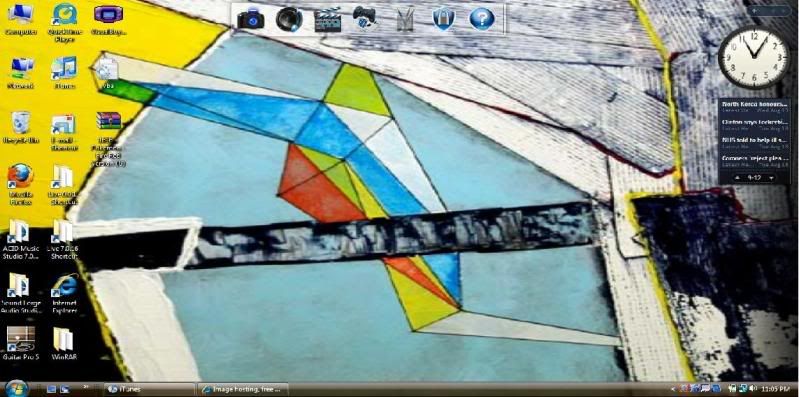
ok. so as you can see. i have a file of pokemon fire red on my desktop and the emulator. as well as winrar down at the bottom.
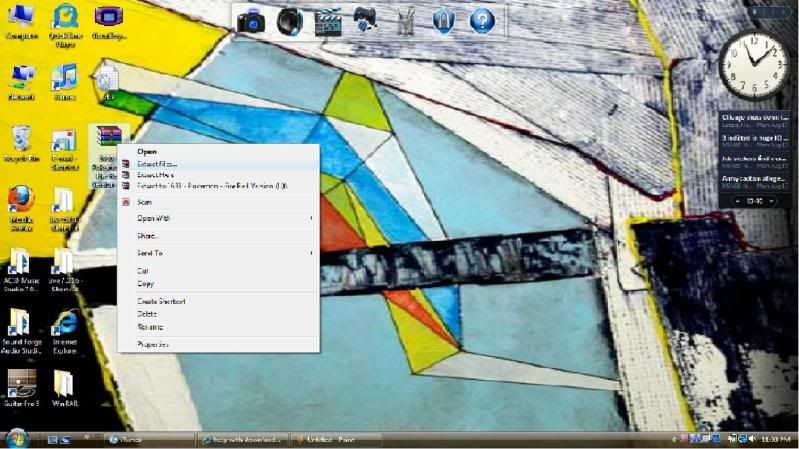
i then right click the fire red file. it then has the options of extract files, extract here, and extract to 1636-pokemon-fire red version (U). i click extract files.
then this window comes up. what do i do from here?
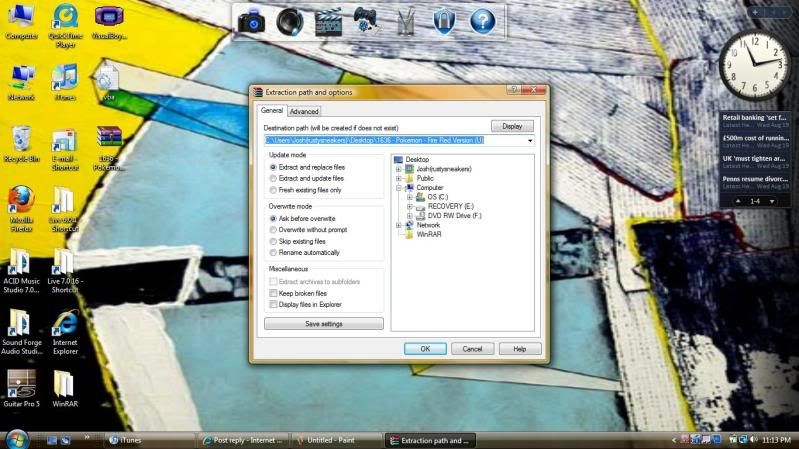
Click on OK.
Launch Visualboy Advance.
Browse to the newly extracted GBA rom.
Open the newly extracted GBA rom.
Enjoy your Pogeymanz.
R
woohooO!!!!!!
i think what i was doing was when i clicked ok, i would delete the file that it put on my desktop.
it worked!!!!!
yayayayayayay!!!!
thank you everyone for all your help !! :)
M
My...my....
That's the problem?You can also drag it. :)
Showing posts 1–20 of 20 · This discussion is archivedBack to top