Back to Computers & Modding
Full (C:) drive.
D
Well my (C:) drive is nearly full however my (D:) drive is literally empty except for about 200MB.
I hate transferring shit between drives, it takes forever & I have to replace all the shortcuts etc. It's very annoying.
So is there a way to transfer available space from my (D:) drive to my (C:) drive? Or even better, get rid of the (D:) drive so there is only one drive?
B
you can unplug your harddisk
D
Unplug?
L
yes there is a method, (assuming both are partitions on the same physical disk) but it involves resizing partitions. You need a program such as acronis disk director, or paragon partition manager/paragon hard disk manager. Defragment both drives before you run the program, then once inside the program you need to shrink the D: partition, move it away from C: (so the unpartitioned space is between C and D), then increase the size of C to use up the unpartitioned space. There is always a slight risk of data loss when carrying out partition operations, defragmenting helps avoid that by consolidating all the data at the beginning of the partition (make sure you take the space off the other end and add it to the end of C that has no data)If C and D are separate physical drives, theres nothing you can do other than moving/deleting stuff off C.
D
So where you say both partitions on same physical disk you mean like both C & D on the same hard-drive?
L
yes, if they are both on the same hard disk then you can do it. This picture should explain:
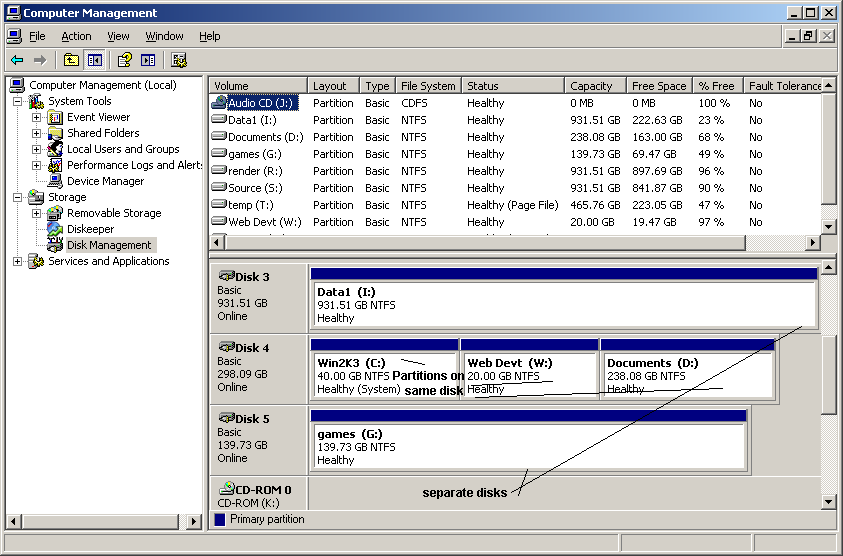
Disk 4 has 3 partitions that could be resized, disks 3 and 5 cannot. I can make C, D or W bigger at the expense of one or both of the other two partitions, but I cannot move space from or to disk 5 or 3.
Aha, awesome.
So I can do it... What do you think is better; Acronis disk director, or Paragon partition manager/paragon hard disk manager?
& if I defragment first I won't lose any data?
L
I dont really have a preference, although one of my friends has said hes had issues caused by paragon after it was uninstalled. Defragmenting first reduces your chance of losing data, it does not eliminate it. There is always some risk when carrying out partition operations.
D
Damn, I guess I just won't worry about it then.
L
ive never suffered data loss from using either of those programs, so the chance is not very big, you just have to know that its still there even if its minute.
D
Hmm, I might wait untill I next format my computer, that way I can backup my stuff and do it straight after :)
L
If you do it when you reformat, you won't need either of those programs. the windows setup program can partition disks. Just back up both partitions off the computer, then when you're reinstalling, delete both C and D in the partition select screen, and create a new partition. Choose the size you want for C in GB, multiply it by 1024, then enter the result into the size box (since it works in MB not GB). Format the new partition as NTFS (quick format unless you've got a lot of time) and install onto it. Leave the rest of the disk as unpartitioned, then create the D partition in windows after its finished installing (using disk management, found by right clicking 'my computer' and selecting 'manage', in disk management, right click on the unpartitioned space to create a partition)
D
Thanks for that Loony, I'll try it :D
D
is it possible to create a partition without reformatting?Like I have 160 GB on C: then i want to create a D: partition, like 100 GB for C: and 60 for D:... or something like that.
B
Replying to #14
GParted. Defragment C:, then boot GParted. Shrink C: to 100 GB, and create a new NTFS partition that fills up the new space.
...I would have just deleted/uninstalled some un-needed programs and moved all my pics and junk (like roms) over.Next to remove may be nero-image burn does fine...if it does dvd movies and basic mp3-music disc then I'm set XD
D
Ive been removing crap I don't need for ages. I've even put all my roms and downloads into an archive.
M
Replying to #17
Try moving the archive-or do what I did...
I got an external drive for all of mine-30GB taken and I see no point repacking still packed roms and isos (it takes ages to extract some I have here-high compression-2.2GB shrunk to 400MG on second sight ps2)
And avoid "impules installs", look around and find out before downloading and installing-otherwise you'd have a laggy pc no matter how much space you got :(
Yeah I have a bit of an addiction with downloading, I actually kind of feel lucky or grateful sometimes 'cause of my slow download speeds, otherwise I would be downloading a LOT more stuff then usual.
Half the stuff I download I only use for a few times or don't use at all.
M
Then achive the program installers, keep the original game downloads in archives (don't pack them again-pointless) and use an external drive...Should see the programs I never use anymore XD
Post Merge: [time]1250587481[/time]
And mine is very slow-before it was a stable 6kbs.Now it's an unstable 16kb that cuts out constantly-but it does go to 80kbs...after midnight, and that still cuts out...dam wireless broad band-can't wait until I starting paying mum's net bill so I can get a better deal!!!
Showing posts 1–20 of 23 · This discussion is archivedBack to top
