Back to Technical Help
ds e-book reader?
C
so i know about the comic book reader but has anyone made an ebook reader for the ds? or at least a pdf viewer? all these visual basic and java books get too freaking heavy to tote around and i am doing all my work on my only computer so it would be too annoying to have the pdf running on the desktop in the background
L
DS cannot read PDFs as far as I know. If you want to read them on the DS they need converting to txt.
A
No, it cannot handle reading pdfs properly. Convert them to txt and read using Moonshell etc.
C
eh i will have to figure something else out these books arent really that text only friendly
R
The DS definetly cannot read PDF files but you can convert them to text and use the DS Libris program, it allows you to turn the DS on its side like a book and read text files, that is what I do.
K
Replying to #5
What about comic books on pfd? Can they be converted to be able to view them on comicboook ds?
Yes. CBDS comes with a converter.
K
Replying to #7
That's interesting. I tried converting my comic books with PictoDS from extension .cbr to .cbds and it worked but when I try converting a .pdf to .cbds it gives me an error.
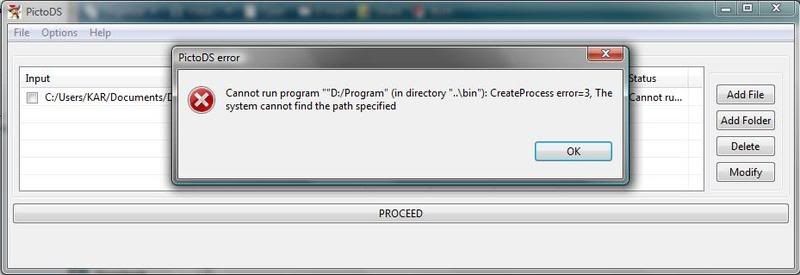
Go to the official site of PictoDS http://cbds.free.fr/Softwares/PictoDS/?language=en
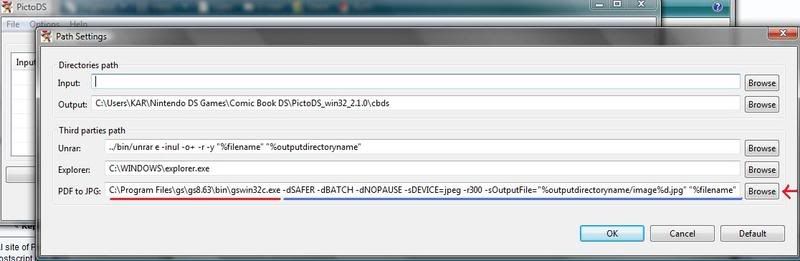
Click on the ghostscript link, and follow the tutorials on this site, you need to install this program, because it makes your pdfs to jpgs and then, picto ds can convert them.If you want to use the the free Ghostscript pdf converter into pictods, here is the kind of command line that you can use : "c:\Program Files\gs\gs8.53\bin\gswin32c.exe" -dSAFER -dBATCH -dNOPAUSE -sDEVICE=jpeg -r300 -sOutputFile="%outputdirectoryname/image%d.jpg" "%filename"
K
Replying to #9
Thanks for that info.
I had trouble trying to copy and paste the command line. The program did not recognize the path so I tried something else.
I browsed manually to get to gswin32.exe (RED) and from there I copy and paste the remaining line (BLUE) and it worked.
The PictoDS website gives you a link to Ghostscript but I don't know what they give you but it's not an executable file so I google the program as gs863w32.exe and many places have it. The file it's about 10 MB
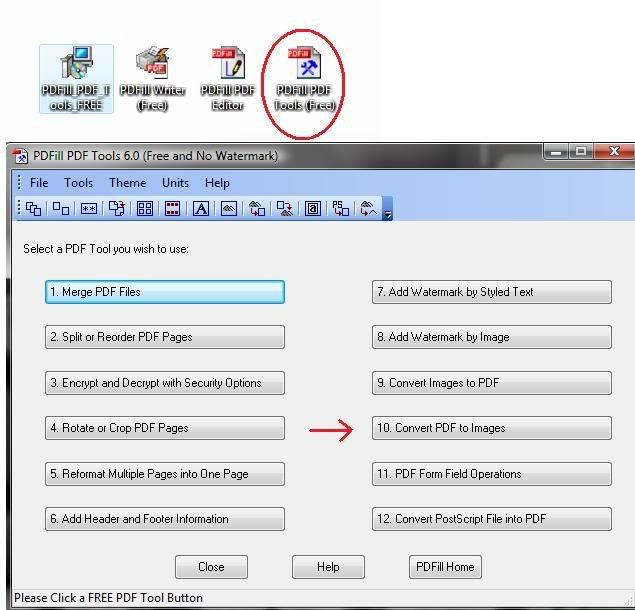
I also tried PDFFill. The program name is PDFill_PDF_Tools_FREE.exe and is about 7.11 MB
For this program I also needed Ghostscript.
When installing PDFFill it will give three icons but I only used one of them since I just wanted to convert PDF to images.
Here is the problem I had here. The program converts the PDF to JPEG images but PictoDS does not recognize JPEG pictures (Not that I know of).
I had to collect all the JPEG pictures and create and .rar file of all the pictures. Now PictoDS recognizes the .rar file and converts the file to .cbds
Showing posts 1–11 of 11 · This discussion is archivedBack to top