Back to Computers & Modding
computer shutdown dureing game
K
i was playing a game(quakelive) and all of a sudden my laptop shut down i turned it on again and started playing again and the same thing happened so i did a virus scan and luckily nothing came up(thankfully) but what is the problem is there something up with the game?
W
Maybe your system is overheating
L
Could well have been overheating.
D
I'd hate to say its over heating from running Quake Live, but I can't think of anything better unless your power supply isn't pulling in enough juice.
K
that dosent make since i was able to play CRYSIS and COD;wow for hours without it overheating and i only played quake for 15 minutes
L
Datanotfound · #4unless your power supply isn't pulling in enough juice.
unlikely if its a laptop.
how would i stop it from over heating without costing money? i have it elivated wit a stack of semi rolled up papers and it seams to help but i still dont see how it can over heat from such a low reg game, iv played mor demanding games than that with no problem
N
Hmm, strange. If you can play CRYSIS and COD without problems, and QuakeLive crashes after 15 minutes, then I doubt it is overheating.Does your windows event log say anything related to this? (Like a driver that has crashed, or a browser crash?)
L
Replying to #8
I discounted a blue screen because it would have rebooted, not powered off.
This happens to me too when im playing an OL game[flyff]. When you exceed the amount of RAM that you have, is it possible that it be a cause for a PC to shutdown?
L
no, it would start swapping and would slow down drastically.
K
i thank it may be because over heating i was playing for hours that day before the first shut down and before that i was burning a disk which used a lont of my cpu power so it was already hot
X
Loonylion · #11no, it would start swapping and would slow down drastically.
what does "swapping" mean?
Basically a computer can store data in two ways, in memory and on the harddisk. Storing things in memory is many, many times faster than on the harddisk, but say you have 512MB RAM and you have processes running that need to store 600MB of data, then it can't fit in memory, so the program stores it on the harddisk instead. This means that every time it has to use that data it has to read from the harddisk instead of the memory, and this is so much slower that a computer will usually come to a crawl and work very, very slowly.So the process of swapping is when it's using the harddisk instead of the memory.
X
ok thanks..I think i get it now.
L
If you turn on 'view hidden files and folders' and turn off 'hide protected operating system files' on your computer, then look inside C:, you will see a massive file called pagefile.sys, which its double the size of the amount of ram you have. This is a pagefile/swapfile, which is basically an area of the hard disk used for what Seph explained; as if it was RAM. (it's often called virtual memory). A good OS would never use the swapfile until you have almost run out of physical ram, but Windows uses it all the time. (this is what people are talking about when they're complaining about Windows memory management). For example:
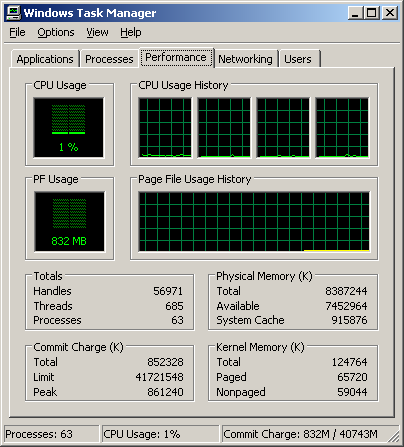
Here we have a screenshot from my computer. As you can see, I have 8GB of RAM, of which 7GB is available, yet the pagefile is still 832MB used, of which 65MB is windows core data (which will have to be retrieved if needed). Since I have 7GB free ram, there is absolutely no need for the pagefile to have anything in it at all.
Now, compare that to an OS which manages its memory properly:
[root@db2 ~]# free
             total       used       free     shared    buffers     cached
Mem:       2062252    1638380     423872          0     179340    1004628
-/+ buffers/cache:     454412    1607840
Swap:      2031608          0    2031608
What this shows is a system with 2GB physical ram, of which 423MB is free. The swapfile(=pagefile) is, however, completely unused.
If you manage to use up all the swapfile as well as all the physical ram, the system will crash.
i think because your computer is full with dust that absorb electricity from your computer.
and when you play game or task that make your computer overheating and with a dust absorb the electricity that computer need when working the task or game so that's make your computer force to shutdown.i already experience this
and now it's happen to me again if my laptop use high performance and balance performance XD
L
dust doesn't absorb electricity...
K
and this laptop is only a few months old
C
Re: computer shutdown during game Maybe a problem with the graphics card?
Showing posts 1–20 of 21 · This discussion is archivedBack to top
