
 The Acekard 2i Card for Nintendo DS, DS Lite, DSi & DSi XL is a popular high-end slot-1 flash cart solution that allows you to launch games, run applications and play media directly from the device. Simply place your files onto either a micro SD or SDHC memory card (sold separately), insert the micro SD into your Acekard 2i, your cart into your DS, and turn the system on. Playing games and media has never been easier!
The Acekard 2i, with its custom AKAIO operating system offers unique features that you won't find on most other carts. Features such as Wi-Fi updates for the cheat database, loaders, and wi-fi plugin. Homebrew soft-reset, Wii connectivity, as well as being one of the few flash carts that allows users to upgrade the core firmware.Table of Contents
Getting StartedGetting StartedAKAIO (Acekard All In One) Download
-AKAIO Download
--Latest Download
--How to Setup AKAIO
-Update Loaders
--Manually
--Through DS(i) (with pictures)
-Backup SAV files online
--Update Wifi Plugin
---Through DS(i)
---Manually
--How To Backup
-Playing Movies (DPG) and Music (MP3)
-How To Use Cheats
-Installing Skins
Fixing Some Issues
-Updating Acekard to Work on DSi Firmware 1.4.4 and 3DS v3.0(with pictures)
-Games Not Booting Because of AP
-Contact Issues
-Games Not Loading
AKAIO is a fan made firmware which has become the best firmware for acekard 2(i), and is also supported by team acekardLatest Download:-AKAIO v1.9.0 - Direct DownloadHow To Setup AKAIO v1.9.0
1.Backup your games and sav files (if you have any) and format your sd cardUpdate Loaders
2.download the file for AKAIO 1.8.9z
3.extract the files. You should have an aio folder and an akmenu4.nds file
4.Copy both files to the root (start) of you sd card
loaders are used to fix games that do not work on AKAIO. There is two ways to update your loaders. CHECK REGULARLY FOR UPDATES ON LOADERSManually
1.Go to http://akaio.net/loaders/Through the DS(i) (with pictures)
2.Download AK2/AK2i Loader
3.extract the file. you should have a file named ak2loader.nds
4.Open the sd card
5.Go to _aio Folder and open it
6.Go to Loaders folder and copy the file here
Loaders can be updated through the DS aswell, but a wifi connection is needed. I recommend updating this way
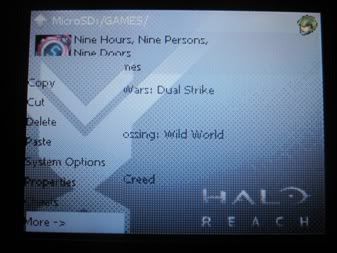
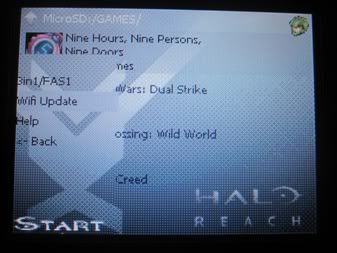
1.Press start to open the options menu and go to "More->"Backup SAV Files Online2.Go to Wifi UpdateSpoiler
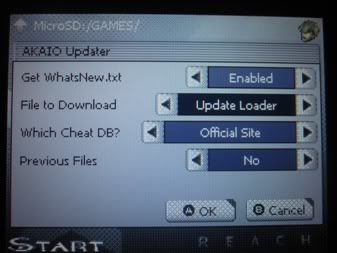
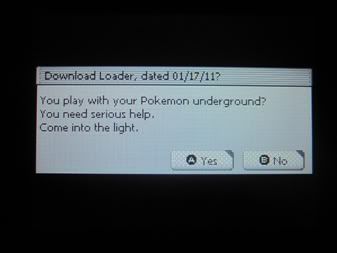
3.Go down to File to Download and choose "Update Loader"Spoiler
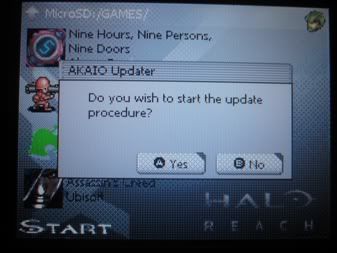
4.Confirmation window opens. Press (A)Spoiler
5.A new window shows up telling you what loader is available. Press (A)Spoiler
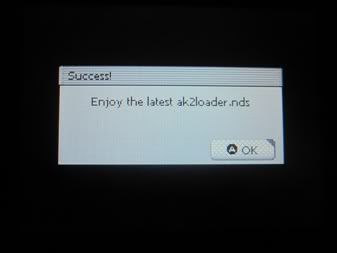
6.Let the update occur. Dont turn off your DS(i). Once done, a message appears telling you it was updated successfully. Press (A)Spoiler
Spoiler
back up and restore your saves on the internet. Saves are kept track of by your unit's MAC address, so saves uploaded with one unit can only be downloaded back to that unit.
It should be noted that the DS's WiFi library is notoriously unreliable at best in regards to compatibility with certain routers, so this feature may not work for everybody.
Update Wifi Plugin:
Through DS(i):
1.Press START
2.Go To "More ->"
3.Go To "Wifi Update"
4.Go To "File To Download" and select "Wifi Plugin"
5.Press (A)
6.Download Latest Plugin, press (A)
7.Once download is complete Press (A)Manually:
1.Download file From: Filetrip
2.Extract File
4.Copy the extracted file to: __aio/plugin/ in your card
How To Backup:Playing Movies (DPG) and Music (MP3)
1.Press START
2.Go To "More ->"
3.Go To "Wifi Update"
4.Go To "File To Download" and select "Show On Load"
5.Press (A)
6.AKAIO restarts itself and Wifi Menu shows up again
7.Press (X)
8.Go to where your .sav files are stored
9.Press (A) on the .sav file you want to upload
10.Press (A) again
11.Once done press (A)
12.To Download your save file, press (X) on this menu
13.Press (A)
14.Choose save file you want to download and press (A)
15.Press (A) to download and extract
16.Choose where to extract the save file
17.If you already have a save file for that game, replace it by pressing (A)
18.Once finished Press (A)
you need to use a program called moonshell that allows you to play these
1.Download moonshell for Acekard: http://www.acekard.com/download/ak2/moonshell.zip or http://mdxonlinemirror.dyndns.org/201002161705_moonshell210stable.zipHow To Use Cheats
2.Once downloaded, extract it
3.You get a folder called moonshell. Open it
4.Copy the files inside the folder moonshell to the root (start) of the SD card. files to copy are moonshl folder and MoonShell_AUTOPATCH_Default (No interface).nds
5.Create a folder for your MP3 and DPG movies
6.start the program through the menu
1.Download the latest cheat database from Codemasters Project (you have to become a member to be able to download it)Installing Skins
2.Once downloaded, extract it
3.Copy the usrcheat.dat file to the cheats folder inside the _aio folder
4.On the DS, go to the game you want cheats for
5.Press (START)
6.Go To "Cheats"
7.Choose the cheats you want to use
8.Save settings by pressing start
1.Download the skin you want from NDSThemes or Acekard SiteFIXING SOME ISSUESUpdating Acekard to Work on DSi Firmware 1.4.4 and 3DS v4.2 (with pictures)
2.Once downloaded, extract the file
3.You should get a folder with the skin name
4.If you didnt get the skin inside a folder, create a folder and place the files inside the folder. inside the skin folder create a folder called calendar and place the following files inside it: clock_colon.bmp, clock_numbers.bmp, day_numbers.bmp, year_numbers.bmp
5.Copy the skin folder to _aio/ui/
6.On the DS, press (START)
7.Go to "System Preferences"
8.In the "Interface Theme" option, change the theme/skin you want
You WILL need either a Nintendo DSLite or a Nintendo DSi with firmware 1.4 (flashcart has to be updated to work on 1.4 to update on DSi 1.4) or lower
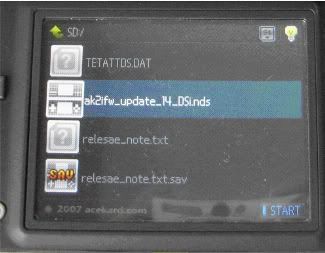
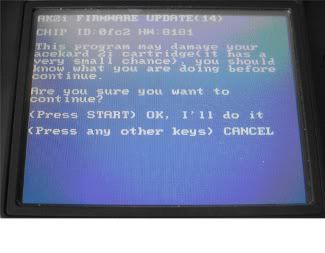
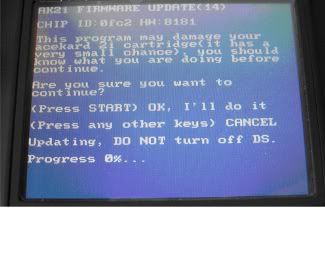
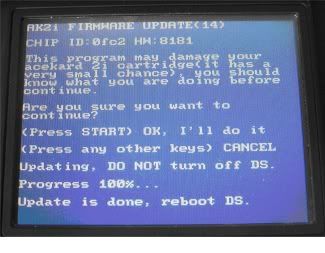
1.Download the files needed to update: AceKard 2i firmware 1.4.4 and 3DS v4.2 - Direct Download2.Extract, you get to files: ak2ifw_update_3ds42_dsi144_onDSi_DSXL_3DS (if using a DSi or 3DS) and ak2ifw_update_3ds42_dsi144_onDSL (if using a DSL)3.Copy the one you need to the root (start) of the sd card4.Plug your DS(i) to the charger (to avoid any problems if DS runs out of battery while doing the update)5.on the start of the AKAIO menu, look for the file you copied and press (A)Games Not Booting Because of APHow to Bypass AP on AKAIO6.Start menu shows, read precautions. once done press (START)Spoiler
7.Wait untill the progress bar reaches 100%. It will take a few minutes for this to finishSpoiler
8.Once the Progress reaches 100%, it will tell you to reboot the DSSpoiler
Spoiler
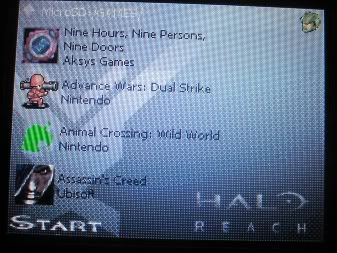
Some games Require using this method if they have some sort of AntiPiracy on them.
NOTE: Not Required in AKAIO v1.8.5/1.8.5a or above because the byapss AP feature comes enabled by default
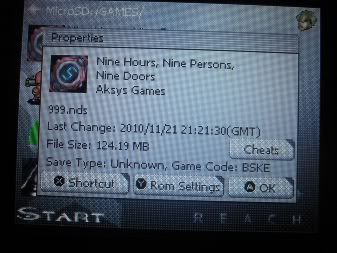
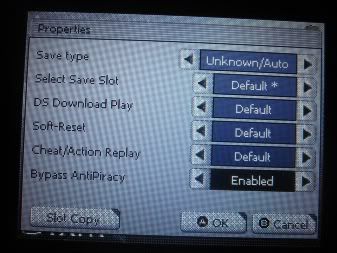
1.Go to the game you wish to play that has AP (in this case I used 999 rom)Contact Issues2.Press (Y) to open the Properties windowSpoiler
3.Press (Y) again to open the Rom Settings Window. Here go down to Bypass AP and enable itSpoiler
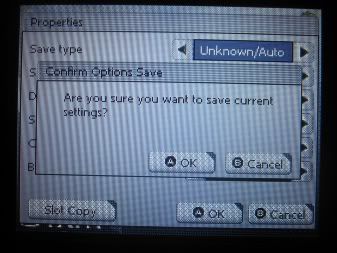
4.Once done, save settings by pressing (A) twiceSpoiler
Spoiler
For contact issues try using the paper trick: Solving Acekard Contact Issues by TK_SaturnGames Not Loading
-Try formating the sd card to FAT32
-If that doesnt work, format it to FATCredits/Thanks
-all download links come from either www.akaio.net www.acekard.com or www.filetrip.net
-thanks to Normmatt and AKAIO team for their support on the acekard
-thanks to AKAIO.net for links to akaio loader, loaders, plugins
-thanks to filetrip for link to plugins, loaders
-thanks to tksaturn for his contact issues guide