A
Omg guys,
please help me!I know I am in the wrong section,
but it was already so difficult to even get here and to create a topic.
Yesterday,
I dropped my mouse (oke, really hard) and I can't click anymore (there is a red light though).I don't ask for solution (oke, a temporary solution :))I need some shortcuts, because I am controling this pc with only my keyboard wich is pretty lame you know --".It was awefull to get to this forum :P (It took me 30 minutes).
I know alt F4, ctrl alt delete, the ctrl tab for switching tabs in the browser, the alt tab for switching in maps.Do you guys have mroe shortcuts? :slike, how to close a tab in your browser or something like that? :PThanks in advance!greetz,
a man without a computermouse
A
Ctrl+Shift+T = Open previously closed tab.
Ctrl+Shift+Del = delete cookies and shit.
Ctrl+W = Close tab.These are for firefox, but may work in other browsers.
U
athemoe · #1a man without a computermouse
Your a man? Your gender states you are a girl ;D
Goodness. Do you have spare mice? You could use a cheap 1$ mouse, better then using the keyboard.Or just kill a street mouse.
U
Stanley Richards · #5Goodness. Do you have spare mice? You could use a cheap 1$ mouse, better then using the keyboard.Or just kill a street mouse.
He's right, get a lab mouse if you can, they are specially bred and trained >:D
Exactly. Anyway, get a mouse as soon as possible.
U
Oh,if you want, you can use voice command but i am not so sure about the details ;D
A
ace1o1 · #4It's a guy.
He just switched it.
No,
I'm a girl :P
This is a shared account with my brother.
We couldn't make 2 accounts or we would be banned for double accounts :s
It's fine to have two accounts from the same IP address, as long as they're not owned by the same individual.
If I had a choice between mouse only and keyboard only, I'd choose keyboard only.
If I want to quickly open an application, I use Windows 7 so I just hit the Windows key and type in the first several letters of the application. XP users can just hit Win+R and type the name of the application.
To move around windows in Windows 7, use Win+arrow keys. It comes in handy sometimes.
Here are the browser shortcuts that I use the most.
Ctrl+T - opens new tab
Ctrl+Tab - switches to next tab
Ctrl+Shift+Tab - switches to last tab
Ctrl+W - closes tab
Ctrl+L - Highlights the address bar
Alt+Left - Back
Alt+Right - Forward
Also if you don't have a mouse, try using
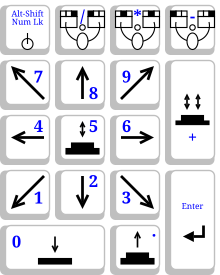
MouseKeys. It allows you to control the mouse cursor using the numpad. Enable it with Alt+Shift+Num Lock. A diagram of the controls from Wikipedia are below.
Replying to #11
Well,
I'm using a trial version of Key Mouse Genie and it works, but it's slower then a normal mouse.
But it is perfect as a temporary thing.
Thanks for your help.
CTRL + V = Paste
CTRL + X = Cut
CTRL + C = CopyToo bad nobody mentioned them.
U
Alt + F4 = close programs
F5 = Refresh ;D
A
Replying to #14
already knew most of the shortcuts (including those basics ;D)
ow and by the way,
I'm really a girl though you guys won't believe it *sigh*
I share this account with my brother,
but I got the account after the downloads (NDS) were cancelled..
Replying to #15
I can believe it ;D Trust me, i can see the personality change between you and your bro ;D
Your brother speaks in a more direct way while you post stuff using emotions ;D
D
yoshi2889 · #13CTRL + V = Paste
CTRL + X = Cut
CTRL + C = CopyToo bad nobody mentioned them.
Because it's a pretty well known shortcut.
Replying to #19
But she didn't list it.
athemoe · #1I know alt F4, ctrl alt delete, the ctrl tab for switching tabs in the browser, the alt tab for switching in maps.
Post Merge: [time]1278679358[/time]athemoe · #17In what way?
Erhm...your more kindly ;)

